
Pic Stitch: Collage Maker
Video Players & EditorsLatest APK
DownloadScreenshots

Related Apps
![]()
Broken Screen Prank
![]()
Fingerprint Scanner App
![]()
Firefox Fast & Private Browser
![]()
Allergy Plus by Pollen.com
![]()
Find My Phone By Clap, Whistle
![]()
Planner 5D: Home Design, Decor
![]()
Ghost Detector Real Life Radar
![]()
Pride Quiz LGBTIQ+
![]()
Galaxy Starry Keyboard Backgro
![]()
Instagram
![]()
Fun Fact- My Personal Fact
![]()
Audible: Audio Entertainment
![]()
Photo Frames
![]()
Photo Collage Maker & Editor
![]()
Japan Timetable & Route Search















About this app
 NamePic Stitch: Collage Maker
 CategoryVideo Players & Editors
 PriceFree
 Safety100% Safe
 DeveloperMaple Media
 LabelPlay Pass
editor reviews
Pic Stitch: Collage Maker is a photo editing app designed to help you combine multiple photos into a single, beautiful collage. It's a tool I use all the time to organize my memories, whether it's from a weekend trip, a family gathering, or just a fun day out with friends. The app launched a while back and has been a staple on both Google Play and the App Store for years. It's racked up millions of downloads, which shows how popular it is for simple collage making. The best part? You can download and install it for free right from Google Play. You don't even need to register an account to start using it, which I love because it gets me straight to creating. While the core app is free, there are some in-app purchases if you want to unlock extra features or remove ads. Yes, there are ads in the free version, but they're usually not too intrusive and pop up between edits.
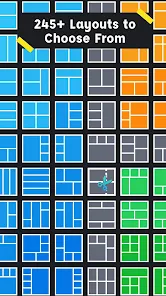
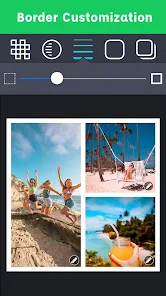
Using Pic Stitch is super straightforward, which is why I keep coming back to it. After I install the app, I just open it and tap to create a new collage. It lets me pick from a huge grid of layouts—everything from simple two-photo side-by-side frames to complex grids that can hold nine or more pictures. I just select the photos from my gallery, drag and drop them into the slots, and the app does the rest. A real user tip: play with the border options! You can make borders thick, thin, or even remove them completely to make a seamless blend. Another tip is to use the quick edit tools inside the collage maker to adjust brightness or add a filter to individual photos before finalizing. It saves me from having to edit each picture in another app first. The whole process from selecting pics to saving the final collage takes just a couple of minutes.
When I look at other collage apps on Google Play, like Canva or Layout from Instagram, I still prefer Pic Stitch for everyday use. Canva is powerful for design, but it can feel overwhelming when I just want a quick photo grid. Layout is super simple but sometimes too basic, with fewer layout choices. Pic Stitch hits that sweet spot for me. It has way more templates and customization than Layout but isn't as complex as a full design suite. I chose this app because it's reliable, fast, and gets the job done without fuss. For a quick share to social media or to save memories in a neat format, it's my go-to. The simple wording and clear buttons make it easy for anyone to use, no matter their tech skill.
features
- 🖼️ Massive layout library with hundreds of grid and freestyle templates to arrange photos exactly how you want, much more variety than many basic collage apps.
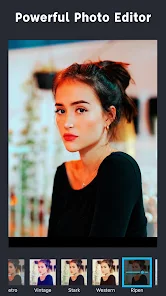
- ✂️ Built-in photo editing tools like cropping, rotating, and filters let you tweak each image right inside the collage without switching apps.
- 🔤 Easy text and sticker addition with various fonts and designs to personalize your creation quickly after you install the app.
- 📤 One-tap sharing to all major social platforms directly from the app, making it faster to post than some competitors that have more steps.
pros
- 👍 The sheer number of free layouts is fantastic compared to similar apps that lock most templates behind a paywall.
- 👍 The interface is incredibly intuitive; you can figure out how to make a collage within seconds of opening the app.
- 👍 It handles high-resolution photos well, and the final save quality is consistently good for an app in this genre.
cons
- 👎 The free version has ads that can interrupt the workflow, more frequent than in some other free collage makers.
- 👎 Some of the more stylish fonts and stickers require a purchase, whereas other apps offer them for free.















































