

Screenshots

Related Apps
![]()
Pocket FM: Audio Series
![]()
FalFal: Astrology, Tarot, Love
![]()
Google Drive
![]()
Yuka - Food & cosmetic scan
![]()
GroupMe
![]()
AgeCam: Face Age Changer App
![]()
Air Horn Prank (Loud Joke)
![]()
Palm Secret - Aging&Cartoon
![]()
YouTube
![]()
Anime Girl Wallpapers
![]()
Doodle Art: Magic Drawing App
![]()
Moises: The Musician's AI App
![]()
Zodiac Palm Reader: MagicWay
![]()
DeepSeek - AI Assistant
![]()
Volume Control Sound Launcher















About this app
 NamePayByPhone
 CategoryProductivity
 PriceFree
 Safety100% Safe
 DeveloperPayByPhone Technologies Inc .
 LabelAuto & Vehicles
editor reviews
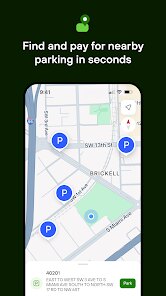
PayByPhone is a finance app that makes paying for parking simple and fast. I downloaded it from Google Play a few years ago when I got tired of carrying coins for parking meters. The app is free to install and you don't need to pay anything just to sign up. You do have to create an account with your email and vehicle details before you can use it. It works in many cities across the UK, Canada, and the US. The app has over a million installs on Google Play alone, and it's also available on the App Store for iPhone users. When I first opened the app, I added my car license plate and saved my payment method. Now I just park, open the app, pick the zone number from the sign, choose how long I want to stay, and pay. The app charges a small convenience fee for each transaction, but it saves me from getting parking tickets when I run late. I also get reminders when my parking time is about to end, so I can extend it from my phone without going back to the car.
Using PayByPhone is really straightforward. After you install the app, you add your car details once and they stay saved. When you park, you look for the zone number on the parking sign and type it into the app. You pick the duration and confirm the payment. The app uses your saved card or PayPal account. I like that I can manage multiple cars on one account, which helps when my partner uses our second car. A simple tip I learned is to always check the zone number twice because entering the wrong zone could mean you pay for someone else's spot. Also, save your favourite zones so you don't have to type them each time. The app keeps a history of all your past sessions, which is helpful for expense tracking if you use the car for work.
Compared to other parking apps like RingGo or Parkmobile, I find PayByPhone easier to use. The interface is cleaner and the payment process takes fewer steps. RingGo also works well but sometimes asks for more details before letting you pay. Parkmobile has a similar setup but I noticed PayByPhone loads faster on my phone. One thing I like more about PayByPhone is that it shows you exactly how much the convenience fee will be before you confirm, while some other apps hide it until after you pay. I have tried all three and I keep coming back to PayByPhone because it feels less cluttered and more reliable when I am in a hurry. It may not have the most features, but for basic parking payments, it does the job well.
features
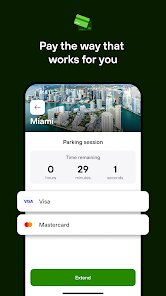
- 💳 Pay with saved cards or PayPal in a few taps, and the app remembers your payment method so you never type card details again.
- 📍 Enter the zone number from the parking sign and choose your parking duration, which takes less than 30 seconds once you have the app open.
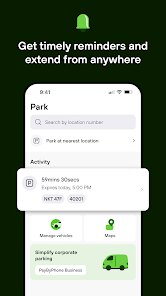
- 🔔 Get a notification when your parking is about to expire, and you can extend the time remotely without going back to your car.
- 🚗 Manage multiple vehicles under one account, which is handy if your household has more than one car or if you rent vehicles sometimes.
pros
- 👍 The app is very fast to load and complete a payment, which matters when you are rushing to park before a meeting starts.
- 👍 It works in many different cities, so you do not need a separate app for each location, unlike some local parking apps that only cover one city.
- 👍 The transaction history is clear and well organised, making it easy to track how much you spend on parking each month.
cons
- 👎 The convenience fee can feel a bit high for short parking sessions, sometimes costing almost as much as the parking itself when you only pay for 15 minutes.
- 👎 The app does not always show which parking zones are available before you arrive, so you cannot plan ahead easily unlike RingGo which shows zone maps.











































