

Zoom - One Platform to Connect
BusinessLatest APK
DownloadScreenshots
Related Apps
![]()
Pocket FM: Audio Series
![]()
FalFal: Astrology, Tarot, Love
![]()
Google Drive
![]()
Yuka - Food & cosmetic scan
![]()
GroupMe
![]()
AgeCam: Face Age Changer App
![]()
Air Horn Prank (Loud Joke)
![]()
Palm Secret - Aging&Cartoon
![]()
YouTube
![]()
Anime Girl Wallpapers
![]()
Doodle Art: Magic Drawing App
![]()
Moises: The Musician's AI App
![]()
Zodiac Palm Reader: MagicWay
![]()
DeepSeek - AI Assistant
![]()
Volume Control Sound Launcher















About this app
 NameZoom - One Platform to Connect
 CategoryBusiness
 PriceFree
 Safety100% Safe
 Developerzoom.us
 LabelBusiness
editor reviews
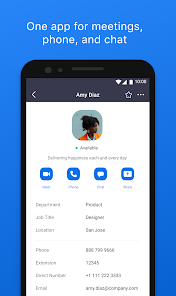
Zoom is a video communication app designed to help you connect with others through meetings, webinars, and calls. I use it for everything from work meetings and online classes to catching up with family and friends. It launched back in 2013 and has become a household name, especially over the last few years. You can download the Zoom app on both Google Play for Android devices and the App Store for iPhones and iPads. It has been installed over a billion times on Google Play alone, which shows how many people rely on it. The basic version of the app is free to download and install, which is fantastic. You don't always need to register an account to join a meeting if someone sends you a link, but creating a free account is simple if you want to host your own calls. The free tier does have some limitations, like a 40-minute cap on group meetings. For longer or larger meetings, you need one of their paid plans, which is their main in-app purchase. You might also see some promotional ads for their paid services within the app, but they're not overly intrusive during calls.
Using the Zoom app is pretty straightforward, which is why so many people have it on their phones. For a quick one-on-one video chat, I just open the app, tap 'New Meeting,' and share the invite link with my friend. For joining a scheduled meeting, I tap 'Join' and enter the meeting ID. A real user tip I always give is to download the app ahead of time if you know you have a meeting coming up—it saves the last-minute panic. Also, once you're in a call, familiarize yourself with the mute and video buttons at the bottom; toggling your video off can really help if your internet is slow. The gallery view lets you see everyone at once, which is great for group calls. I also use the chat feature on the side to share links or ask questions without interrupting the speaker. It feels very natural, just like being in a room together, but from my couch.
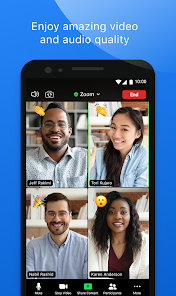
Compared to other similar apps like Google Meet or Microsoft Teams, I often choose Zoom for its reliability and simplicity. Google Meet is deeply integrated if you use Gmail, and Teams is powerful for office work, but Zoom just seems to work consistently well every time I use it. The audio and video quality is generally clear, and it handles different internet connections better in my experience. It feels less 'corporate' than Teams for personal calls with family. While other apps are good, Zoom was one of the first to make video conferencing this easy for everyone, and that familiarity keeps me coming back. It's the app I recommend when someone needs a reliable way to connect online without a fuss.
features
- 🔗 Instant Meeting Joining: Just tap a link or enter a code. It's faster than some other apps where you might need to sign into an account first, making it super easy for guests.
- 🔗 Stable Video & Audio: Even on slower connections, Zoom manages to keep the call going with fewer freezes compared to some competitors I've tried, which is crucial.
- 🔗 Interactive Features: The raise hand, reactions (like thumbs up), and in-meeting chat let you participate without talking over people, which is more polished than basic options in other apps.
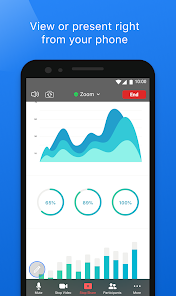
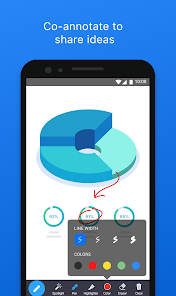
- 🔗 Screen Sharing & Annotation: You can share your phone screen and even draw on it to explain things, a feature that feels more intuitive here than on similar platforms.
pros
- 👍 Rock-Solid Reliability: It rarely crashes mid-call. Compared to other apps that can be buggy, Zoom's consistency is its biggest strength.
- 👍 Cross-Platform Ease: Everyone can join from any device just by clicking a link. This universal access is simpler than some apps that work better on specific ecosystems.
- 👍 Simple Host Controls: Muting participants or managing the waiting room is easy for hosts, offering more immediate control than some free versions of similar software.
cons
- ⚠️ 40-Minute Free Limit: The time cap on free group calls is a known drawback. Apps like Google Meet sometimes offer longer free sessions for personal use.
- ⚠️ Battery Drain: It can use a lot of battery and data on mobile, more so than some lighter messaging apps with video, so you need to plan for that.













































