

Screenshots
Related Apps
![]()
Pocket FM: Audio Series
![]()
FalFal: Astrology, Tarot, Love
![]()
Google Drive
![]()
Yuka - Food & cosmetic scan
![]()
GroupMe
![]()
AgeCam: Face Age Changer App
![]()
Air Horn Prank (Loud Joke)
![]()
Palm Secret - Aging&Cartoon
![]()
YouTube
![]()
Anime Girl Wallpapers
![]()
Doodle Art: Magic Drawing App
![]()
Moises: The Musician's AI App
![]()
Zodiac Palm Reader: MagicWay
![]()
DeepSeek - AI Assistant
![]()
Volume Control Sound Launcher















About this app
 NameBlink Home Monitor
 CategoryProductivity
 PriceFree
 Safety100% Safe
 DeveloperImmedia Semiconductor
 LabelTools
editor reviews
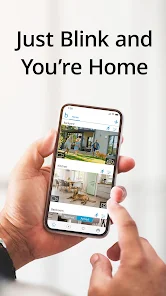
Blink Home Monitor is a home security app designed to help you keep an eye on your property from anywhere. It works with Blink's range of wireless cameras, doorbells, and smart home devices. The app launched alongside the first Blink cameras and is available for free on both Google Play and the App Store. It has been downloaded millions of times, making it a popular choice for DIY home security. You can download and install it for free, and no registration is needed to browse, but you must create an account to use it with your cameras. The app itself doesn't have in-app purchases, but you manage your Blink subscription plans through it if you want cloud video storage or advanced features. You might see some promotional messages for Blink products within the app.
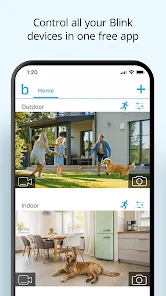
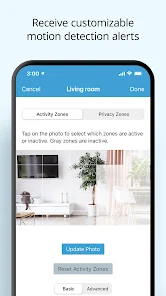
Using the Blink app is pretty straightforward. After you install it from Google Play or the App Store and set up your cameras, the main screen shows a live view or a list of your devices. When motion is detected, you get an alert on your phone. You can tap it to see a live feed or review the saved clip. A real user tip: make sure to adjust the motion sensitivity zones for each camera in the settings. This stops getting alerts every time a car drives by or a tree branch moves, saving your battery and your sanity. For indoor cameras, the two-way audio is great for telling your dog to get off the couch when you're not home. The scheduling feature is also handy to arm and disarm cameras automatically when you leave for work or go to bed.
Compared to other home security apps like the one for Ring or Arlo, I chose Blink mainly for its simplicity and battery life. Ring's app feels more crowded with its neighborhood alert features, and Arlo's can be overcomplicated with too many settings. Blink keeps it clean and fast. You open the app, you see your cameras, and you're done. It doesn't try to do too much, which I like. For someone who just wants reliable, no-fuss monitoring without a complex setup, Blink Home Monitor is a solid pick. It feels less like a corporate security portal and more like a simple tool you actually use every day.
features
- 📹 Live View & Alerts: The core function is instant live streaming and motion alerts. It's faster to launch a live view than on some competitor apps, which often have a slight delay.
- 📹 Clip Playback & Timeline: You can scroll through a timeline of recorded events. Compared to Nest's app, which heavily relies on a subscription, Blink's timeline is simpler but effective for quick reviews.
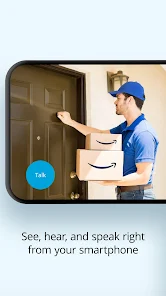
- 📹 Two-Way Audio: Talk and listen through supported cameras. The audio quality and lack of lag stand out compared to similar budget-friendly systems.
- 📹 System Scheduling & Modes: Easily set armed and disarmed schedules. This automation is more user-friendly than manually toggling each camera in other basic apps.
pros
- 👍 Incredibly simple and intuitive interface. It's much easier to navigate than Ring's app, which can feel cluttered.
- 👍 Fast loading times for live views. Compared to Wyze, the connection feels more stable and quicker to establish.
- 👍 Excellent battery management for wireless cameras, leading to longer life than some Arlo models.
cons
- 👎 The free cloud storage is very limited. Competitors like Eufy offer more local storage options without a fee.
- 👎 Advanced features require a subscription, whereas some apps include more for free.












































