

Pandora - Music & Podcasts
EntertainmentLatest APK
DownloadScreenshots
Related Apps
![]()
Pocket FM: Audio Series
![]()
FalFal: Astrology, Tarot, Love
![]()
Google Drive
![]()
Yuka - Food & cosmetic scan
![]()
GroupMe
![]()
AgeCam: Face Age Changer App
![]()
Air Horn Prank (Loud Joke)
![]()
Palm Secret - Aging&Cartoon
![]()
YouTube
![]()
Anime Girl Wallpapers
![]()
Doodle Art: Magic Drawing App
![]()
Moises: The Musician's AI App
![]()
Zodiac Palm Reader: MagicWay
![]()
DeepSeek - AI Assistant
![]()
Volume Control Sound Launcher















About this app
 NamePandora - Music & Podcasts
 CategoryEntertainment
 PriceFree
 Safety100% Safe
 DeveloperPandora
 LabelMusic & Audio
editor reviews
Pandora - Music & Podcasts is a streaming app designed to help you discover and listen to personalized music and podcasts. I've been using it for years to find new songs and create stations based on my favorite artists. The app originally launched as a web service way back and has been on mobile for a long time. You can download it for free from both Google Play and the App Store. It has been installed by millions of people. The basic version of the app is free to download and use, but you do need to create an account to get started. There are ads in the free version, and you can upgrade to a paid subscription called Pandora Plus or Premium to remove ads, get better audio quality, and enjoy features like unlimited skips and offline listening.
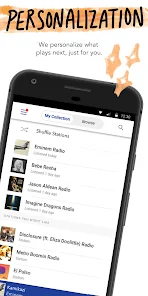
Using Pandora is pretty straightforward. When you first install the app and sign up, it asks you to pick a few artists or songs you like. Then, it creates a "station" for you. For example, if you choose The Beatles, it will make a station that plays songs by them and other similar artists. You give songs a thumbs up or thumbs down, and the app learns your taste over time. I use it mostly in the car or while working. A simple tip from a real user is to be generous with your thumbs-up and thumbs-down clicks—it really does make the stations better. You can also create stations based on specific moods or activities, like "Workout Radio" or "Chill Vibes." The podcast side works similarly; you can search for shows and subscribe to them.
Compared to other apps like Spotify or Apple Music, Pandora feels different. Its main strength has always been its recommendation engine. While Spotify is great for searching and playing any song on demand, Pandora's free tier is more about lean-back listening and discovery. I often choose Pandora when I don't know exactly what I want to hear and just want a radio-style mix that surprises me. It feels less overwhelming than browsing huge playlists. The interface is simpler, which I like. For someone who wants a hands-off music experience that gets smarter the more you use it, Pandora is a solid choice you can download and try without much commitment.
features
- 🎵 Personalized Music Stations: The core feature is creating radio stations from any artist, song, or genre. It's different from Spotify because it's not about playlists; it's a continuous, adaptive stream that introduces you to new music based on your feedback.
- 🎵 Thumb Feedback System: A simple thumbs-up or thumbs-down on any track teaches Pandora your preferences. This direct feedback loop is what makes its Music Genome Project-powered recommendations feel so tailored over time.
- 🎵 Integrated Podcasts: You can stream podcasts right alongside your music stations. While apps like Spotify heavily promote podcasts, Pandora integrates them smoothly without making them the main focus, keeping the experience balanced.
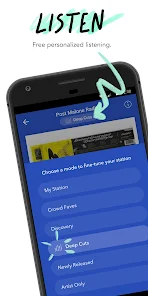
- 🎵 Modes & Soundscapes: Features like "Crowd Faves" (shows what's popular on a station) or "Artist Only" mode let you fine-tune listening. This level of station customization for discovery stands out compared to simpler internet radio apps.
pros
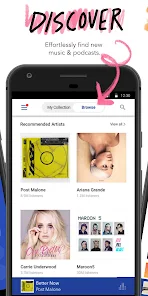
- 👍 Discovery & Surprise: Its algorithm for finding new music you'll like is exceptional. It often surfaces deep cuts or lesser-known artists that perfectly fit your taste, which feels more curated than the algorithmic playlists on YouTube Music.
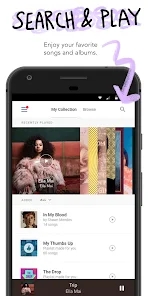
- 👍 Ease of Use: The interface is clean and simple. Creating a new station is incredibly fast—just search and tap. It's less cluttered than Amazon Music, making it great for quick, casual listening.
- 👍 Free Tier Accessibility: The ad-supported free version on Google Play is quite generous for radio-style listening, offering a legitimate way to enjoy personalized music without a subscription, which is more restrictive on Apple Music.
cons
- 🔇 Limited On-Demand Control (Free): On the free plan, you can't replay a song or choose a specific track to play immediately. This feels restrictive compared to Spotify's free mobile tier, which allows more on-demand selection within playlists.
- 🔇 Audio Quality Options: Hi-Fi or very high-quality streaming isn't a highlighted feature as it is with Tidal or Amazon Music HD, which might matter to audiophiles looking to install a top-tier app.












































