

Waze Navigation & Live Traffic
Travel & LocalLatest APK
DownloadScreenshots
Related Apps
![]()
Pocket FM: Audio Series
![]()
FalFal: Astrology, Tarot, Love
![]()
Google Drive
![]()
Yuka - Food & cosmetic scan
![]()
GroupMe
![]()
AgeCam: Face Age Changer App
![]()
Air Horn Prank (Loud Joke)
![]()
Palm Secret - Aging&Cartoon
![]()
YouTube
![]()
Anime Girl Wallpapers
![]()
Doodle Art: Magic Drawing App
![]()
Moises: The Musician's AI App
![]()
Zodiac Palm Reader: MagicWay
![]()
DeepSeek - AI Assistant
![]()
Volume Control Sound Launcher















About this app
 NameWaze Navigation & Live Traffic
 CategoryTravel & Local
 PriceFree
 Safety100% Safe
 DeveloperWaze
 LabelMaps & Navigation
editor reviews
Waze Navigation & Live Traffic is a community based navigation app designed to help you get real time traffic updates and find the best route. It's a free GPS app that launched back in 2008 and is available on both Google Play and the Apple App Store. It's incredibly popular, with over 150 million downloads on Google Play alone. You can download and install the app for free, and no registration is needed to start using basic navigation. However, to report traffic events or connect with friends, you'll need to sign in with a social account. The app is free to use, but it does show ads while you're driving. There are no in app purchases to remove these ads, which is a point some users mention. The whole idea is that the more people who use it, the better the traffic data becomes for everyone.
Using Waze is pretty straightforward. After you install it, you just type in your destination and hit go. The magic happens with the community reports. As you drive, you'll see icons pop up for police, accidents, hazards, and even cheap gas prices, all reported by other 'Wazers'. A simple tip from a regular user: don't just be a passenger, be a contributor. Tapping the orange report button to confirm a hazard or add a new one takes a second and helps everyone behind you. I also keep the voice guidance on; the alerts for stopped cars or objects on the road ahead have saved me from a few close calls. It feels like having a bunch of friends on the road looking out for you.
Compared to other navigation apps like Google Maps, Waze is all about the here and now. Google Maps is fantastic for exploring and has more detailed business info, but for my daily commute where every minute counts, Waze is my go to. It seems more aggressive in finding faster routes, even if it takes you down some weird side streets. Some people find the interface a bit busy with all the icons and pop ups, but I got used to it. I choose it over others because it consistently gets me around traffic jams I didn't even know were there. It's not perfect, but for pure, crowd sourced, real time traffic dodging, it's hard to beat.
features
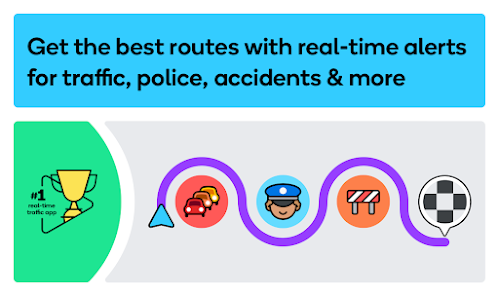
- 🚗 Real Time Community Reports: This is the core of Waze. Unlike standard navigation apps that rely on sensors, Waze uses reports from other drivers for police, accidents, hazards, and traffic jams, giving you a heads up that feels incredibly current and personal.
- 🚗 Dynamic Re routing: The app constantly searches for a faster path. Compared to Apple Maps, which can be slower to adjust, Waze is notoriously aggressive, often re calculating your route mid drive to shave off minutes based on live conditions.
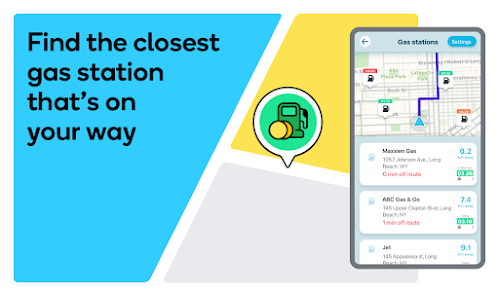
- 🚗 Integrated Gas Price Finder: Need fuel? Waze shows real time gas prices at nearby stations, a feature not as prominent in Google Maps. You can even navigate directly to the cheap one, which is a nice money saver on road trips.
- 🚗 Planned Drives & Calendar Integration: You can schedule a future drive, and Waze will notify you when it's time to leave based on predicted traffic. This proactive planning feature gives it an edge for daily commuters over more basic navigation apps.
pros
- ✅ Beating Traffic: It's simply the best at finding alternative routes around congestion. The crowd sourced data often knows about a slowdown before traditional apps do, getting you moving again faster.
- ✅ Driver Alerts: The alerts for police, crashes, and road hazards are more frequent and detailed than in apps like Google Maps, making you feel more prepared and safer on unfamiliar roads.
- ✅ Community Vibe: There's a fun, game like element with points and moods. It encourages participation, which directly improves the data quality for everyone, creating a better system than static maps.
cons
- ⚠️ Battery & Data Drain: It uses more battery and mobile data than simpler navigation apps due to its constant data processing and map updates, which can be a drawback on long trips.
- ⚠️ Cluttered Interface: The screen can get very busy with avatars, pop ups, and ads, which some find distracting compared to the cleaner, more minimalist look of Apple Maps.














































