

Screenshots





Related Apps
![]()
Broken Screen Prank
![]()
Fingerprint Scanner App
![]()
Firefox Fast & Private Browser
![]()
Allergy Plus by Pollen.com
![]()
Find My Phone By Clap, Whistle
![]()
Planner 5D: Home Design, Decor
![]()
Ghost Detector Real Life Radar
![]()
Pride Quiz LGBTIQ+
![]()
Galaxy Starry Keyboard Backgro
![]()
Instagram
![]()
Fun Fact- My Personal Fact
![]()
Audible: Audio Entertainment
![]()
Photo Frames
![]()
Photo Collage Maker & Editor
![]()
Japan Timetable & Route Search











About this app
 NamePhoto Frames
 CategoryVideo Players & Editors
 PriceFree
 Safety100% Safe
 DeveloperCsmartworld
 LabelPhotography
editor reviews
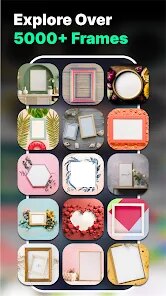
Photo Frames is a photography app created to help you add decorative borders to your pictures in just a few taps. I found this app on google play a few months back when I was looking for a quick way to make my photos look more special without using any heavy editing software. The app has been around for a while and you can download it for free on both google play and the App Store. It has crossed over ten million installs which shows how many people actually use it. When you first open the app, you do not need to register or sign up for anything, which I really like because it saves time. The download is free but there are some in app purchases if you want access to the premium frame packs. There are also ads that show up between edits but they are not too annoying. Honestly, for a free app, it does a decent job of letting you add frames without forcing you to pay right away.
Using this app is pretty simple. You just pick a photo from your gallery and then scroll through the many frame options available. The app groups the frames by style like love, birthday, floral, and festive. I usually tap on the category that fits my photo mood and then preview the frame before applying it. One tip I have is to check the brightness of your photo first because some frames look better on lighter images. After you pick a frame, you can also rotate or zoom the picture inside the frame to get the right position. Once you are happy, you can save the edited photo or share it directly to social media. I often use it for quick edits when I do not feel like opening a bigger photo editing app. It gets the job done without needing a tutorial or guide.
When I compare Photo Frames to other similar apps like Photo Frame Gallery or Frames for Photos, I feel this one is simpler to use. The other apps often have too many buttons or confusing menus, which slows things down. With Photo Frames, everything is right there on the main screen and the frames load quickly. I have tried other apps that crash or take too long to apply the frame, but this one does not give me those problems. The reason I keep coming back to this app is because it does exactly what it says without extra fluff. It is not the most advanced frame app out there, but for someone like me who just wants a quick border on a photo, it works perfectly every time.
features
- Photo Frames lets you add borders to your photos with just a couple of taps, something that apps like PicsArt also offer but with far more steps involved. The simplicity here makes it much faster for basic framing needs.
- The app has a huge library of themed frames sorted by occasion like wedding, birthday, and holiday. Picture Frame Plus has fewer categories and the frames look less polished compared to what you get here.
- You can zoom and rotate your image inside the frame to get the perfect placement, which is a feature I did not see in many other basic frame apps. It gives you more control without overcomplicating things.
- Sharing your framed photo directly from the app to social media is easy and quick. Other apps like Frames Studio often make you save the image first and then upload separately, which takes extra time.
pros
- The app works fast even on older phones, which is something I cannot say about similar apps like Photo Lab that often lag on my device. Speed matters a lot when I just want a quick edit.
- No registration required is a big plus for me. Many frame apps ask for an account before you can even use them, but here you just download and start editing right away from google play.
- The frames actually look clean and well designed. Compared to Free Photo Frames, the quality of the borders here feels more professional and less like clip art thrown together.
cons
- The ads appear after every edit which slows down the flow a bit. Similar apps like Photo Frame Gallery show fewer ads between uses, so this area could be improved.
- There are not many options to adjust the frame thickness or color yourself. Competing apps sometimes let you customize borders more, so adding that would make the app better.
















































