

Screenshots

Related Apps
![]()
Pocket FM: Audio Series
![]()
FalFal: Astrology, Tarot, Love
![]()
Google Drive
![]()
Yuka - Food & cosmetic scan
![]()
GroupMe
![]()
AgeCam: Face Age Changer App
![]()
Air Horn Prank (Loud Joke)
![]()
Palm Secret - Aging&Cartoon
![]()
YouTube
![]()
Anime Girl Wallpapers
![]()
Doodle Art: Magic Drawing App
![]()
Moises: The Musician's AI App
![]()
Zodiac Palm Reader: MagicWay
![]()
DeepSeek - AI Assistant
![]()
Volume Control Sound Launcher















About this app
 NameCapCut - Video Editor
 CategoryVideo Players & Editors
 PriceFree
 Safety100% Safe
 DeveloperBytedance Pte. Ltd.
 LabelVideo Players & Editors
editor reviews
CapCut is a video editing app designed to help you create and edit videos quickly on your phone. I've been using it for over a year now, and it's become my go-to tool for everything from social media clips to family vacation videos. It launched a few years back and is available for free on both Google Play and the App Store. The download numbers are huge, in the hundreds of millions, which shows how popular it is. You can install it without paying anything, and you don't even need to register an account to start using most features, which I really appreciate. While the core app is free, there are some in-app purchases for premium effects and no-watermark exports. You'll also see occasional ads, but they're not too intrusive and are a fair trade for such a powerful free tool.
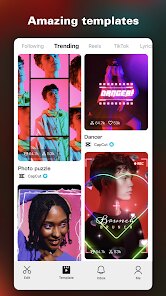
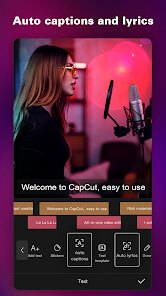
Using CapCut is pretty straightforward. I usually start by importing my clips from my phone's gallery. The timeline editor is intuitive; you just drag and drop to trim, split, or rearrange clips. One of my favorite tips is using the 'Auto Captions' feature—it saves so much time compared to typing out subtitles manually. For quick edits, I rely on the templates. You pick a style, drop in your photos or videos, and the app does the rest, syncing everything to the music. It feels like having a professional editor in your pocket. I also use it to adjust colors with filters and add smooth transitions between scenes. Exporting is fast, and you can choose different resolutions depending on where you're sharing the video.
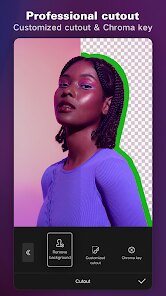
Compared to other apps like InShot or KineMaster, CapCut stands out because of its depth. It has pro-level features like keyframe animation and chroma key (green screen) that you usually only find on desktop software, yet it keeps everything simple. I tried a few others from Google Play, but I always come back to CapCut. The reason I chose it over others is the perfect balance. It doesn't overwhelm you with complexity but doesn't feel limited either. The updates are frequent, adding cool new effects and stickers. For a free download, it gives you so much control. It just works better for my needs, whether I'm making a fun reel or a more polished project.
features
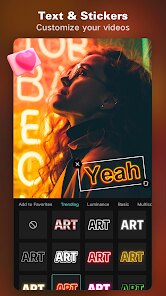
- 🎬 Advanced Editing Suite: Unlike many mobile editors, CapCut offers a full timeline with layers for video, audio, text, and stickers. You get precise tools like keyframing for custom animations and a curve speed editor for slow-mo effects, which rivals what you find in apps like Adobe Premiere Rush but in a simpler package.
- 🎵 Huge Media Library: The app provides a massive, integrated library of trending music, sound effects, and copyright-free tracks. This is a game-changer compared to similar apps where you often have to source music separately, risking copyright issues on platforms like YouTube or TikTok.
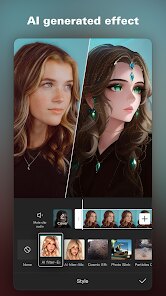
- 🤖 Smart AI Tools: Features like Auto Captions that generate subtitles by detecting speech, and AI-powered portrait effects that separate the subject from the background, are incredibly efficient. These smart tools save hours of manual work, setting it apart from more basic editors like InShot.
- 📱 One-Click Templates: For quick content creation, its vast collection of trending templates is unmatched. You can instantly apply popular TikTok or Instagram Reels styles by just swapping in your clips, a feature that is more extensive and up-to-date than what's offered in most competing apps.
pros
- ✅ Completely Free Core Features: You can do professional-grade editing—trimming, splicing, adding effects, text, and music—without paying a cent. Many competitors either watermark exports heavily or lock basic tools behind a paywall.
- ✅ User-Friendly Interface: Despite its power, the layout is clean and intuitive. It's easier to navigate for beginners than a complex app like KineMaster, making high-quality editing accessible to everyone.
- ✅ Regular, Quality Updates: The developers consistently add new, trendy filters, effects, and templates based on what's popular online, keeping the app feeling fresh and current compared to more stagnant alternatives.
cons
- ⚠️ Occasional Performance Hiccups: When working with very long 4K videos or many layers, the app can sometimes lag or crash, an area where some premium desktop-grade mobile editors might be more stable.
- ⚠️ Persistent Watermark Removal: To export a video without the CapCut watermark, you need to watch an ad or sometimes make an in-app purchase. Other free apps offer a completely watermark-free experience after a one-time payment.













































