

Screenshots
Related Apps
![]()
Pocket FM: Audio Series
![]()
FalFal: Astrology, Tarot, Love
![]()
Google Drive
![]()
Yuka - Food & cosmetic scan
![]()
GroupMe
![]()
AgeCam: Face Age Changer App
![]()
Air Horn Prank (Loud Joke)
![]()
Palm Secret - Aging&Cartoon
![]()
YouTube
![]()
Anime Girl Wallpapers
![]()
Doodle Art: Magic Drawing App
![]()
Moises: The Musician's AI App
![]()
Zodiac Palm Reader: MagicWay
![]()
DeepSeek - AI Assistant
![]()
Volume Control Sound Launcher















About this app
 NameVenmo
 CategoryFinance
 PriceFree
 Safety100% Safe
 DeveloperPayPal, Inc.
 LabelFinance
editor reviews
Venmo is a mobile payment app designed to help you send and receive money quickly with friends, family, or even small businesses. It's basically a digital wallet that makes splitting a dinner bill, paying your share of the rent, or chipping in for a group gift super simple. Launched back in 2009 and later acquired by PayPal, it's available for free download on both Google Play and the App Store. It has been installed by tens of millions of users. The app itself is free to download and use for its core features. You do need to register with your phone number or email and link a bank account, debit card, or credit card to get started. While sending money from your Venmo balance or linked bank account is free, there's a small fee for instant transfers to your bank or for using a credit card. You'll also see some ads within the app, but they're usually not too intrusive.
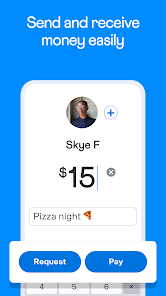
Using Venmo is really straightforward. After you download and install the app from Google Play or the App Store and set up your account, you can start adding friends. You find people by searching their name, username, phone number, or even by scanning a QR code. To pay someone, you just tap the "Pay or Request" button, choose your friend, enter the amount, add a note about what it's for (like "for pizza 🍕"), and hit pay. A real user tip: always double-check the username before sending money, especially if you have friends with common names! Another handy feature is the social feed, where you can see your friends' public transactions (with the amounts hidden, of course). It adds a fun, casual feel to sending money. For splitting costs, you can use the "Split" feature right on a payment to divide a bill evenly or by custom amounts among several friends.
Compared to other payment apps like Cash App or Zelle, Venmo really stands out for its social element. It feels less like a formal banking transaction and more like a casual interaction between friends. While Zelle is often faster and integrated directly into many bank apps, it lacks the personality and easy splitting features of Venmo. Cash App has some similar features, like investing in stocks, but Venmo's integration with PayPal and its widespread acceptance as a payment method at many online and physical stores gives it an edge. I chose Venmo over others because almost everyone I know already has it, making it the easiest way to get paid back without any hassle. The app just feels familiar and is perfect for the kind of small, everyday payments I need to make.
features
- 💰 Peer-to-Peer Payments: The core function is sending money instantly to anyone in your contacts. It's faster than writing a check and easier than getting cash. Unlike some bank transfers, the money often appears in the recipient's Venmo balance right away.
- 👥 Social Payment Feed: This unique feature lets you share your payments (with details hidden) with emojis and notes. It creates a fun, community feel you don't get with sterile apps like Zelle or standard bank transfers.
- 🔀 Easy Bill Splitting: You can easily split any payment with multiple friends directly in the app. This is a lifesaver for group dinners or trips and is more streamlined than manually calculating shares and sending separate requests like you might in other apps.
- 🛒 Pay with Venmo: You can use your Venmo balance to check out at millions of online stores and in-person retailers that accept PayPal. This turns your casual payment app into a usable digital wallet, similar to how Apple Pay works but with your social payment history.
pros
- 👍 Incredibly User-Friendly: The interface is clean, simple, and intuitive. Adding friends and making payments takes just a few taps. It's much more straightforward than navigating some banking apps for transfers.
- 👍 Social & Fun Vibe: The feed and use of emojis make sending money feel less transactional and more like a social interaction. This casual approach is a big win over more formal competitors.
- 👍 Near-Universal Adoption: In my social circles and age group, almost everyone has Venmo. This widespread use means I rarely have to convince someone to download a new app to pay me back.
- 👍 Quick Bank Transfers: While instant transfers have a fee, the standard free transfer to your bank is reliable and usually completes within one business day, which is perfectly fine for most needs.
cons
- 👎 Privacy Concerns: The default social feed setting is public. You have to manually change settings to make transactions private, which can be a worry if you're not careful. Other apps like Cash App default to more privacy.
- 👎 Fees for Certain Actions: Instant transfers and using credit cards incur fees. For users who need money immediately or prefer card rewards, this can be a downside compared to some free bank-linked services.















































