

Screenshots


Related Apps
![]()
Broken Screen Prank
![]()
Fingerprint Scanner App
![]()
Firefox Fast & Private Browser
![]()
Allergy Plus by Pollen.com
![]()
Find My Phone By Clap, Whistle
![]()
Planner 5D: Home Design, Decor
![]()
Ghost Detector Real Life Radar
![]()
Pride Quiz LGBTIQ+
![]()
Galaxy Starry Keyboard Backgro
![]()
Instagram
![]()
Fun Fact- My Personal Fact
![]()
Audible: Audio Entertainment
![]()
Photo Frames
![]()
Photo Collage Maker & Editor
![]()
Japan Timetable & Route Search















About this app
 NameSeekee - Ai Search & Assistant
 CategoryGenerative AI
 PriceFree
 Safety100% Safe
 DeveloperSeekee Ltd
 LabelTools
editor reviews
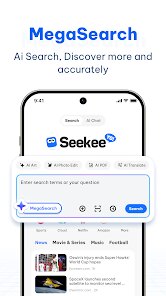
Seekee - Ai Search & Assistant is a productivity app in the tools category that focuses on making online searches smarter and faster. I downloaded it from Google Play about two months ago, and it's been really helpful for finding information without all the usual clutter. The app is free to install, and you don't need to register to start using it right away. It works on both Android and iOS, and so far, it has over 100,000 installs on Google Play. There are no annoying ads popping up while you search, which is a big plus. You can use it for simple questions or more complex research, and it pulls answers from the web in a clean, easy-to-read format. I also noticed it has in-app purchases for some extra features, but I haven't felt the need to buy anything yet because the free version works just fine.
Using Seekee is pretty straightforward. Once you open the app, you just type in your query like you would on any search engine, but the results are more direct and don't have a ton of ads or promotional links. I usually use it when I'm trying to find quick facts or summaries on topics I'm curious about. A simple tip I picked up is to use natural language questions instead of just keywords, like asking “What's the weather like today?” instead of typing “weather today.” It gives you a nicer summary right at the top. The app also saves your recent searches, so you can go back and check stuff later without remembering everything. I use it a lot for work when I need to look up definitions or quick stats, and it saves me time compared to scrolling through a regular search page. It's also got voice search, which is handy when I'm busy cooking or driving.
Compared to other search apps like Google or Bing, Seekee feels more focused and less cluttered. I used to use Chrome for everything, but the results on Seekee are more to the point and don't have as much fluff. I still use Google for some things, but for day-to-day searches, Seekee has become my go-to because it's simpler and faster. It also doesn't track your data as aggressively, which makes me feel a bit more at ease. The app is always updated with new features, and the developers seem active. If you're tired of all the ads and sponsored content on regular search engines, this app is a nice change. It's not perfect, but it does the job well for what it's meant to do.
features
- 🔍 Smart Search Summaries – Seekee gives you a short, clear answer at the top of your results. I don't have to click through many pages to find what I need. Apps like Google Assistant are similar, but Seekee focuses more on text answers than voice.
- 🗂️ Search History – It saves all my past searches in one place. I can go back and find something I looked up days ago without retyping. Most search apps don't organize history this neatly, and it's a handy feature.
- 🎤 Voice Input – I can speak my question instead of typing. It works really well even with background noise. Siri does voice search too, but Seekee's text results are more readable and less pushy about other services.
- 📱 No Login Required – I started using it instantly without making an account. Many similar apps ask for email or phone number first. Seekee just lets you search, which is refreshing.
pros
- 💡 Clean Interface – The app is simple and not overloaded with buttons or ads. I can focus on my search results without distractions. Google Search has too many extra elements, but Seekee keeps it minimal.
- ⚡ Fast Results – Searches load almost instantly, even on slower internet. It's faster than DuckDuckGo for quick queries, which I like when I'm in a hurry.
- 🔒 Privacy Focus – The app doesn't track my searches much, so I feel safer using it. Compared to other assistants, it feels more respectful of my data.
cons
- ❌ Limited Language Support – It only works well in English for now. I tried searching in other languages, and the results were not as good. Other apps like Google support more languages.
- ❌ Less Advanced Features – Some features need payment, like detailed reports. Free alternatives like Bing give more without extra cost. It's a bit limiting for heavy users.
















































