

Screenshots
Related Apps
![]()
Pocket FM: Audio Series
![]()
FalFal: Astrology, Tarot, Love
![]()
Google Drive
![]()
Yuka - Food & cosmetic scan
![]()
GroupMe
![]()
AgeCam: Face Age Changer App
![]()
Air Horn Prank (Loud Joke)
![]()
Palm Secret - Aging&Cartoon
![]()
YouTube
![]()
Anime Girl Wallpapers
![]()
Doodle Art: Magic Drawing App
![]()
Moises: The Musician's AI App
![]()
Zodiac Palm Reader: MagicWay
![]()
DeepSeek - AI Assistant
![]()
Volume Control Sound Launcher















About this app
 NameGoogle Home
 CategoryLifestyle
 PriceFree
 Safety100% Safe
 DeveloperGoogle LLC
 LabelLifestyle
editor reviews
Google Home is a smart home control app designed to help you manage all your compatible smart devices from one central place. I've been using it since it launched back in 2016, and it's become the main hub for my lights, thermostat, and speakers. You can download it for free from both Google Play and the App Store, and it has over 100 million installs on Android alone. No registration is needed beyond signing in with your Google account, which most of us already have. The app itself is free with no in-app purchases, though you will see some ads or promotions for new Google devices and services within the app, which is pretty standard.
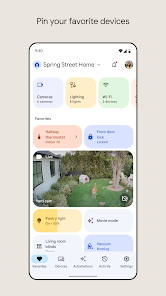
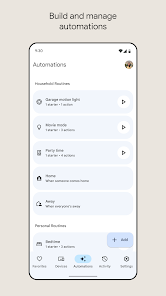
Using the app is straightforward. I open it to check if I left any lights on or to adjust the temperature before I get home. The main screen shows all your connected devices in rooms you set up, like 'Living Room' or 'Bedroom'. A simple tip from a regular user: take ten minutes when you first install it to properly name your devices and group them into rooms. Saying 'Hey Google, turn off the bedroom lights' works perfectly only if your devices are named clearly in the app. I also use the routines feature daily; my 'Good Morning' routine turns on the lights, reads the news, and tells me the weather with one command. For anyone new, just start by connecting one or two devices and play with the basic controls before diving into automations.
Compared to other hubs like the Amazon Alexa app, I keep coming back to Google Home. The main reason is how well it integrates if your phone, email, and calendar are already on Google. Setting up a routine that adds events to my Google Calendar feels seamless. While Alexa might have more compatible gadgets, Google Home feels smarter at understanding what I mean. If I say 'it's too bright,' it dims the lights without me specifying which ones. The interface is also less cluttered than some others I've tried, making it faster to find what I need when I'm not using voice commands. For a free app that turns your phone into a universal remote for your house, it's hard to beat.
features
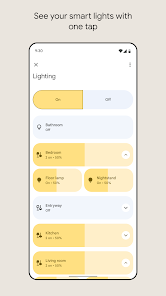
- 🏠 Centralized Device Control: It brings all your smart plugs, lights, cameras, and thermostats into one clean dashboard. Unlike some brand-specific apps, this lets me control my Nest, Philips Hue, and third-party gadgets without jumping between different applications.
- 🗣️ Voice Command Setup & Routines: The app makes creating custom voice routines incredibly simple. I have one for movie night that dims the lights and turns on the TV soundbar. Compared to Samsung SmartThings, which can be complex, Google Home simplifies automation for everyday use.
- 📻 Media & Broadcast Management: You can easily cast music, podcasts, or videos to any speaker or display group from your phone. The 'Broadcast' feature for sending voice messages to all Home devices stands out as a unique family communication tool not as polished in the Alexa app.
- 🔐 Home & Away Automations: The app can use your phone's location to automatically trigger scenes, like turning everything off when you leave. This geo-fencing works more reliably for me than similar features in Apple's Home app, which often requires a dedicated Apple TV hub.
pros
- ✅ Superb Google Ecosystem Integration: If you use Gmail, Calendar, or YouTube, the connectivity is flawless. Adding a calendar event by voice works perfectly, which isn't as smooth on other platforms.
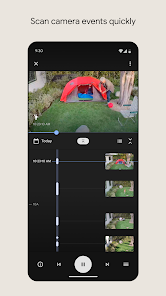
- ✅ Clean, User-Friendly Interface: The layout is intuitive. Finding a device or checking camera feeds is faster here than in the more menu-heavy Alexa app.
- ✅ Reliable Voice Understanding: The Google Assistant behind it is excellent at parsing natural language, often better than competitors when I use casual commands.
cons
- ⚠️ Limited Advanced Automation: For complex 'if this, then that' logic, it's less powerful than dedicated platforms like Home Assistant or even some Alexa routines.
- ⚠️ Occasional Connectivity Bugs: Sometimes devices show as 'unavailable' and require a quick app refresh, a minor hiccup not frequent in more stable systems.













































