

Gallery - photo gallery, album
Video Players & EditorsLatest APK
DownloadScreenshots
Related Apps
![]()
Broken Screen Prank
![]()
Fingerprint Scanner App
![]()
Firefox Fast & Private Browser
![]()
Allergy Plus by Pollen.com
![]()
Find My Phone By Clap, Whistle
![]()
Planner 5D: Home Design, Decor
![]()
Ghost Detector Real Life Radar
![]()
Pride Quiz LGBTIQ+
![]()
Galaxy Starry Keyboard Backgro
![]()
Instagram
![]()
Fun Fact- My Personal Fact
![]()
Audible: Audio Entertainment
![]()
Photo Frames
![]()
Photo Collage Maker & Editor
![]()
Japan Timetable & Route Search















About this app
 NameGallery - photo gallery, album
 CategoryVideo Players & Editors
 PriceFree
 Safety100% Safe
 Developer4th floor apps
 LabelPhotography
editor reviews
Gallery is a photo management app used for organizing, viewing, and editing pictures and videos on your phone. I've been using it for a while now to keep my camera roll from becoming a total mess. It launched a few years back and you can get it on both Google Play and the App Store. It has millions of downloads, which shows how popular it is. The best part is it's completely free to download and install. You don't even need to register or create an account to start using it, which I really appreciate for privacy. There are no annoying in-app purchases to unlock basic features, and I haven't seen any intrusive ads either, making the experience really clean.
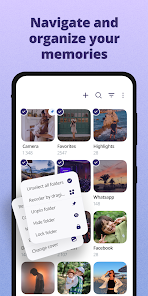
Using the Gallery app is pretty straightforward. After you download and install it, it automatically scans your device for all your photos and videos. I use it mainly to create separate albums for different events, like vacations or family gatherings, instead of having everything dumped in one camera folder. A simple tip from a regular user: you can hide private albums with a PIN, which is great for keeping certain pictures secure. It also has basic editing tools right there, so I can quickly crop a photo or adjust the brightness without needing another app. For everyday browsing, it's much faster than my phone's default gallery.
Compared to other gallery apps on Google Play, like Google Photos, I keep coming back to this one for a few reasons. Google Photos is awesome for cloud backup, but it can feel bloated and is always pushing you to buy storage. Gallery is simpler and stays focused on managing what's actually on your device. It feels lighter and more private since it doesn't automatically upload everything. For someone who just wants a no-fuss way to organize local photos without a complicated setup, this app is a perfect choice. It does the core job well without trying to be a social network or a cloud service.
features
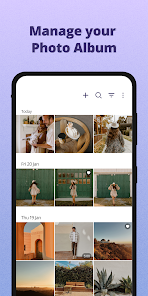
- 📁 Smart Auto-Albums: Unlike some apps that just show a timeline, Gallery automatically sorts photos by date and location into neat albums. It's more intuitive for finding old vacation pics than scrolling through thousands of images.
- 🔒 Built-in Privacy Vault: You can hide albums and lock them with a PIN or pattern. Many similar apps require a separate 'vault' app download for this, but here it's integrated seamlessly.
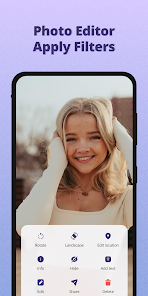
- ✂️ Quick In-App Editor: It has essential editing tools (crop, rotate, filters, adjust) right inside the viewer. This saves time compared to apps that only let you view and then force you to open another app to edit.
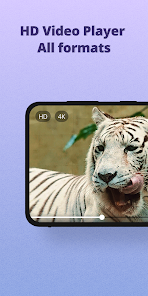
- 🎞️ Smooth Video Playback & Preview: It handles video files really well, showing clear previews and playing them smoothly. Some other gallery apps stutter with high-resolution videos.
pros
- 👍 Lightning Fast & Lightweight: It opens instantly and browses photos quickly, using much less phone storage and RAM than heavier apps like Google Photos.
- 👍 Truly Offline-First: Everything works without an internet connection. It's purely for device storage, which feels more secure and reliable than cloud-based galleries.
- 👍 No Bloatware: The app is ad-free and doesn't pester you with upgrade prompts or social features, keeping the interface clean and focused on the gallery.
cons
- 👎 Limited Cloud Integration: It lacks direct backup to services like Google Drive or Dropbox. For backup, you still need to use a separate file manager or app.
- 👎 Basic Sharing Options: Sharing photos only uses standard Android/iOS menus. It doesn't have clever compression or direct sharing to specific social apps built-in.















































