

Screenshots

Related Apps
![]()
Pocket FM: Audio Series
![]()
FalFal: Astrology, Tarot, Love
![]()
Google Drive
![]()
Yuka - Food & cosmetic scan
![]()
GroupMe
![]()
AgeCam: Face Age Changer App
![]()
Air Horn Prank (Loud Joke)
![]()
Palm Secret - Aging&Cartoon
![]()
YouTube
![]()
Anime Girl Wallpapers
![]()
Doodle Art: Magic Drawing App
![]()
Moises: The Musician's AI App
![]()
Zodiac Palm Reader: MagicWay
![]()
DeepSeek - AI Assistant
![]()
Volume Control Sound Launcher















About this app
 NameAmazon Alexa
 CategoryLifestyle
 PriceFree
 Safety100% Safe
 DeveloperAmazon Mobile LLC
 LabelLifestyle
editor reviews
Amazon Alexa is a voice assistant app designed to help you control your smart home, get information, and manage daily tasks using just your voice. It's the mobile companion to Amazon's popular Echo devices, allowing you to access Alexa's capabilities directly from your phone. The service launched with the first Echo speaker in 2014, and the mobile app has been available on both Google Play and the Apple App Store for years. It has been downloaded hundreds of millions of times globally. The app itself is completely free to download and install. You don't need to pay anything to use the core Alexa features. However, you do need to register for a free Amazon account to log in and set up the service. Once inside, you'll find that while Alexa's basic functions are free, there are optional in-app purchases, primarily for premium music streaming services like Amazon Music Unlimited or for making voice purchases from Amazon. The app does display some ads, usually promoting Amazon's own services, new Alexa skills, or products you can buy with your voice.
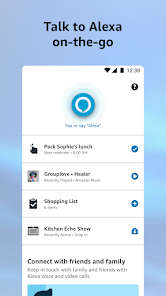
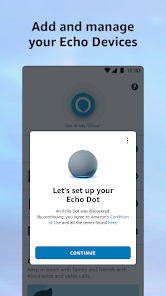
Using the Amazon Alexa app is pretty straightforward. After you download and install it from Google Play or the App Store, you log in, and it guides you through connecting to any Echo devices you have. But even without a smart speaker, you can use the app as a full Alexa device on your phone. I use it mostly by tapping the blue button at the bottom to talk, just like saying "Alexa" to a speaker. I ask for the weather while getting dressed, set timers when I'm cooking, and add items to my shopping list by voice—it's super handy. A simple tip from a regular user: create Routines. For example, I made a "Good Morning" routine that turns on my smart lights, gives me the news briefing, and tells me my calendar when I say "Alexa, good morning." It feels like magic. You can also use the app to discover and enable new "Skills," which are like apps for Alexa, from games to workout guides. I found it's easier to browse and enable Skills in the app than by voice.
Compared to other assistants like Google Assistant or Siri, I keep coming back to Alexa for a few reasons. For smart home control, it's the king. I have a mix of smart bulbs, plugs, and a thermostat, and Alexa works with almost all of them seamlessly. Setting up devices through the Alexa app is often simpler than using the manufacturer's own app. While Google Assistant might be slightly better at answering random trivia questions, Alexa feels more focused on getting practical things done around the house. The sheer number of Skills available also means you can teach it to do almost anything, from ordering a pizza to playing a guided meditation. For someone already in the Amazon ecosystem—using Prime Music, shopping on Amazon—it ties everything together nicely. It just feels like the most complete package for turning your phone into a command center for your life.
features
- 🗣️ Voice Control Hub: The core function is turning your phone into a hands-free voice assistant. You can ask questions, set alarms, check traffic, and control all your compatible smart home devices (lights, locks, thermostats) from one place. Compared to Apple's Siri, which is deeply integrated into iOS but less open with third-party smart home gear, Alexa works with a much wider range of brands.
- 📱 Smart Home Management: The app provides a visual dashboard to see and control all your connected devices, create groups (like "Living Room Lights"), and set up complex Routines. Google Home offers similar management, but Alexa's interface for creating Routines (like "when I say 'I'm home,' turn on the lights and play jazz") is incredibly intuitive and powerful for automation.
- 🔧 Skills & Customization: This is where Alexa really stands out. The "Skills" store lets you add thousands of third-party capabilities, from playing trivia with Jeopardy! to ordering an Uber. It's like an app store for your voice assistant. While Google Assistant has "Actions," Alexa's Skills library is more extensive and often promoted more prominently within the app.
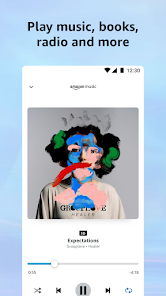
- 🛒 Amazon Ecosystem Integration: If you use Amazon services, the integration is seamless. You can voice-shop on Amazon, track your orders, listen to Audible books, or stream from Amazon Music. This deep tie-in with shopping and entertainment is a unique advantage over competitors like Samsung's Bixby.
pros
- ✅ Unmatched Smart Home Control: It supports the widest variety of smart devices. Setting up a new smart plug or bulb is often quicker in the Alexa app than in the device's own app or Google Home.
- ✅ Routine Automation Power: The ability to create multi-step Routines triggered by voice, time, or device status is more flexible and user-friendly than similar features in other assistant apps.
- ✅ Massive Skills Library: The vast and ever-growing Skills library means the app constantly gains new functions without needing a full update, keeping it fresh and versatile.
cons
- ⚠️ Voice Recognition Can Stumble: Sometimes, especially in noisy environments, the app on your phone doesn't hear the wake word as reliably as a dedicated Echo speaker does. Google Assistant on Pixel phones feels more consistently responsive to "Hey Google."
- ⚠️ Interface Can Feel Cluttered: The app's home screen tries to do a lot—showing shopping deals, promoting Skills, and displaying device controls. It can feel busy compared to the cleaner, more focused layout of the Apple Home app.
















































