

Yuka - Food & cosmetic scan
Health & FitnessLatest APK
DownloadScreenshots
Related Apps
![]()
Pocket FM: Audio Series
![]()
FalFal: Astrology, Tarot, Love
![]()
Google Drive
![]()
Yuka - Food & cosmetic scan
![]()
GroupMe
![]()
AgeCam: Face Age Changer App
![]()
Air Horn Prank (Loud Joke)
![]()
Palm Secret - Aging&Cartoon
![]()
YouTube
![]()
Anime Girl Wallpapers
![]()
Doodle Art: Magic Drawing App
![]()
Moises: The Musician's AI App
![]()
Zodiac Palm Reader: MagicWay
![]()
DeepSeek - AI Assistant
![]()
Volume Control Sound Launcher














About this app
 NameYuka - Food & cosmetic scan
 CategoryHealth & Fitness
 PriceFree
 Safety100% Safe
 DeveloperYuka App
 LabelHealth & Fitness
editor reviews
Yuka is a health and wellness app designed to help you quickly scan food and cosmetic products to understand their impact on your health. I use it almost every time I go grocery shopping or need to buy a new shampoo. It's a free app that launched a few years ago and is available for download on both Google Play and the App Store. It has millions of installs, which shows how popular it's become. You don't need to register to start scanning, which I love because it gets me right into using the app. There are no annoying ads popping up all the time, and while the core scanning is completely free, there is a paid option for more detailed insights, but I've never felt the need to upgrade.
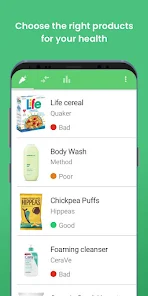
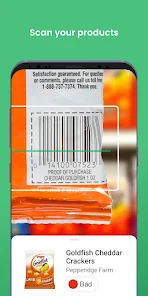
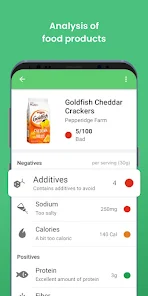
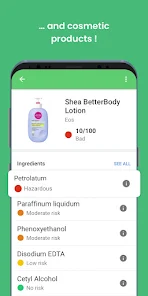
Using Yuka is super straightforward. I just open the app, point my phone's camera at the barcode on a product, and within seconds, I get a color-coded score—green for good, orange for moderate, and red for poor. The score is based on the product's nutritional quality for food or the safety of ingredients for cosmetics. It breaks down exactly why a product got its score, highlighting things like high sugar content, controversial additives, or potentially harmful preservatives. My simple tip is to scan a few similar items to compare; you'd be surprised how two brands of tomato sauce can have completely different ratings. It has genuinely changed how I shop, making me more conscious of what I'm putting in and on my body without needing a science degree to understand the labels.
Compared to other similar apps like MyFitnessPal or Think Dirty, Yuka stands out for its sheer simplicity and laser focus. MyFitnessPal is great for calorie counting but feels overwhelming for quick product checks. Think Dirty is similar but focuses more on cosmetics. I chose Yuka because it does both food and cosmetics in one clean, ad-free interface. It doesn't try to be a social network or a meal planner; it has one job and does it incredibly well. For someone who just wants a fast, reliable answer on whether a product is a healthy choice, Yuka is the clear winner. It feels less cluttered and more direct than the alternatives, which is exactly what I need when I'm standing in a store aisle.
features
- 🔍 Instant barcode scanning for both food and personal care items, giving a clear good/medium/bad rating faster than reading the fine print on a label.
- 📊 Detailed breakdowns that explain the score, pointing out specific problematic ingredients like palm oil or parabens, which helps me make informed swaps.
- 🆚 A great comparison tool within the app; I can scan multiple similar products side-by-side to instantly see which is the healthier option.
- 📈 It offers personalized history, letting me look back at all my past scans, which is useful for remembering which brands I decided to buy or avoid.
pros
- ✅ The user interface is incredibly clean, intuitive, and ad-free, making the scanning process stress-free compared to more cluttered apps.
- ✅ It provides clear, actionable information without being alarmist, which I find more trustworthy than some other scanner apps.
- ✅ The database is extensive for a free app, covering a huge range of products from major supermarkets and brands.
cons
- ⚠️ The product database can sometimes be missing newer or regional store-brand items, leading to "product not found" scans.
- ⚠️ The scoring algorithm is strict; some generally considered healthy products get medium scores, which can be confusing without the detailed explanation.














































