
Photo Collage - Pic Grid Maker
Video Players & EditorsLatest APK
DownloadScreenshots

Related Apps
![]()
Broken Screen Prank
![]()
Fingerprint Scanner App
![]()
Firefox Fast & Private Browser
![]()
Allergy Plus by Pollen.com
![]()
Find My Phone By Clap, Whistle
![]()
Planner 5D: Home Design, Decor
![]()
Ghost Detector Real Life Radar
![]()
Pride Quiz LGBTIQ+
![]()
Galaxy Starry Keyboard Backgro
![]()
Instagram
![]()
Fun Fact- My Personal Fact
![]()
Audible: Audio Entertainment
![]()
Photo Frames
![]()
Photo Collage Maker & Editor
![]()
Japan Timetable & Route Search















About this app
 NamePhoto Collage - Pic Grid Maker
 CategoryVideo Players & Editors
 PriceFree
 Safety100% Safe
 DeveloperMagic Photo Collage & Photo Editor - CollageArt
 LabelPhotography
editor reviews
Photo Collage - Pic Grid Maker is a photo editing app designed to help you create beautiful collages from your pictures. It's a tool I've been using for a few years now, ever since I wanted to make more interesting posts for my social media. The app launched a while back and you can easily download it for free from Google Play or the App Store. It has millions of installs, which shows how popular it is. You don't need to register or create an account to start using it, which I really appreciate for quick projects. The basic download and installation are free, and you can make a lot of collages without paying. There are some in-app purchases if you want extra fancy frames or to remove ads, but the free version has plenty to offer for everyday use.
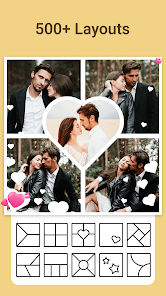
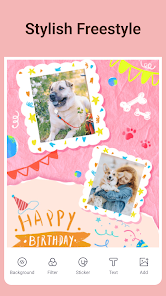
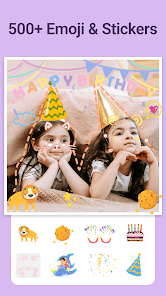
Using the app is super straightforward. I usually open it, tap to create a new collage, and then pick photos from my gallery. The app lets you choose from tons of grid layouts – classic ones, fun shapes, or even freeform where you can place pictures anywhere. After selecting a layout, you just drag and drop your photos into the spots. A simple tip from a regular user: play with the spacing and roundness of the corners. A little rounding makes the collage look much softer and more polished. You can also add backgrounds, stickers, and text. I often use the quick edit tools to adjust brightness or add a filter right inside the collage maker, so I don't need to edit each photo separately first. When I'm happy, I just hit save, and it goes straight to my phone's gallery, ready to share.
Compared to other collage apps I've tried, like PicCollage, I keep coming back to Photo Collage - Pic Grid Maker. The main reason is its simplicity. Some apps feel cluttered with too many options or slow ads. This one feels cleaner and faster for putting together a nice grid for Instagram or a memory page for family photos. While other apps might have more advanced drawing tools, for just making a quick, good-looking photo grid, this app gets the job done without fuss. It's my go-to because it does exactly what I need without overcomplicating things. The variety of free templates is also better than many I've seen on Google Play.
features
- 🖼️ Massive Template Library: The app offers a huge collection of grid layouts, from simple 2x2 squares to intricate mosaic and heart shapes. This variety beats many similar apps where you have to pay for the good templates.
- 🖼️ All-in-One Editing: You can crop, filter, and adjust each photo right within the collage frame. Unlike some apps that make you edit pictures separately, this integrated workflow saves so much time.
- 🖼️ Easy Customization: Adjusting border thickness, background colors, and corner roundness is incredibly intuitive. Compared to a popular app like Canva's collage tool, this feels more dedicated and user-friendly for pure photo collaging.
- 🖼️ Fast Export & Share: The save process is quick, and images are high quality. It's faster at rendering the final collage than some other free apps I've downloaded, which often have long processing times.
pros
- 👍 User-Friendly Interface: It's very easy to navigate. Everything is where you expect it to be, making collage creation a smooth experience even for first-time users.
- 👍 Great Free Content: The amount of free grids, stickers, and fonts is impressive. Many competitors lock basic features behind a paywall.
- 👍 Reliable Performance: The app rarely crashes during editing, which is a common issue I've faced with other similar photo apps from Google Play.
cons
- 👎 Ad Frequency: The free version shows ads quite often between actions. Some rival apps manage ad placement less intrusively.
- 👎 Advanced Features: Tools for precise layer control or more complex text effects are limited compared to premium desktop-grade editors.















































