
Screenshots
Related Apps
![]()
Broken Screen Prank
![]()
Fingerprint Scanner App
![]()
Firefox Fast & Private Browser
![]()
Allergy Plus by Pollen.com
![]()
Find My Phone By Clap, Whistle
![]()
Planner 5D: Home Design, Decor
![]()
Ghost Detector Real Life Radar
![]()
Pride Quiz LGBTIQ+
![]()
Galaxy Starry Keyboard Backgro
![]()
Instagram
![]()
Fun Fact- My Personal Fact
![]()
Audible: Audio Entertainment
![]()
Photo Frames
![]()
Photo Collage Maker & Editor
![]()
Japan Timetable & Route Search















About this app
 NameGoogle Calendar
 CategoryProductivity
 PriceFree
 Safety100% Safe
 DeveloperGoogle LLC
 LabelProductivity
editor reviews
Google Calendar is a time management app designed to help you organize your schedule and never miss an important event. I've been using it for years to keep track of everything from work meetings and doctor's appointments to my kid's soccer games and family birthdays. It launched way back in 2006 and is available on both Google Play and the App Store, making it super easy to download and install on any device. With over a billion installs on Google Play alone, it's one of the most popular apps in its genre. The best part? The core app is completely free to download and use. You don't even need to register separately if you already have a Google account—you just sign in and you're ready to go. There are no annoying ads cluttering up your view of the month, and while there are some paid features for business users through Google Workspace, for personal use, you get a powerful, ad-free calendar without any in-app purchases. It just works seamlessly.
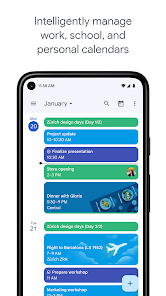
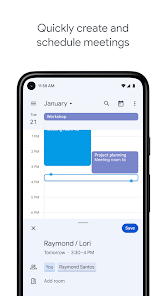
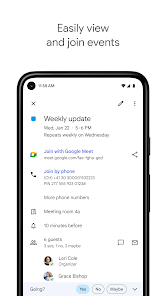
Using Google Calendar is incredibly straightforward. I mainly use it on my phone, but I love that any change I make there instantly shows up on my laptop. My main tip is to color-code everything. I have one color for work, another for personal, one for family, and a different one for bills. At a glance, I can see what my day looks like. Setting up events is a breeze—just tap the plus button, type "Dentist at 3 pm Tuesday," and it figures out the details. The "Goals" feature is a game-changer for habits; I told it I wanted to exercise three times a week, and it finds open slots in my schedule and automatically blocks them. For shared things, like my partner and I managing household chores or planning a trip with friends, creating a shared calendar is the way to go. Everyone can add and see events, which cuts down on so many "what time are we meeting?" texts.
Compared to other calendar apps like Apple Calendar or Outlook, I keep coming back to Google Calendar. Apple Calendar is fine if you're all-in on Apple devices, but I have an Android phone and a Windows laptop, so Google's cross-platform sync is perfect for me. Outlook's calendar feels a bit too tied to email and work for my taste; it can feel clunky for personal life. What really makes Google Calendar stand out is its deep integration with other Google services I already use, like Gmail. If I get a flight confirmation email, it automatically creates an event for me. It just feels smarter and more proactive about managing my time than other options. The search function is also lightning-fast—I can find that dinner reservation from six months ago in seconds. For a free app, it's incredibly powerful and reliable, which is why it's my go-to.
features
- 📅 Smart Event Creation from Gmail: It automatically scans my Gmail for things like flight confirmations, hotel bookings, and restaurant reservations, then creates draft calendar events for me. I just have to click "Add." No other app I've used integrates this seamlessly.
- 📅 "Find a Time" for Group Meetings: When scheduling with multiple people, it can overlay everyone's Google Calendars to instantly show available slots. This is a huge time-saver compared to the back-and-forth needed with simpler apps.
- 📅 Integrated "Goals" & "Reminders": Unlike basic calendars, it has dedicated features for habits and quick notes. "Goals" intelligently schedules my workout times, while "Reminders" stick at the top of my day until I mark them done.
- 📅 Powerful, Instant Search: I can search for anything—"pizza night," "vet appointment," "project meeting"—and it finds the event instantly, even from years ago. Apple Calendar's search feels much slower and less thorough in comparison.
pros
- ✅ Flawless Cross-Platform Sync: My events are instantly updated everywhere—phone, tablet, laptop. It's more reliable and faster than the sync I've experienced with Outlook or standalone apps.
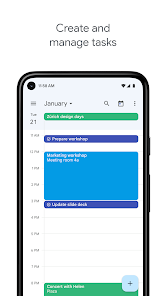
- ✅ Clean, Customizable Interface: The view (day, week, month, schedule) is super clear. I can customize the density of information and color-code calendars, which is more flexible than Apple Calendar's simpler design.
- ✅ Superior Smart Features: The AI-powered features like event creation from emails and smart scheduling for "Goals" are genuinely useful and set it apart from more static competitors.
cons
- ⚠️ Can Feel Overwhelming: For brand-new users, the sheer number of features and settings can be intimidating. Simpler apps like Apple Calendar are easier to pick up immediately.
- ⚠️ Privacy Reliance on Google: Using it fully requires trusting Google with your schedule data. Some people prefer a more privacy-focused, standalone calendar app for that reason.














































