
Screenshots

Related Apps
![]()
Broken Screen Prank
![]()
Fingerprint Scanner App
![]()
Firefox Fast & Private Browser
![]()
Allergy Plus by Pollen.com
![]()
Find My Phone By Clap, Whistle
![]()
Planner 5D: Home Design, Decor
![]()
Ghost Detector Real Life Radar
![]()
Pride Quiz LGBTIQ+
![]()
Galaxy Starry Keyboard Backgro
![]()
Instagram
![]()
Fun Fact- My Personal Fact
![]()
Audible: Audio Entertainment
![]()
Photo Frames
![]()
Photo Collage Maker & Editor
![]()
Japan Timetable & Route Search















About this app
 NameMove to iOS
 CategoryProductivity
 PriceFree
 Safety100% Safe
 DeveloperApple
 LabelTools
editor reviews
Move to iOS is a data transfer app used for moving your stuff from an Android phone to a new iPhone. I used it when I finally decided to switch from my old Android to an iPhone 13. The app launched back when Apple was really pushing to make switching easier for Android users. You can find it on Google Play to download and install on your Android device, and it works with iPhones running the latest iOS. It has over 50 million installs on Google Play, which shows how many people are making the switch. The best part is it's completely free to download and use. You don't need to create any account or register. There are no in-app purchases or annoying ads popping up while you're trying to move your precious photos and contacts. It's a straightforward, one-time tool.
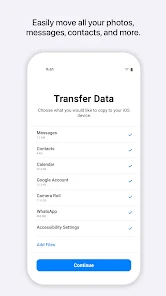
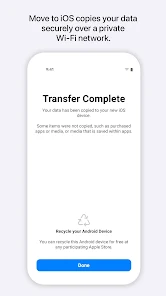
Using the app is pretty simple, but you need both phones ready. First, you set up your new iPhone until you reach the "Apps & Data" screen and tap "Move Data from Android." That's when you get a code. Then, on your Android, you open the Move to iOS app, agree to the terms, and enter that code. The phones connect over a private Wi-Fi network. My tip is to plug both phones into power because it can take a while depending on how much you're moving. You can pick what to transfer: contacts, message history, photos, videos, mail accounts, and calendars. It even tries to find free versions of apps you had on Android in the App Store. Just be patient and don't use either phone during the transfer.
Compared to other ways of switching, like manually backing up to a computer or using cloud services, Move to iOS is the official method. Other apps might transfer files, but they often cost money or don't move everything in one go. I chose this app because it's made by Apple, so it feels more reliable for getting my data onto their ecosystem. It's built right into the iPhone setup, which makes it the obvious choice. While similar data transfer apps exist, they can be clunky. This one, despite sometimes being slow, is designed for this single job and usually does it without much fuss, which is why most new iPhone users from Android give it a try.
features
- 📱 Transfers core data seamlessly like contacts, messages, and photo albums directly into the right iPhone apps.
- 📱 Creates a private Wi-Fi network between the phones for security, unlike some third-party apps that use Bluetooth or cables.
- 📱 Finds your old Android apps on the App Store and suggests downloading them, saving you search time.
- 📱 Integrates perfectly with the iPhone's initial setup process, making it the official, guided path to switch.
pros
- ✅ It's completely free with no hidden fees, unlike many third-party transfer tools that require payment.
- ✅ Transfers a wide range of data types in one process, more comprehensive than manual cloud transfers.
- ✅ Very user-friendly with clear on-screen instructions during the iPhone setup, reducing confusion.
- ✅ Direct from Apple, so it's trustworthy for handling your personal information during the move.
cons
- ⚠️ The transfer process can be very slow, especially with lots of photos, compared to a direct cable transfer.
- ⚠️ It sometimes fails to connect or gets stuck, requiring you to start the setup over, which is frustrating.
















































