

Screenshots


Related Apps
![]()
Broken Screen Prank
![]()
Fingerprint Scanner App
![]()
Firefox Fast & Private Browser
![]()
Allergy Plus by Pollen.com
![]()
Find My Phone By Clap, Whistle
![]()
Planner 5D: Home Design, Decor
![]()
Ghost Detector Real Life Radar
![]()
Pride Quiz LGBTIQ+
![]()
Galaxy Starry Keyboard Backgro
![]()
Instagram
![]()
Fun Fact- My Personal Fact
![]()
Audible: Audio Entertainment
![]()
Photo Frames
![]()
Photo Collage Maker & Editor
![]()
Japan Timetable & Route Search















About this app
 NamePeachy - AI Face & Body Editor
 CategoryGenerative AI
 PriceFree
 Safety100% Safe
 DeveloperInShot Video Editor
 LabelPhotography
editor reviews
Peachy - AI Face & Body Editor is a photo editing app designed to help you enhance your selfies and portraits with powerful AI tools. I've been using it for a few months now to touch up pictures before I post them on social media. The app launched a while back and you can easily find it on both Google Play and the App Store. It's had millions of downloads, which shows how popular it is. The best part is that it's completely free to download and install. You don't even need to register or create an account to start using most of the basic features, which I really appreciate for quick edits. While the core app is free, there are some premium filters and advanced AI features that are locked behind a subscription. You'll also see some ads, but they're not too intrusive and usually appear when you're exiting a tool or finishing an edit.
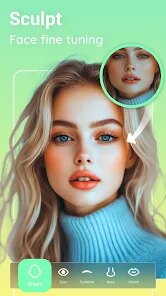
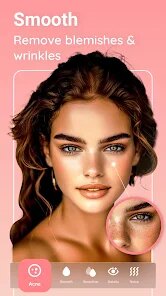
Using Peachy is super straightforward. After you download and install the app from Google Play, you just open it and pick a photo from your gallery. The main screen has all the AI tools neatly laid out. I mostly use it for subtle tweaks—like the 'Body Reshape' tool to fix my posture in a photo or the 'Face Reshape' to make my smile look a bit brighter. A simple tip from a regular user: always use the sliders gently. Moving them too far can make edits look fake. The 'AI Retouch' feature is my go-to for a quick overall glow; it automatically smooths skin and removes blemishes without making me look like a plastic doll. I usually spend just a minute or two per photo. It's perfect for when you need a fast polish before sharing.
Compared to other similar apps like FaceTune, I find myself choosing Peachy more often. The main reason is how simple and fast it is. FaceTune is powerful, but it can feel complicated and is quite expensive. Peachy gives me most of what I need for free and the results look very natural if I'm careful. For someone who isn't a professional editor but just wants better selfies, Peachy hits the sweet spot. It doesn't overload you with complicated options. The AI seems smart enough to understand what looks good, so I don't have to fiddle with a hundred different settings. In the crowded world of beauty and photo editing apps on Google Play, Peachy stands out for being genuinely user-friendly and getting the job done quickly.
features
- 🤖 The core AI editing tools for face and body are incredibly fast. You select a feature like 'Slim Face' or 'Lengthen Legs' and the app processes the change in a second, much quicker than manually editing in something like Photoshop Express.
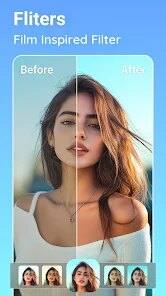
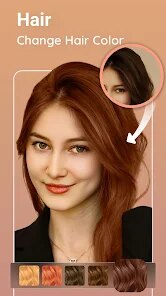
- 🎨 It offers a wide range of one-tap beauty filters and makeup styles. This is great for experimenting with different looks without needing separate apps for filters and edits, giving it an edge over more basic photo editors.
- ✂️ The background changer and object eraser tools work surprisingly well for a mobile app. It can clean up messy backgrounds or remove photobombers almost as effectively as more specialized (and often paid) apps like TouchRetouch.
- 📱 The interface is clean and intuitive. Everything is labeled clearly, making it easier to navigate than something like Perfect365, which can feel cluttered with options for a casual user.
pros
- 👍 The 'natural edit' mode is fantastic. It applies enhancements subtly, so you still look like yourself, unlike some other apps that make everyone look the same.
- 👍 It's very lightweight and doesn't slow down your phone, even when processing high-res photos. Many similar apps can be real resource hogs.
- 👍 The free version is genuinely useful. You can accomplish a lot without paying, whereas apps like Facetune lock almost all good features behind a paywall immediately.
cons
- 👎 The subscription price feels a bit high for the premium features, especially when compared to the value of a full Adobe Lightroom subscription.
- 👎 Sometimes the AI can be too aggressive, requiring manual adjustment to dial back the effect for a more realistic look.
















































