

Screenshots


Related Apps
![]()
Broken Screen Prank
![]()
Fingerprint Scanner App
![]()
Firefox Fast & Private Browser
![]()
Allergy Plus by Pollen.com
![]()
Find My Phone By Clap, Whistle
![]()
Planner 5D: Home Design, Decor
![]()
Ghost Detector Real Life Radar
![]()
Pride Quiz LGBTIQ+
![]()
Galaxy Starry Keyboard Backgro
![]()
Instagram
![]()
Fun Fact- My Personal Fact
![]()
Audible: Audio Entertainment
![]()
Photo Frames
![]()
Photo Collage Maker & Editor
![]()
Japan Timetable & Route Search















About this app
 NameFind my Phone - Clap, Whistle
 CategoryProductivity
 PriceFree
 Safety100% Safe
 DeveloperFunGear inc
 LabelPersonalization
editor reviews
Find my Phone - Clap, Whistle is a utility app designed to help you locate your misplaced phone quickly. It's a clever tool I found on Google Play a while back, perfect for those moments when your phone slips between the couch cushions or gets buried under a pile of papers. The app launched a few years ago and is available for download on both Google Play and the App Store. It has a solid number of installs, showing it's a popular choice for people who tend to misplace their devices. The best part? It's completely free to download and install. You don't even need to register an account to start using it, which I really appreciate for simplicity. There are no annoying in-app purchases to worry about, and while there might be a few ads to support the developers, they are not intrusive and don't get in the way of the core function.
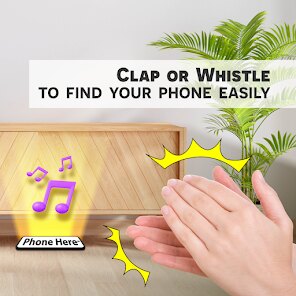
Using this app is incredibly straightforward, which is why I keep it installed. After you download it from Google Play, you just open it and toggle the main switch to 'on'. Then, you can walk away. The next time you can't find your phone, instead of frantically searching, you just clap your hands twice or let out a sharp whistle. The app listens for these specific sounds and will make your phone ring at full volume, even if it's on silent or vibrate mode. A simple tip from a regular user: make sure the app is running in the background. I usually just open it once after I install it and then forget about it; it stays active. Also, test it in your home environment first to see how sensitive it is. In a noisy room, you might need to clap louder, but in my quiet apartment, even a soft double clap from across the room works like a charm.
Compared to other similar apps, I chose Find my Phone - Clap, Whistle because it does one job and does it well. Many other 'finder' apps are part of bigger security suites or require you to log into another device or website. That's too much hassle just to find a phone in the next room. This app is simpler. It uses the microphone you already have. I've tried a few others from Google Play, but they often had more complicated setups or required permissions I wasn't comfortable with. This one feels lightweight and direct. For a quick, no-fuss solution to a common daily problem, this app from FunGear inc is my go-to. It turns a moment of panic into a simple action, and that's exactly what I need.
features
- 🔔 Sound-Triggered Ringing: The core function is brilliant in its simplicity. Unlike Google's 'Find My Device' which requires another device or browser, this app lets you trigger a loud ring just by clapping or whistling. It uses your phone's microphone to listen for these precise sounds, making it hands-free and instant.
- 🔔 Works on Silent Mode: This is a huge advantage over just calling your phone. The app can override your phone's silent or vibrate settings, forcing it to ring at maximum volume. This has saved me multiple times when my phone was buried in a bag or under bedding on silent.
- 🔔 Minimal Setup & Background Operation: After a quick install from Google Play, you just enable it once. It runs quietly in the background without draining much battery. Compared to other utility apps that need constant permissions or foreground services, this one is wonderfully low-maintenance.
- 🔔 No Network Needed: A standout feature compared to cloud-based solutions. Since it works via direct sound input, you don't need an internet or mobile data connection for the core 'find' function. It will work anywhere, which is perfect for finding a phone that's simply lost in your house.
pros
- 👍 Instant and Intuitive: The reaction time is fantastic. A quick clap and my phone starts ringing within a second. It feels much more direct than unlocking another device to send a signal.
- 👍 Zero Configuration: You download, open, and switch it on. That's it. Many competitor apps in this genre have calibration steps or sensitivity sliders that can confuse users.
- 👍 Truly Hands-Free: When your hands are dirty or full, whistling is a perfect solution. This simple alternative trigger is something I haven't seen consistently in other similar apps.
cons
- 👎 Background Limitation: On some Android versions, aggressive battery savers might stop the app. You need to exempt it from optimization, which isn't always clear to every user.
- 👎 Sound Specificity: In very loud environments, it might not hear you. Other apps using Bluetooth beacons don't have this issue, but they require extra hardware.















































