

Lightleap by Lightricks
Video Players & EditorsLatest APK
DownloadScreenshots
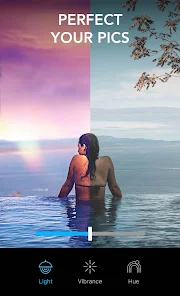
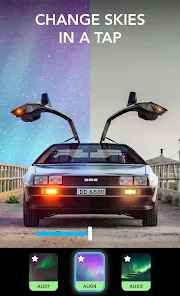
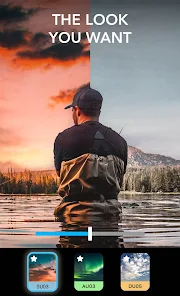
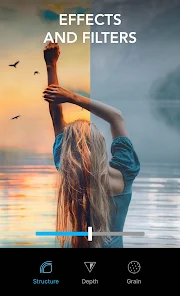
Related Apps
![]()
Broken Screen Prank
![]()
Fingerprint Scanner App
![]()
Firefox Fast & Private Browser
![]()
Allergy Plus by Pollen.com
![]()
Find My Phone By Clap, Whistle
![]()
Planner 5D: Home Design, Decor
![]()
Ghost Detector Real Life Radar
![]()
Pride Quiz LGBTIQ+
![]()
Galaxy Starry Keyboard Backgro
![]()
Instagram
![]()
Fun Fact- My Personal Fact
![]()
Audible: Audio Entertainment
![]()
Photo Frames
![]()
Photo Collage Maker & Editor
![]()
Japan Timetable & Route Search















About this app
 NameLightleap by Lightricks
 CategoryVideo Players & Editors
 PriceFree
 Safety100% Safe
 DeveloperLightricks Ltd.
 LabelPhotography
editor reviews
Lightleap by Lightricks is a photo editing app designed to help you transform your images with powerful AI tools. I've been using it for a few months now to give my social media photos and casual shots a professional, artistic flair. The app launched a while back and you can easily find it on both Google Play and the App Store. It has millions of downloads, which shows how popular it is. The best part? You can download and install Lightleap for free right from the app store. You don't even need to register an account to start playing with most of the basic features, which I really appreciate for a quick edit. Of course, like many creative apps, it offers in-app purchases to unlock the full suite of premium filters and advanced AI tools. You'll also see some ads in the free version, but they're not too intrusive and are a fair trade for getting such a capable editor without paying upfront.
Using Lightleap is super intuitive. I usually just open a photo from my gallery and start browsing the different AI categories. My go-to move is to tap on 'Sky AI' to replace a boring overcast sky with a dramatic sunset or a starry night—it works magically well. For portraits, the 'Portrait AI' tools are fantastic for subtle skin smoothing and enhancing eyes without making anyone look fake. A simple tip from a regular user: always play with the intensity sliders after applying an effect. The AI does a great job, but dialing the effect back to 70% or 80% often makes the edit look more natural and believable. I also love using the 'Artistic' filters to turn photos into paintings or sketches with just one tap. The process is so fast; you can go from a plain snapshot to a gallery-worthy piece in under a minute.
Compared to other photo editors like VSCO or Snapseed, I find myself choosing Lightleap more often for its specific AI magic. While VSCO is amazing for its classic film presets and Snapseed is a powerhouse for manual control, Lightleap feels like it's in a different league for transformative, creative edits. It's less about color grading an already good photo and more about completely reimagining what the photo could be. The AI tools are just more fun and accessible. For someone who isn't a pro but wants pro-level results easily, this app on Google Play is a perfect download. It turns editing from a chore into a creative playground, which is why it stays installed on my phone.
features
- ✨ The core AI features, like Sky Replacement and Portrait AI, are incredibly powerful and easy to use, setting it apart from more manual editors.
- ✨ It offers a vast library of one-tap artistic filters and effects that can dramatically change a photo's mood, something more basic apps lack.
- ✨ The app provides a great free tier with substantial functionality, allowing you to test drive its capabilities before any purchase.
- ✨ Its user interface is clean and focused on discovery, making it fun to experiment compared to the sometimes-cluttered layouts of similar apps.
pros
- 👍 Its specialty AI tools (sky, portrait, background) are top-tier and produce more convincing results than many competitors.
- 👍 The 'Artistic' filters are uniquely creative, offering styles you don't commonly find in standard filter apps.
- 👍 The app is excellent for creating eye-catching, viral-style content for social media quickly and effortlessly.
- 👍 It simplifies complex edits (like changing a background) into a one-tap process, which is a huge time-saver.
cons
- ⚠️ The free version has noticeable ads and locks the best AI features behind a subscription, which can feel limiting.
- ⚠️ It can sometimes over-process images if you're not careful with the effect intensity, requiring a manual touch.














































