

Remini - AI Photo Enhancer
Video Players & EditorsLatest APK
DownloadScreenshots
Related Apps
![]()
Broken Screen Prank
![]()
Fingerprint Scanner App
![]()
Firefox Fast & Private Browser
![]()
Allergy Plus by Pollen.com
![]()
Find My Phone By Clap, Whistle
![]()
Planner 5D: Home Design, Decor
![]()
Ghost Detector Real Life Radar
![]()
Pride Quiz LGBTIQ+
![]()
Galaxy Starry Keyboard Backgro
![]()
Instagram
![]()
Fun Fact- My Personal Fact
![]()
Audible: Audio Entertainment
![]()
Photo Frames
![]()
Photo Collage Maker & Editor
![]()
Japan Timetable & Route Search















About this app
 NameRemini - AI Photo Enhancer
 CategoryVideo Players & Editors
 PriceFree
 Safety100% Safe
 DeveloperBending Spoons
 LabelPhotography
editor reviews
Remini - AI Photo Enhancer is a photo editing app designed to help you turn old, blurry, or low-quality photos into sharp, clear, and high-resolution images. I use it mostly for fixing up old family photos from my grandparents' albums that got scanned in poorly. The app launched a few years back and you can find it on both Google Play and the App Store. It's been downloaded tens of millions of times, which shows how many people are looking for this kind of help. You can install it for free, which is great for trying it out. You don't need to register an account to start using the basic features, which I really appreciate for quick access. However, to get the best results and use it without limits, you'll run into in-app purchases. There's a subscription model and sometimes you see ads in the free version, which can be a bit annoying but is pretty standard for apps like this.
Using Remini is straightforward. You just open the app, tap to upload a photo from your gallery, and then pick an enhancement mode like 'Enhance' or 'Upscale'. The AI does its thing in seconds. My tip is to use good lighting in the original photo if you can, even if it's old—the AI works better with a clearer starting point. I also make sure to save the original separately, just in case. For really grainy pictures, sometimes running the enhancement twice gives a better result. It's become my go-to before sharing any vintage pics on social media or printing them for gifts. The process feels almost magical when you see a blurry face become detailed and clear.
Compared to other similar apps like Adobe Lightroom or even basic phone editors, Remini stands out for one specific job: fixing bad-quality photos. Lightroom is better for overall color and style editing on already-decent shots. But if you have a photo that's just too pixelated or faded, Remini's AI is much more focused and powerful for that rescue mission. I've tried a few other 'enhancer' apps from Google Play, but Remini consistently gives me more natural-looking skin tones and fewer weird, over-processed artifacts. That's why I keep it installed. It doesn't try to do everything, but what it does, it does really well for a casual user like me who isn't a photo editing pro.
features
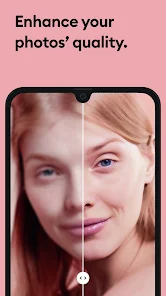
- 🖼️ The core function is one-tap AI enhancement. You pick a blurry photo and it sharpens faces, restores details, and reduces noise almost instantly. Compared to Snapseed, which requires manual tweaking with tools, Remini automates the complex restoration part perfectly for quick fixes.
- 🖼️ It offers a specific 'Old Photo' repair mode that colorizes black & white images and fixes cracks or stains. Other apps might have a colorize feature, but Remini's is fine-tuned to handle the typical damage found in physical old photographs better.
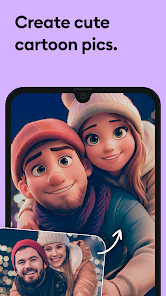
- 🖼️ The app includes fun AI features like generating professional-looking headshots from casual selfies or creating 'AI Babies' pictures. While gimmicky, these are unique social features you don't typically find in standard photo editors like VSCO, making it more than just a utility tool.
- 🖼️ It handles portrait photos exceptionally well, focusing on enhancing eyes, skin texture, and hair details. Compared to general upscaling apps, Remini's AI seems specifically trained on human faces, giving more lifelike results than a generic sharpening filter.
pros
- 🌟 It's incredibly effective at its main job. For turning a hopelessly blurry group photo into something shareable, it beats the basic enhancement tools in Google Photos or your phone's gallery hands down.
- 🌟 The speed is a major plus. The AI processing happens in seconds on their servers. Compared to some desktop software that can take minutes, the quick turnaround is perfect for mobile use.
- 🌟 The user interface is simple and focused. You're not overwhelmed with sliders and options like in a pro app. It's download, open, enhance, save—very straightforward for non-experts.
- 🌟 The before-and-after preview is immediate and clear, which really sells the value. Some other apps make you wait or don't show a good comparison, but Remini makes the improvement obvious.
cons
- ⚠️ The subscription can feel pricey for casual users. Other apps might offer a one-time purchase for certain features, while Remini pushes heavily towards a recurring plan after a few free tries.
- ⚠️ It can sometimes over-process images, making skin look too plastic or eyes unnaturally bright. More control over the strength of the effect, like in FaceApp, would be helpful.
- ⚠️ The free version is quite limited with ads and watermarks, which is more restrictive than some competitors' free tiers that offer basic editing without such interruptions.















































