
Screenshots
Related Apps
![]()
Broken Screen Prank
![]()
Fingerprint Scanner App
![]()
Firefox Fast & Private Browser
![]()
Allergy Plus by Pollen.com
![]()
Find My Phone By Clap, Whistle
![]()
Planner 5D: Home Design, Decor
![]()
Ghost Detector Real Life Radar
![]()
Pride Quiz LGBTIQ+
![]()
Galaxy Starry Keyboard Backgro
![]()
Instagram
![]()
Fun Fact- My Personal Fact
![]()
Audible: Audio Entertainment
![]()
Photo Frames
![]()
Photo Collage Maker & Editor
![]()
Japan Timetable & Route Search















About this app
 NameLINE Sticker Maker
 CategoryVideo Players & Editors
 PriceFree
 Safety100% Safe
 DeveloperLINE (LY Corporation)
 LabelPhotography
editor reviews
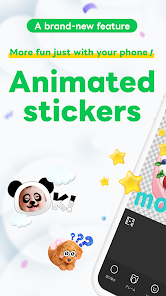
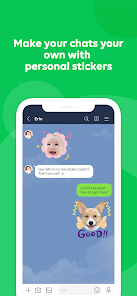
LINE Sticker Maker is a creative app designed to help you make custom stickers for LINE chats. It's a tool that lets you turn your photos, drawings, or ideas into personalized stickers you can send to friends and family. The app was launched by LINE (now LY Corporation) to give users more ways to express themselves in their daily messaging. You can find it on both Google Play and the App Store, and it has been downloaded millions of times. The app itself is free to download and install. You don't need to create a separate account to use it if you already have a LINE account, as it works within the LINE ecosystem. Once you download the app, you can start creating right away. There are no annoying ads that pop up while you're designing, which is great for keeping your focus. However, to actually use the stickers you make in LINE chats, you need to purchase them as a sticker set through the LINE store. This is the main in-app purchase. So, while making the stickers is free, sending them to friends requires a small one-time payment per set.
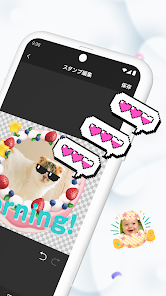
Using the LINE Sticker Maker is pretty straightforward and fun. After I installed it from Google Play, I opened it and it connected to my LINE account easily. The first thing I do is choose a background, either a solid color or a transparent one. Then, I can draw something new with the brush tools or, my favorite way, upload a photo from my gallery. The app lets me cut out the subject from the photo automatically, which saves so much time compared to doing it manually in other apps. Once my image is ready, I can add text with fun fonts or draw little decorations around it. A simple tip from a regular user: make sure your main image is high-contrast and clear; the auto-cutout works best that way. After designing all the stickers for a set (you need to make a few for a complete pack), the app guides you to preview and then publish them to the LINE store for purchase. The whole process feels like a mini creative project.
Compared to other sticker-making apps or just using generic emoji keyboards, LINE Sticker Maker has a huge advantage because it's made specifically for LINE. Other apps might let you create images, but then you have to send them as pictures, not as proper, tappable stickers that live in your LINE sticker tray. Some similar apps are more for general digital art. This app cuts out the extra steps and integrates directly with the platform I use every day. I chose it over others because the output is seamless. The stickers I make look and work just like the official ones from the LINE store. It feels more professional and integrated. For someone who messages on LINE all the time, having my own custom stickers is a game-changer for expressing inside jokes or personal reactions, and this app makes that possible without needing to be a graphic design pro.
features
- 🎨 Direct LINE Integration: Unlike general drawing apps, this maker is built for LINE. Stickers you create are formatted perfectly and can be uploaded directly to your LINE account for use, making the path from idea to chat incredibly smooth.
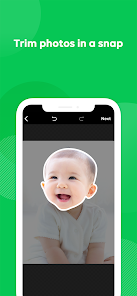
- ✂️ Smart Photo Cut-Out Tool: This feature stands out. It automatically removes the background from your photos, which is much easier than painstakingly erasing it manually in other similar photo editing apps. It gets you to the fun part faster.
- 📱 Simple, Guided Workflow: The app breaks down the creation process into clear steps—drawing, adding text, previewing, and publishing. Compared to more complex design software, it's very user-friendly and doesn't overwhelm you with options.
- 🛒 Official Store Publishing: You can officially sell your sticker sets on the LINE Store. This is a unique feature compared to just making images for personal use; it turns your creativity into a potential side hustle within a huge messaging platform.
pros
- 👍 Seamless Platform Fit: It works perfectly within LINE. Stickers made here feel native, unlike converted images from other apps that might look out of place.
- 👍 Accessibility: It's very easy for anyone to start. You don't need advanced skills, which is better than professional design apps that have a steep learning curve.
- 👍 Quality Output: The final sticker quality is consistently high and optimized for LINE's display, often better than what you'd get by resizing images in a generic gallery app.
cons
- 👎 Requires Purchase to Use: You must buy your own sticker set to use it in chats. Other creative apps let you use outputs for free immediately.
- 👎 Limited Advanced Editing: Compared to full-featured art apps, tools for detailed editing (like layers or advanced brushes) are quite basic.















































