
Warp My Face: Fun Photo Editor
Video Players & EditorsLatest APK
DownloadScreenshots
Related Apps
![]()
Broken Screen Prank
![]()
Fingerprint Scanner App
![]()
Firefox Fast & Private Browser
![]()
Allergy Plus by Pollen.com
![]()
Find My Phone By Clap, Whistle
![]()
Planner 5D: Home Design, Decor
![]()
Ghost Detector Real Life Radar
![]()
Pride Quiz LGBTIQ+
![]()
Galaxy Starry Keyboard Backgro
![]()
Instagram
![]()
Fun Fact- My Personal Fact
![]()
Audible: Audio Entertainment
![]()
Photo Frames
![]()
Photo Collage Maker & Editor
![]()
Japan Timetable & Route Search















About this app
 NameWarp My Face: Fun Photo Editor
 CategoryVideo Players & Editors
 PriceFree
 Safety100% Safe
 DeveloperKaufcom Games Apps Widgets
 LabelLifestyle
editor reviews
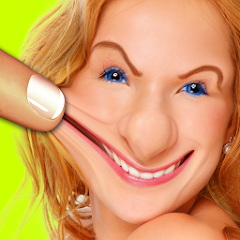
Warp My Face: Fun Photo Editor is a photo editing app designed to help you create hilarious, distorted, and fun images by warping faces and objects in your photos. It's a go-to tool for anyone looking to add a touch of humor to their pictures, whether it's for a laugh with friends or creating unique social media content. The app launched several years ago and has been a popular choice on both Google Play and the App Store. You can easily download and install it for free from either store. It has garnered millions of installs, which shows how many people enjoy its quirky features. There's no need to register or create an account to start using it, which makes getting into the fun super quick. While the core app is free to download and use, it does support itself through in-app advertisements. There are also optional in-app purchases available if you want to remove ads or unlock additional premium warping effects and tools to expand your creative possibilities.
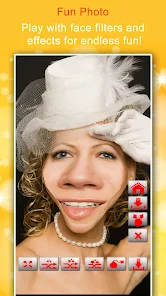
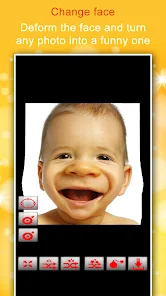
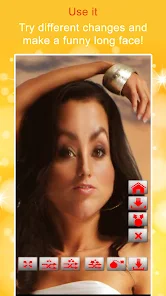
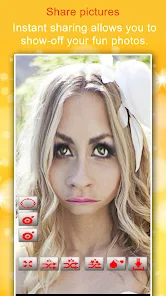
Using Warp My Face is incredibly straightforward, which is a big part of its appeal. After you download and install the app, you simply open it and choose a photo from your gallery or take a new one with your camera. The main interface is user-friendly, with clear icons for the different warping tools. You use your finger to pinch, pull, and twist areas of the face or background. My personal tip is to start with the 'Liquify' tool for smooth, exaggerated stretches, and then try the 'Bulge' or 'Punch' effects for more dramatic, cartoonish distortions. It's fun to experiment on group photos, stretching a friend's smile or giving someone giant, goofy eyes. The undo button is your best friend if a warp goes too far. Once you're happy with your creation, you can save it directly to your device or share it instantly to platforms like Instagram, WhatsApp, or Facebook to get a laugh from your friends.
Compared to other similar apps like FaceTune or even the warping features in apps like Snapchat, Warp My Face stands out because it's entirely dedicated to this one type of fun, silly editing. While FaceTune is more for professional retouching and Snapchat has filters, Warp My Face gives you manual, pixel-level control to create truly custom and often absurd distortions. I chose it over others because it feels less serious and more focused on pure entertainment. Some other apps might have a warping tool buried in a complex menu, but here, it's the main event. The results are often much more exaggerated and funny than what you can achieve with a standard filter, making it perfect for inside jokes and lighthearted content rather than just beautifying a photo.
features
- 🎭 Manual Face & Object Warping: Unlike preset filters, this app lets you use your finger to manually stretch, pinch, and twist any part of a photo with tools like Liquify, Bulge, and Punch for fully custom, hilarious distortions.
- 🎭 Simple, Dedicated Interface: The app is built solely for fun warping, so the tools are front and center and easy to use immediately after install, unlike more complex editors like Photoshop Express where these features are harder to find.
- 🎭 Instant Social Sharing: Once your masterpiece is done, you can save it or share it directly to all major social platforms with one tap, making it faster to post than transferring an edited photo from a desktop app.
pros
- 👍 Pure Fun Focus: It excels at being silly and uncomplicated, offering a more dedicated and powerful warping experience than the limited face-alteration tools found in apps like Instagram or Snapchat.
- 👍 Great for Jokes: The level of control allows for creating uniquely funny images perfect for memes or pranks with friends, something more serious photo apps don't facilitate as well.
- 👍 Quick to Learn: You can download, install, and create a warped photo within minutes, thanks to its intuitive design, which has a gentler learning curve than professional software.
cons
- 📌 Ad Interruptions: The free version shows ads, which can disrupt the creative flow, whereas some competing apps offer a cleaner experience upfront or have different monetization.
- 📌 Basic Editing Tools: It lacks standard photo edit features like cropping or brightness adjustment, so you might need another app to prep your photo first.
















































