
Screenshots
Related Apps
![]()
Broken Screen Prank
![]()
Fingerprint Scanner App
![]()
Firefox Fast & Private Browser
![]()
Allergy Plus by Pollen.com
![]()
Find My Phone By Clap, Whistle
![]()
Planner 5D: Home Design, Decor
![]()
Ghost Detector Real Life Radar
![]()
Pride Quiz LGBTIQ+
![]()
Galaxy Starry Keyboard Backgro
![]()
Instagram
![]()
Fun Fact- My Personal Fact
![]()
Audible: Audio Entertainment
![]()
Photo Frames
![]()
Photo Collage Maker & Editor
![]()
Japan Timetable & Route Search















About this app
 NameWOMBO Dream - AI Art Generator
 CategoryGenerative AI
 PriceFree
 Safety100% Safe
 DeveloperWombo Studios Inc
 LabelArt & Design
editor reviews
WOMBO Dream is a creative art generator app designed to help you turn your ideas into AI-powered artwork with just a few taps. I use it mostly for fun, to create unique images for social media posts or as custom phone wallpapers. The app launched a few years back and quickly became popular for its simplicity. You can download it for free on both Google Play and the App Store. It has millions of installs, which shows how many people are into this kind of creative tool. You don't need to register or create an account to start using it, which I really appreciate—it means you can jump right in. The core app is free to download and use, but it does have optional in-app purchases. These purchases are for a premium subscription called "Dream Premium" that gives you more features, like generating images faster and getting access to more art styles. There are also some ads in the free version, but they aren't too intrusive and usually pop up between generating images.
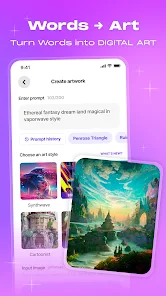
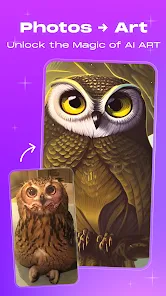
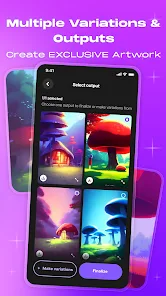
Using the app is super straightforward. You just type in a text prompt—anything from "a cyberpunk cat in a neon city" to "a serene mountain landscape at sunset"—then pick an art style from a big list. Styles range from realistic and painterly to totally abstract and trippy. You tap "Create," and in about 30 seconds, the AI gives you a few different versions of your idea. My tip is to be as descriptive as possible in your prompt; adding details about colors, lighting, or mood really makes a difference in the final image. You can also upload a starting image if you want the AI to use it for inspiration, which is a cool way to remix your own photos. Once your art is generated, you can save it to your phone, share it directly to Instagram or other apps, or even order a print. I find myself using it whenever I'm bored or need a quick burst of creativity. It's less about being a professional tool and more about playful, instant artistic expression.
Compared to other AI art apps like StarryAI or Wonder, I keep coming back to WOMBO Dream for a few reasons. First, its interface is the simplest and most intuitive I've found. Other apps can feel cluttered with settings, but Dream keeps it clean so you're not overwhelmed. Second, the speed is great for a free app; you get results very quickly. While some similar apps might offer slightly more control over advanced parameters, they often have a steeper learning curve or more aggressive ads. For me, Dream hits the sweet spot between being powerful enough to make cool art and being easy enough for anyone to use immediately. The variety of styles is also impressive and seems to be updated often with new, trendy options. It just feels like the most user-friendly option in the google play store for casual AI art fun.
features
- 🎨 Text-to-Image Magic: The core function is turning any text description into AI-generated artwork. You type a phrase, choose a style, and get unique images in seconds. It's much more immediate and user-friendly than some desktop AI art tools that require more technical knowledge.
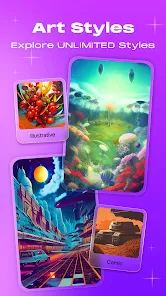
- 🎨 Massive Style Library: The app offers a huge and ever-growing list of art styles, from "Synthwave" and "Steampunk" to "Ukiyo-e" and "Realistic." This variety lets you explore completely different visual interpretations of the same prompt, which is more extensive than many competitors' basic style packs.
- 🎨 Image Remixing: You can upload your own photo as a starting point. The AI then uses your image for inspiration along with your text prompt, creating a blended, artistic remix. This function stands out against apps that are purely text-based, adding a personal touch.
- 🎨 Easy Sharing & Printing: Once your art is made, sharing is seamless. You can post directly to social platforms or save to your gallery. The app also integrates with a print service, letting you order physical products—a feature not all similar free apps offer.
pros
- ✨ Incredibly Easy to Use: The simplicity is its biggest strength. From download to first creation takes less than a minute. Compared to more complex AI generators, Dream removes all the confusing settings, making AI art truly accessible to everyone.
- ✨ Fast and Free Generation: For a free app, the generation speed is impressive. You get multiple image options quickly without long waits, which is better than some other free apps that heavily throttle speed to push subscriptions.
- ✨ Great for Inspiration: It's a fantastic tool for sparking creativity. The random and sometimes surprising results can give you ideas for other projects, acting like a creative brainstorming partner in your pocket.
cons
- 🔧 Limited Customization: Unlike some pro apps, you have little control over advanced details like image composition, specific colors, or AI parameters. The output can sometimes feel a bit random.
- 🔧 Ads and Upsells: The free version has ads, and the push for the premium subscription is noticeable. Other similar apps might offer a slightly less aggressive freemium model.















































