

Screenshots
Related Apps
![]()
Broken Screen Prank
![]()
Fingerprint Scanner App
![]()
Firefox Fast & Private Browser
![]()
Allergy Plus by Pollen.com
![]()
Find My Phone By Clap, Whistle
![]()
Planner 5D: Home Design, Decor
![]()
Ghost Detector Real Life Radar
![]()
Pride Quiz LGBTIQ+
![]()
Galaxy Starry Keyboard Backgro
![]()
Instagram
![]()
Fun Fact- My Personal Fact
![]()
Audible: Audio Entertainment
![]()
Photo Frames
![]()
Photo Collage Maker & Editor
![]()
Japan Timetable & Route Search















About this app
 NamePhoto Editor - Lumii
 CategoryVideo Players & Editors
 PriceFree
 Safety100% Safe
 DeveloperInShot Video Editor
 LabelPhotography
editor reviews
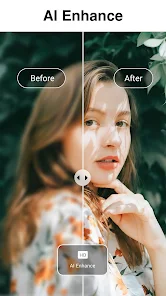
Lumii is a photo editing app designed to help you enhance and beautify your pictures with professional-grade tools. I've been using it for a few months now to touch up my social media photos, and it's become my go-to. The app launched a while back and is available on both Google Play and the App Store. It has millions of downloads, which shows how popular it is. The best part? You can download and install it for free. You don't even need to register an account to start using most features, which I really appreciate for quick edits. While the core app is free, there are in-app purchases if you want to unlock all the premium filters and tools. I do see occasional ads, but they're not too intrusive and are a fair trade for such a powerful free tool.
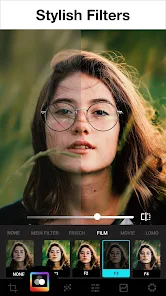
Using Lumii is pretty straightforward. After you install the app, you just pick a photo from your gallery. I usually start with the basic adjustments like brightness and contrast. The sliders are very responsive. One of my favorite features is the huge collection of filters; they have ones for making your photos look vintage, cinematic, or just clean and bright. A simple tip from a regular user: don't just slap on a filter and call it a day. Try adjusting the filter's intensity afterward. Often, I'll apply a filter at about 70% strength and then tweak the warmth or saturation manually. It gives a much more natural and custom look. The retouching tools for skin smoothing and blemish removal are also great for portrait shots. The interface is clean, so you're not overwhelmed, even with all these options.
Compared to other photo editors on Google Play, like VSCO or Snapseed, I find myself choosing Lumii more often for everyday use. VSCO has a distinct aesthetic, but its filters can sometimes feel a bit too strong or specific. Snapseed is incredibly powerful for detailed edits, but it has a steeper learning curve. Lumii strikes a perfect balance for me. It offers professional-level control without being intimidating. It feels like an app made for regular people who want their photos to look amazing without needing a degree in photo editing. The tools are just where you expect them to be, and the results are consistently good, which keeps me coming back instead of jumping between different apps.
features
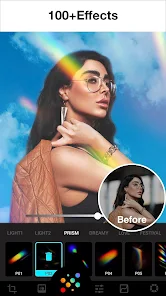
- 🎨 Vast Filter & Effect Library: It has one of the largest collections of filters and effects I've seen, much more varied than a basic app like Instagram's built-in tools. You can find looks for food, portraits, landscapes, and artsy styles all in one place.
- ✏️ Precise Retouching Tools: The blemish remover and skin smoothing tools work really well. Compared to something like Facetune (which is a paid app), Lumii offers a surprisingly capable free version for basic portrait touch-ups, making it a great alternative.
- 🛠️ Layer-Based Editing: A feature I didn't expect in a free app is the ability to work with layers for text and stickers. This is more common in desktop software like Photoshop, and having it here on mobile gives you way more creative freedom than simpler editors.
- 📱 User-Friendly Interface: The layout is intuitive. Tools are categorized logically, which makes the workflow faster. In my experience, it's easier to navigate than something like PicsArt, which can feel cluttered with social features and too many options on the main screen.
pros
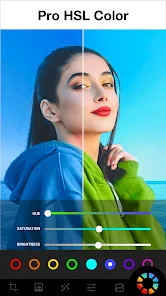
- 👍 All-in-One Simplicity: It bundles advanced features like curves and selective color editing into a simple package. Apps like Adobe Lightroom are more powerful but also more complex; Lumii makes these tools accessible.
- 👍 Quality of Free Filters: The free filters are genuinely good and diverse. Many other free editors lock their best looks behind a paywall immediately, but Lumii gives you plenty to work with from the start.
- 👍 Non-Destructive Editing: You can always revert changes, which is a huge plus. Some apps bake in your edits, but Lumii lets you tweak any step later, giving you peace of mind while experimenting.
cons
- 👎 Ad Frequency in Free Version: The ads can pop up between certain actions, which sometimes interrupts the editing flow. A popular paid app like Afterlight offers a completely ad-free experience, which is smoother.
- 👎 Some Premium Locks: Key features like certain premium filters and advanced tools require a subscription. While common, it can be a limitation if you're comparing it to a one-time purchase app like TouchRetouch for specific tasks.














































