

Screenshots
Related Apps
![]()
Pocket FM: Audio Series
![]()
FalFal: Astrology, Tarot, Love
![]()
Google Drive
![]()
Yuka - Food & cosmetic scan
![]()
GroupMe
![]()
AgeCam: Face Age Changer App
![]()
Air Horn Prank (Loud Joke)
![]()
Palm Secret - Aging&Cartoon
![]()
YouTube
![]()
Anime Girl Wallpapers
![]()
Doodle Art: Magic Drawing App
![]()
Moises: The Musician's AI App
![]()
Zodiac Palm Reader: MagicWay
![]()
DeepSeek - AI Assistant
![]()
Volume Control Sound Launcher















About this app
 NameSkype for Business for Android
 CategoryBusiness
 PriceFree
 Safety100% Safe
 DeveloperMicrosoft Corporation
 LabelBusiness
editor reviews
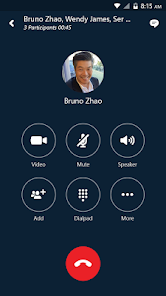
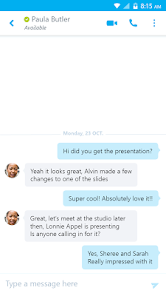
Skype for Business is a communication app designed to help you stay connected with your team through instant messaging, audio calls, and video meetings. It's essentially the business-focused version of the classic Skype app, built for professional use within organizations. The app launched to support Microsoft's enterprise customers who were using its Lync and later Skype for Business server platforms. You can download it for free from Google Play and the Apple App Store. It has been installed millions of times from Google Play alone. The app itself is free to download and install, but you need an account provided by your company or school to actually use it—you can't just sign up with a personal email. There are no in-app purchases or annoying ads, as it's a tool provided through your organization's subscription to Microsoft 365 or a similar plan.
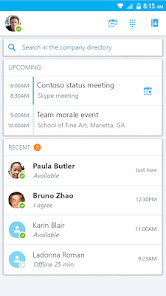
Using Skype for Business is pretty straightforward if you're familiar with workplace tools. Once your IT department sets up your account, you just log in with your work credentials. The main screen shows your recent conversations and a list of your contacts, usually pulled from your company's directory. I use it every day to quickly message a colleague with a question instead of sending an email. For impromptu meetings, you can just right from a chat window start an audio call or a video call with screen sharing, which is super handy. A simple tip from a regular user: pin your most important team chats to the top so you don't lose them in the flow. Also, the app can be a bit of a battery drain during long video calls, so I try to plug in my phone if I know a meeting will run over 30 minutes.
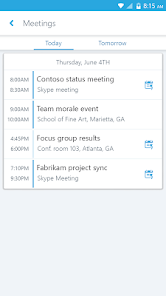
Compared to other similar apps like regular Skype or even consumer messaging apps, Skype for Business is all about that secure, managed environment. My company chose it over something like WhatsApp because it integrates directly with our Outlook calendars—meetings pop up right in the app. It feels more professional and controlled than the standard free-for-all of group chats on other platforms. While apps like Slack are great for ongoing project chatter, Skype for Business is our go-to for the actual face-to-face (or screen-to-screen) meetings and quick personal calls. It's not the flashiest app out there, but it gets the job done for what we need at work.
features
- 🔒 Secure enterprise messaging and calling that ties into your company's existing Microsoft 365 account and directory.
- 📅 Deep integration with Outlook calendar, so your scheduled online meetings join with a single tap from the app.
- 📞 Reliable audio and video conferencing with features like screen sharing, designed for business meetings on the go.
- 👥 Presence indicators that show if your colleagues are available, busy, in a call, or offline, right in the contact list.
pros
- ✅ Seamless integration with the Microsoft ecosystem (Outlook, Office) makes it a natural choice for companies already using those tools.
- ✅ The "Meet Now" feature is fantastic for starting an instant conference call without any pre-scheduling.
- ✅ Offers a more formal and secure environment compared to consumer apps like regular Skype or WhatsApp for work communication.
cons
- ⚠️ The user interface feels dated and less intuitive compared to modern rivals like Microsoft Teams or Slack.
- ⚠️ Can be heavy on battery and data usage during prolonged video conferences.















































