

Screenshots

Related Apps
![]()
Pocket FM: Audio Series
![]()
FalFal: Astrology, Tarot, Love
![]()
Google Drive
![]()
Yuka - Food & cosmetic scan
![]()
GroupMe
![]()
AgeCam: Face Age Changer App
![]()
Air Horn Prank (Loud Joke)
![]()
Palm Secret - Aging&Cartoon
![]()
YouTube
![]()
Anime Girl Wallpapers
![]()
Doodle Art: Magic Drawing App
![]()
Moises: The Musician's AI App
![]()
Zodiac Palm Reader: MagicWay
![]()
DeepSeek - AI Assistant
![]()
Volume Control Sound Launcher














About this app
 NameMoises: The Musician's AI App
 CategoryEntertainment
 PriceFree
 Safety100% Safe
 DeveloperMoises Systems
 LabelMusic & Audio
editor reviews
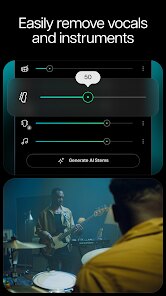
Moises is a music app designed to help you separate vocals from instruments in any song. I found it on Google Play a few months ago and it has completely changed how I practice. You just download the app, pick a song from your library, and the AI does the rest. It works on both Android and the App Store, and the basic features are free to use. You don't need to register right away but having an account lets you save your projects. It has over 10 million installs and it is free to download. Some advanced features like higher quality stems and more exports require a subscription. There are no annoying pop up ads which is nice. The app launched in 2019 and has been improving ever since. It handles most music genres well from pop to heavy metal. I use it almost every day to isolate bass lines for learning. You can also adjust the tempo and pitch which is super helpful for practice.
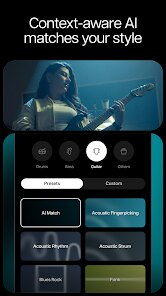
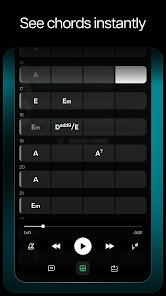
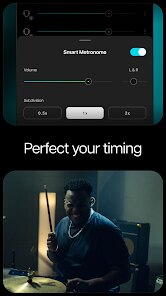
To use Moises you just select a track from your phone or from cloud storage. The AI takes a minute to process and then you get separate tracks for vocals, drums, bass, and other instruments. A simple tip is to use the metronome feature when practicing slower sections. You can also mute certain stems to focus on what you want to learn. The interface is clean and easy to navigate. I like how you can export individual stems for use in other software. The app saves your recent projects so you can go back to them anytime. For beginners it is very straightforward. You do not need any technical knowledge. Just tap and play. I found that using headphones gives better results when checking the separated tracks. The app also has a section with tips and tricks which I found useful. Overall it feels like having a studio engineer in your pocket.
Compared to apps like Vocal Remover or PhonicMind, Moises feels more polished and reliable. Those apps sometimes give messy results with complex tracks. Moises handles dense mixes better and keeps the audio quality high. I also like that it is regularly updated. The community around it is active and the developers listen to feedback. Other apps often limit how many tracks you can process per day. Moises gives a generous free tier. The pitch and tempo controls work smoothly unlike some competitors where the audio gets distorted. I chose Moises because it balances good results with ease of use. It has become a must have tool for my music practice and I recommend it to anyone who plays an instrument or sings.
features
- 🎧 The stem separation is very accurate. I compared it with Vocal Remover Pro and Moises does a much cleaner job. Even with songs that have multiple overlapping instruments it separates them clearly. The bass track sounds natural and not muddy.
- ⏱️ The tempo and pitch changer is smooth. You can slow down a song without losing quality. Other apps like Anytune also do this but Moises gives better results on compressed audio files. I use this to learn fast guitar solos.
- 📱 The export options are useful. You can save stems as WAV or MP3. This is great for importing into DAW software. Most free apps only let you listen in app. Moises lets you actually use the tracks elsewhere which is a big plus for musicians.
- 🔄 The cloud sync feature works well. I started a project on my phone and finished it on my tablet. Not many music AI apps offer this kind of flexibility. It makes practicing seamless across devices.
pros
- ✅ The audio quality of separated stems is impressive. Compared to Lalal.ai, Moises keeps more detail in the vocals and drums. The results are clean enough to use for covers or remixes.
- ✅ The user interface is simple and fast. Loading times are short and processing happens quickly. Some similar apps take forever to analyze a track. Moises does it in under a minute for most songs.
- ✅ The free tier is generous. You get several free exports per month. Other apps like Splitter give you very few free uses. Moises lets you really test the app before committing to a subscription.
cons
- ❌ The subscription cost is a bit high compared to some rivals. I wish the paid plan gave more exports per month. Other apps offer cheaper lifetime options.
- ❌ Some older songs do not separate as well. Dense live recordings can confuse the AI. A simple improvement would be to add a manual stem adjustment tool.













































