

Screenshots

Related Apps
![]()
Broken Screen Prank
![]()
Fingerprint Scanner App
![]()
Firefox Fast & Private Browser
![]()
Allergy Plus by Pollen.com
![]()
Find My Phone By Clap, Whistle
![]()
Planner 5D: Home Design, Decor
![]()
Ghost Detector Real Life Radar
![]()
Pride Quiz LGBTIQ+
![]()
Galaxy Starry Keyboard Backgro
![]()
Instagram
![]()
Fun Fact- My Personal Fact
![]()
Audible: Audio Entertainment
![]()
Photo Frames
![]()
Photo Collage Maker & Editor
![]()
Japan Timetable & Route Search















About this app
 NameAura Frames
 CategoryProductivity
 PriceFree
 Safety100% Safe
 DeveloperAura Home, Inc.
 LabelTools
editor reviews
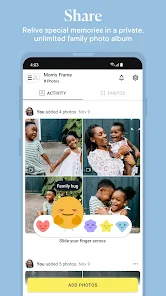
Aura Frames is a digital photo frame app designed to help you manage and display your photos on Aura's smart frames. It launched a few years back and is available on both Google Play and the App Store. The app itself is free to download and install, and it has millions of installs on Google Play. You don't need to create a separate account to use it; you just connect it to your Aura frame. While the app is free, the Aura frame hardware is a separate purchase. The app itself doesn't have annoying ads or in-app purchases for core features, which is great. It's purely for setting up your frame and sending pictures.
Using the Aura Frames app is pretty straightforward. After you download and install it, you open the app and follow the steps to connect your phone to your Aura frame via Wi-Fi. Once connected, you can create albums right from your phone's camera roll or from cloud services like Google Photos. A real user tip: I found it easiest to make a dedicated album in my phone's gallery first, then just select that whole album in the Aura app to send over. You can invite family members too, so they can add photos directly from their own phones, which is perfect for grandparents. The photos update on the frame automatically, so you never have to manually sync it after the initial setup.
Compared to other digital frame apps or services, like the one for Nixplay frames, I chose Aura Frames mainly for its simplicity and focus. Some other apps feel cluttered with extra features or store options. Aura's app does one job—getting photos to the frame—and does it well. The picture quality on the Aura frame screen is also a big reason people pick it. The app is just the bridge. It feels less like a social media platform and more like a private family network, which I prefer for displaying personal photos at home.
features
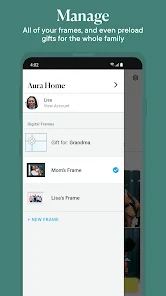
- 🖼️ Frame & Album Management: The core function is linking your app to the physical frame and creating shared albums. You can have multiple frames on one account and control which albums go to which frame, offering more centralized control than some competitors where each frame operates more independently.
- 📤 Effortless Photo Sharing: Adding photos is as simple as selecting pictures from your phone or cloud storage. The standout feature is the unlimited cloud storage for photos sent to your frame, a major advantage over apps that limit you or require subscription fees for more space.
- 👨👩👧👦 Multi-User Contributor Invites: You can invite family and friends to your frame's album via email or link. Once they download the app and accept, they can add photos directly. This collaborative feature is smoother and more integrated than simply emailing photos to a frame address, as some other brands require.
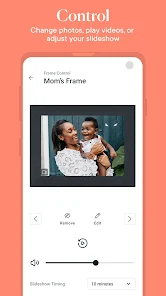
- ⚙️ Frame Settings & Controls: The app lets you adjust display settings like brightness, fit, shuffle speed, and sleep schedules remotely. Compared to using just a remote control, this app-based management is more intuitive and allows for adjustments from anywhere.
pros
- ✅ Seamless Setup & Use: The connection process is very user-friendly. Once set up, it truly is "set it and forget it," with photos auto-updating, which is more reliable than some frames that require manual syncs.
- ✅ Unlimited Photo Storage: The free, dedicated cloud storage for your frame's photos is a huge pro. Unlike other services that might cap you, you never have to worry about deleting old pictures to make room for new ones.
- ✅ Beautiful Display Quality: While the hardware itself deserves credit, the app optimizes and sends photos in high quality, ensuring they look fantastic on the frame's high-resolution screen, often outperforming the visual results of similar apps.
- ✅ Clean, Ad-Free Interface: The app is focused and without distractions. It doesn't push ads or premium upgrades, creating a cleaner experience than many other free apps in the genre.
cons
- ⚠️ Limited Editing Features: The app has very basic photo cropping/rotation. For any real edits (filters, lighting), you must edit in another app first, whereas some competitors offer light editing tools within their app.
- ⚠️ Dependent on Hardware: The app is useless without an Aura frame. This tight lock-in is a limitation compared to more versatile gallery or slideshow apps that work on various devices.














































