
Screenshots


Related Apps
![]()
Broken Screen Prank
![]()
Fingerprint Scanner App
![]()
Firefox Fast & Private Browser
![]()
Allergy Plus by Pollen.com
![]()
Find My Phone By Clap, Whistle
![]()
Planner 5D: Home Design, Decor
![]()
Ghost Detector Real Life Radar
![]()
Pride Quiz LGBTIQ+
![]()
Galaxy Starry Keyboard Backgro
![]()
Instagram
![]()
Fun Fact- My Personal Fact
![]()
Audible: Audio Entertainment
![]()
Photo Frames
![]()
Photo Collage Maker & Editor
![]()
Japan Timetable & Route Search















About this app
 NameGPS Map Camera - Timestamp
 CategoryProductivity
 PriceFree
 Safety100% Safe
 DeveloperSliver AI Photo Editor
 LabelPhotography
editor reviews
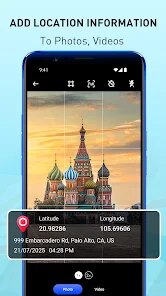
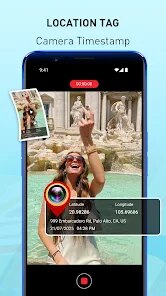
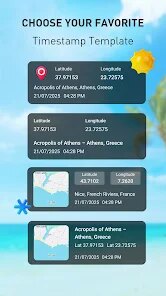
GPS Map Camera - Timestamp is a photo app in the photography category that focuses on adding location and time details to your pictures. I started using this app after I needed a simple way to prove where and when I took certain photos for work. You can download it for free on Google Play, and it has over 500,000 installs. The app does not need you to register, which I really liked. There are some ads when you use it, but you can buy the premium version to remove them. The design is very simple and clean. When you open the app, you pick a photo from your gallery or take a new one. Then you can choose from many stamp styles. The app gives you the exact latitude, longitude, and time. I use it mostly for travel and to keep track of my daily visits. The stamps look good and do not cover the photo too much. You can also change the font and color of the stamp. It is very easy to use, and I never had any crash issues. The app works well on my phone, and I always have it ready when I need to send location proof to someone.
To use the app, you first take a photo or choose one from your gallery. Then you click on the stamp option. The app will show you the current location and time. You can move the stamp to any part of the photo. I like to place it at the bottom right corner. There is also a map stamp option that adds a small map with your location. This is very helpful if you want to show exactly where you are. A useful tip is to allow the app to use your location always, so it updates the coordinates in real time. You can also save your favorite stamp styles to use later. If you are using the free version, you will see ads after saving a few photos. But the ads are not very annoying. You can also add the date separately if you only need that. I use this app when I go hiking or when I visit new places. It makes my photo collection very organized and easy to remember.
Compared to other similar apps, GPS Map Camera - Timestamp is much simpler. Apps like Timestamp Camera have more features like video support and watermark style options. But I feel this app is better because it does not have a confusing menu. The stamps are clean and the location data is accurate. I have tried other apps that add too many options, which made me waste time. This one is fast and direct. Also, the free version lets you add unlimited stamps, which is not common. Some apps limit how many photos you can stamp without paying. The Google Play reviews also show that many users like the easy design. The only thing I wish is that the developer could add a batch stamp option. Overall, it is a good app for anyone who needs to add location and time to photos quickly.
features
- GPS Map Camera - Timestamp has a very simple way to add location and time. Other apps like Timestamp Camera have many menus, but this app keeps everything in one screen. You just pick your photo and then choose a stamp style. It is much faster to finish a photo here.
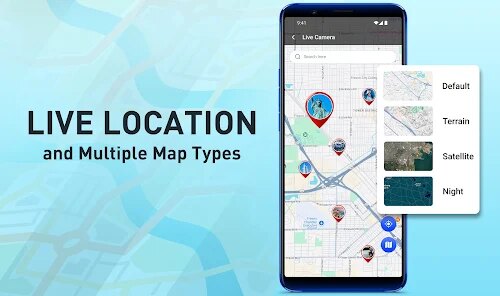
- The app also gives you a map stamp option. This means you can show a small map in your photo with your exact point. Not many apps offer this in the free version. Timestamp Camera offers this too, but you need to upgrade to get the same quality. I really like this feature for my travel photos.
- Another thing is the app saves your stamp style. You can choose your font, color, and position once, and then use it again for the next photo. This saves a lot of time. In other apps, you have to set it again every time. This makes the app feel more user friendly for daily use.
pros
- The app does exactly what it says without extra steps. I can add a timestamp and location stamp in a few seconds. Apps like GeoStamp Camera need you to adjust many settings before you can stamp. This app is more direct and simpler to use.
- The stamps are very clean and do not ruin the photo. The text is clear and easy to read. Other apps sometimes have stamps that look too big or ugly. I can change the size and position easily here. The design is really neat.
- The location accuracy is very good. I compared the coordinates with my GPS device, and they were almost the same. That is important for me when I need to prove a location. Other apps sometimes show the wrong location or a very broad area. This app is precise.
cons
- The app does not have a batch stamp feature. If you have many photos to stamp, you have to do them one by one. Timestamp Camera has a batch mode that lets you stamp all photos at once. That would be a good improvement.
- The free version shows ads after saving a few photos. Sometimes the ads are for other games, which is annoying. I think ads are okay, but they could show fewer ads or let users watch a video to remove ads for a short time.














































