

Screenshots




Related Apps
![]()
Pocket FM: Audio Series
![]()
FalFal: Astrology, Tarot, Love
![]()
Google Drive
![]()
Yuka - Food & cosmetic scan
![]()
GroupMe
![]()
AgeCam: Face Age Changer App
![]()
Air Horn Prank (Loud Joke)
![]()
Palm Secret - Aging&Cartoon
![]()
YouTube
![]()
Anime Girl Wallpapers
![]()
Doodle Art: Magic Drawing App
![]()
Moises: The Musician's AI App
![]()
Zodiac Palm Reader: MagicWay
![]()
DeepSeek - AI Assistant
![]()
Volume Control Sound Launcher















About this app
 NameHome AI - AI Interior Design
 CategoryLifestyle
 PriceFree
 Safety100% Safe
 DeveloperHubX
 LabelLifestyle
editor reviews
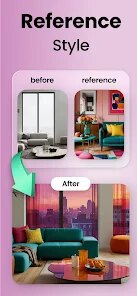
Home AI - AI Interior Design is a home design app designed to help you visualize and plan room makeovers using artificial intelligence. I've been using it for a few months now to help redecorate my apartment, and it's been a game-changer. The app launched a couple of years ago and is available for download on both Google Play and the App Store. It has over a million installs on Google Play alone. You can download and install the app for free, which is a huge plus. You don't need to register an account to start using the basic features, which I really appreciate for quick testing. There are some in-app purchases if you want access to premium AI models or to remove watermarks from your high-resolution renders. I do see occasional ads, but they're not too intrusive and are a fair trade for the free functionality.
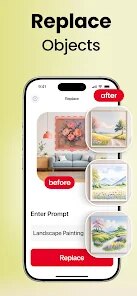
Using the app is straightforward. You start by taking a photo of any room you want to redesign. The AI then identifies the room type and furniture. The magic happens when you use the 'Redesign' feature. You can type in a style prompt like 'modern Scandinavian living room' or 'cozy bohemian bedroom,' and the AI generates a completely new version of your photo. It's like having an interior designer in your pocket. My tip is to be as specific as possible in your prompts for the best results. I also use the 'Virtual Staging' tool a lot; it lets you see how new furniture would look in your empty space before you buy anything. I often save my favorite designs to a mood board within the app to keep my ideas organized.
Compared to other home design apps I've tried, like Planner 5D or Roomstyler, Home AI stands out because of its speed and simplicity. Those other apps often require you to manually place 3D objects, which can be time-consuming and frustrating. With Home AI, I get a photorealistic result in seconds just from a text description. It's less about precise technical drawing and more about instant inspiration, which is exactly what I need as a regular user, not a professional designer. While the more complex apps might offer finer control, for quickly trying out paint colors, new layouts, or completely different decor styles, Home AI is my go-to choice on Google Play. It makes the daunting task of redecorating feel fun and accessible.
features
- 🖼️ Instant AI Room Redesign: Upload a photo, describe your dream style with text, and get a stunning, photorealistic render in seconds. Unlike manual tools in apps like MagicPlan, this requires zero design skill.
- 🧠 Smart Virtual Staging: The AI realistically places furniture into empty rooms. It's more intuitive than searching through catalogs in IKEA Place, as it suggests complete setups based on your style prompt.
- 🎨 Infinite Style Experiments: Change your room's theme endlessly—from Mid-Century Modern to Japandi—with a few taps. It offers more creative freedom and faster iteration than apps limited to pre-set furniture items.
- 📱 All-in-One Mood Board: Save, compare, and share all your AI-generated designs in one place within the app, keeping your renovation ideas perfectly organized without needing separate tools.
pros
- 🚀 Unbeatable Speed for Ideas: Generates multiple design concepts from a single photo faster than any manual or catalog-based app, turning inspiration into a visual plan almost instantly.
- 🎯 Amazing for Visualization: The photorealistic quality of the AI renders is superior for visualizing final looks compared to the cartoonish or blocky 3D models in many free alternatives.
- 💡 Great for Non-Designers: Lowers the barrier to entry dramatically. You don't need to learn complex software; your imagination and a photo are all you need to start, which apps like Homestyler don't offer as seamlessly.
cons
- 📏 Limited Precision Control: You can't tweak the exact placement of AI-generated items like you can in more technical CAD apps, which can be frustrating for detailed planning.
- 🔒 Watermarks on Free Renders: The free version adds a watermark, and removing it requires a purchase. Some competing apps offer watermark-free exports at lower resolutions.














































