

Screenshots


Related Apps
![]()
Broken Screen Prank
![]()
Fingerprint Scanner App
![]()
Firefox Fast & Private Browser
![]()
Allergy Plus by Pollen.com
![]()
Find My Phone By Clap, Whistle
![]()
Planner 5D: Home Design, Decor
![]()
Ghost Detector Real Life Radar
![]()
Pride Quiz LGBTIQ+
![]()
Galaxy Starry Keyboard Backgro
![]()
Instagram
![]()
Fun Fact- My Personal Fact
![]()
Audible: Audio Entertainment
![]()
Photo Frames
![]()
Photo Collage Maker & Editor
![]()
Japan Timetable & Route Search















About this app
 NameEmoji Battery Widget
 CategoryProductivity
 PriceFree
 Safety100% Safe
 DeveloperMIA Studio Inc
 LabelPersonalization
editor reviews
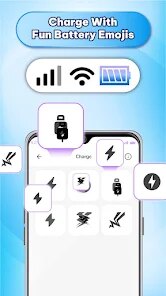
Emoji Battery Widget is a battery monitoring app designed to help you keep track of your phone's battery life in a fun, visual way. It's a simple widget that sits on your home screen, showing your current battery percentage not as a boring number, but as a cute, changing emoji face. The app launched a few years back and is available for free download on Google Play. It has over a million installs from the Play Store, which shows a lot of people find it useful. You don't need to register an account to use it, which is great for privacy. Just download, install, and you're ready to go. It's completely free with no hidden in-app purchases to unlock features, which is pretty rare these days. There are some ads in the app, but they are not too intrusive and mostly appear in the settings menu, not on the widget itself. The main purpose is to give you a quick, at-a-glance view of your battery that's more engaging than the standard icon.
Using the Emoji Battery Widget is super straightforward. After you download and install it from Google Play, you just long-press on your home screen, choose 'Widgets,' and find the Emoji Battery Widget in the list. You drag it to your home screen, and it instantly starts working. The emoji changes its expression based on your battery level—it might be a happy, full face at 100%, a sleepy one around 50%, and a worried or crying face when the battery is critically low. A real user tip is to place it right next to your clock or weather widget for a neat, informative row. You don't really open the app itself much; the widget does all the work. It updates automatically, so you always see the latest status. I find myself checking it more often than the default battery icon because the emojis are just more noticeable and fun.
Compared to other battery widgets on Google Play, this one stands out because of its pure simplicity and charm. Many similar apps, like Battery Widget Reborn, offer tons of graphs, estimates, and technical data, which can be overwhelming if you just want a simple status. Emoji Battery Widget does one thing and does it with personality. I chose it over others because it's lightweight, doesn't drain my battery to monitor my battery, and adds a little bit of joy to my home screen. Other apps might be more powerful, but for a casual user who just wants a cute and immediate visual cue, this app from MIA Studio Inc is perfect. It feels less like a utility and more like a friendly little helper on your screen.
features
- 🔋 Fun, At-a-Gance Status: Unlike standard percentage numbers, this app uses expressive emojis that instantly communicate your battery health. A smiling sun means you're fully charged, while a tired face tells you it's time to plug in, making it more intuitive than just digits.
- 🔋 Ultra-Lightweight Widget: Once installed, the widget runs with minimal system resources. Compared to feature-heavy competitors like AccuBattery, which runs constant background analysis, this app is just a simple, updating icon that doesn't impact your phone's performance or battery life itself.
- 🔋 Zero-Fuss Setup: You don't need an account or complex permissions. Download from Google Play, place the widget, and it works. This contrasts with some apps that require registration or extensive access to your device's usage data just to show a basic battery level.
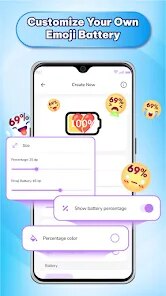
- 🔋 Customizable Emoji Styles: The app offers a few different emoji sets or themes to choose from in its settings. While not as deep as full theme engines, it lets you personalize the look slightly, which is more than most basic battery widgets on the Play Store offer.
pros
- 😊 Pure Simplicity: It excels at providing a single, clear function without clutter. Where other apps bury the battery percentage in menus, this app makes it the star of the show right on your home screen.
- 😊 Visual Appeal: The use of emojis is genuinely effective and engaging. It turns a mundane piece of data into something you actually want to look at, which is a unique strength in the utility app genre.
- 😊 Reliability: The widget updates consistently and accurately. I've never had it freeze or show incorrect info, which is more than I can say for some fancier, buggier alternatives I've tried from the Play Store.
cons
- 😐 Limited Features: It's only a visual widget. You can't tap it for detailed stats or charging history, a feature common in apps like GSAM Battery Monitor. For power users, it's too basic.
- 😐 Ad Presence: While the ads are not on the widget, they are in the app's settings screen. Some competing widgets are entirely ad-free, making for a cleaner experience.

















































