
Screenshots
Related Apps
![]()
Broken Screen Prank
![]()
Fingerprint Scanner App
![]()
Firefox Fast & Private Browser
![]()
Allergy Plus by Pollen.com
![]()
Find My Phone By Clap, Whistle
![]()
Planner 5D: Home Design, Decor
![]()
Ghost Detector Real Life Radar
![]()
Pride Quiz LGBTIQ+
![]()
Galaxy Starry Keyboard Backgro
![]()
Instagram
![]()
Fun Fact- My Personal Fact
![]()
Audible: Audio Entertainment
![]()
Photo Frames
![]()
Photo Collage Maker & Editor
![]()
Japan Timetable & Route Search















About this app
 NameInk AI – Tattoo design maker
 CategoryGenerative AI
 PriceFree
 Safety100% Safe
 DeveloperRefaceEuropeUAB
 LabelArt & Design
editor reviews
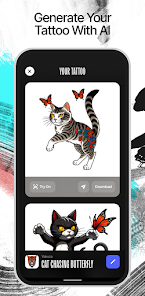
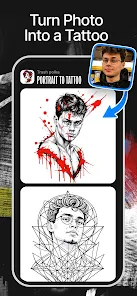
Ink AI is a tattoo design app that makes creating custom tattoo ideas simple and fast. I've been using it for a few months now, and it's become my go-to tool whenever I'm thinking about new ink. The app launched a while back and you can find it on both Google Play and the App Store. It's got a solid number of downloads, which shows a lot of people are into it. The best part? It's completely free to download and install. You don't even need to register an account to start playing around with the designs, which I really appreciate for quick brainstorming. I haven't run into any annoying ads that interrupt the creative flow, and while there might be some optional in-app purchases for extra features, the core design-making tools are totally free. It's perfect for someone like me who just wants to visualize ideas without any commitment or cost upfront.
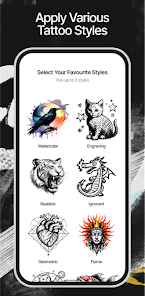
Using the app is super straightforward. I usually start by either taking a photo of the body part where I'm thinking of getting the tattoo or choosing a shape from their library. Then, I type in what I'm looking for—something like "geometric wolf" or "watercolor rose"—and the AI generates a bunch of unique designs in seconds. My tip is to be as specific as you can with your keywords; you get much better and more personalized results. I often save my favorites to a collection and then use the editing tools to tweak the colors or adjust the size. It feels less like using complicated software and more like having a creative partner that instantly gets your vibe. I'll play with designs for a while, show them to friends, and then have a solid visual to bring to my tattoo artist.
Compared to other tattoo design apps on Google Play, Ink AI stands out because of its focus on AI generation. A lot of other apps are just galleries of pre-made flash art or basic drawing tools. With those, I felt limited to existing styles or needed actual drawing skills. Ink AI feels more like a custom design service. It creates something new just for me based on my words. This is why I chose it over others; it helps bridge the gap between the fuzzy idea in my head and a concrete visual. It doesn't just show me what's popular, it helps invent what could be mine. For someone who isn't an artist but has a clear concept, this app is a game-changer. It makes the whole process of deciding on a tattoo much less intimidating and way more fun.
features
- 🤖 Instant AI Design Generation: You describe your idea in words, and the app creates multiple custom tattoo designs in seconds. It's way faster than scrolling through generic galleries in other apps.
- 🎨 Customization & Editing Tools: After the AI makes a design, you can easily change colors, adjust size, and refine details. It gives you control without needing pro skills like in complex drawing apps.
- 📁 Personal Idea Collection: You can save all your generated designs into organized folders. This is super handy for tracking inspiration over time, unlike apps where your ideas just get lost.
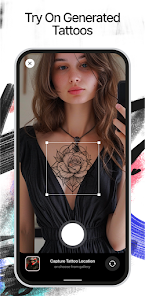
- 🔍 Body Placement Preview: Use your camera or select a body shape to see how a design would look on your actual skin. This practical feature beats just seeing a design on a blank screen.
pros
- ✨ Sparks Unique Creativity: The AI helps you discover design styles you might not have thought of, which is more inspiring than static galleries in other tattoo apps.
- 🚀 Extremely User-Friendly: From download to first design, it takes minutes. The process is smoother and more intuitive than many similar apps that feel cluttered.
- 💡 Great Communication Tool: It creates a perfect visual reference to show your tattoo artist, making discussions clearer than just using descriptive words.
cons
- ⏳ Occasional Repetitive Outputs: Sometimes the AI generates similar-looking designs. It could use more variety in certain style categories.
- 📐 Limited Fine-Detail Control: While good for concepts, it's not for ultra-precise line editing. Artists might still need to refine the final drawing.














































