
Retake AI: Face & Photo Editor
Video Players & EditorsLatest APK
DownloadScreenshots
Related Apps
![]()
Broken Screen Prank
![]()
Fingerprint Scanner App
![]()
Firefox Fast & Private Browser
![]()
Allergy Plus by Pollen.com
![]()
Find My Phone By Clap, Whistle
![]()
Planner 5D: Home Design, Decor
![]()
Ghost Detector Real Life Radar
![]()
Pride Quiz LGBTIQ+
![]()
Galaxy Starry Keyboard Backgro
![]()
Instagram
![]()
Fun Fact- My Personal Fact
![]()
Audible: Audio Entertainment
![]()
Photo Frames
![]()
Photo Collage Maker & Editor
![]()
Japan Timetable & Route Search















About this app
 NameRetake AI: Face & Photo Editor
 CategoryVideo Players & Editors
 PriceFree
 Safety100% Safe
 DeveloperCodeway Dijital
 LabelPhotography
editor reviews
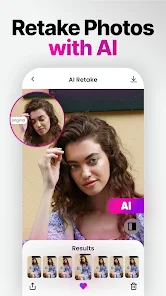
Retake AI: Face & Photo Editor is a photo editing app designed to help you fix and enhance your portraits with artificial intelligence. It's a tool I use all the time to clean up my selfies and group photos before sharing them. The app launched a few years back and is available on both Google Play and the App Store. It has millions of downloads, which shows how popular it is. You can download and install Retake AI for free, which is great. You don't need to create an account or register to start using most of its features, making it super quick to jump in. There are in-app purchases if you want to unlock some premium tools or remove ads, but the free version is already quite powerful for basic fixes.
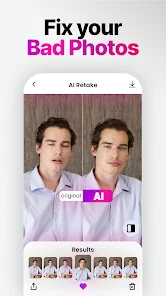
Using Retake AI is straightforward. I usually open the app, pick a photo from my gallery, and let the AI scan it. The first thing I do is hit the 'Retouch' button. It automatically smooths skin, removes blemishes, and brightens eyes. It feels like having a professional editor in your pocket. A simple tip from a regular user: don't overdo the sliders. The AI suggestions are a good starting point, but I always tweak the 'Smooth Skin' intensity down a bit to keep it looking natural. For group photos, you can edit faces individually, which is a lifesaver. Another tip is to use the 'Relight' feature on dull photos; it instantly makes everyone look more vibrant. The process is fast, and you can see a before-and-after with a tap, which helps decide if you like the edit.
Compared to other similar apps like FaceTune or AirBrush, I find myself choosing Retake AI more often. The main reason is its balance of power and simplicity. Some apps have a million confusing buttons, while others are too basic. Retake AI sits right in the middle. Its AI seems smarter at detecting what needs fixing without making everyone look like a plastic doll. Also, for a free app, it gives you a lot of control. While FaceTune might be the industry name, it's expensive. Retake AI handles most of my daily needs—removing acne, whitening teeth, fixing red-eye—without any cost. The interface is cleaner than many others on Google Play, so I don't waste time figuring things out. It just works for quick, share-ready edits.
features
- ✨ AI-Powered Face Retouching: The core function. It automatically detects faces and applies enhancements like skin smoothing, blemish removal, and shine reduction. Compared to manual tools in other apps, this one-click fix saves tons of time.
- ✨ Selective Editing for Groups: You can tap on each face in a photo to edit them individually. This is much better than apps that apply one filter to everyone, often ruining some people's looks.
- ✨ Smart Object Removal: It can erase photobombers or unwanted objects from the background. While not as advanced as a dedicated tool like Snapseed's Healing brush, it's impressively good for an all-in-one editor.
- ✨ Portrait Relighting & Background Change: You can change the lighting direction on a face or swap out a boring background. This feature rivals premium apps and is a standout reason to download Retake AI over simpler editors.
pros
- 👍 The AI retouch is incredibly fast and produces natural-looking results, unlike some competitors that make skin look overly airbrushed.
- 👍 The free version is very generous. You can install it and do substantial editing without paying, which isn't always the case with apps like FaceTune.
- 👍 The interface is user-friendly. It's easy to navigate compared to more complex professional apps, making it great for casual users.
- 👍 Regular updates with new features, keeping it competitive with other top apps on Google Play in the photo genre.
cons
- ⚠️ The app can show frequent video ads, which can interrupt the editing flow. Some similar free apps have less intrusive ad placement.
- ⚠️ Advanced features like high-resolution export are locked behind a subscription, which might push heavy users toward other one-time-purchase apps.













































