

Screenshots
Related Apps
![]()
Pocket FM: Audio Series
![]()
FalFal: Astrology, Tarot, Love
![]()
Google Drive
![]()
Yuka - Food & cosmetic scan
![]()
GroupMe
![]()
AgeCam: Face Age Changer App
![]()
Air Horn Prank (Loud Joke)
![]()
Palm Secret - Aging&Cartoon
![]()
YouTube
![]()
Anime Girl Wallpapers
![]()
Doodle Art: Magic Drawing App
![]()
Moises: The Musician's AI App
![]()
Zodiac Palm Reader: MagicWay
![]()
DeepSeek - AI Assistant
![]()
Volume Control Sound Launcher















About this app
 NameStep Counter - Pedometer
 CategoryHealth & Fitness
 PriceFree
 Safety100% Safe
 DeveloperHitchhike Tech
 LabelHealth & Fitness
editor reviews
Step Counter - Pedometer is a fitness tracking app designed to help you monitor your daily steps and physical activity. It's a straightforward pedometer app that launched a few years back and is available on both Google Play and the App Store. I downloaded it for free from Google Play, and it has millions of installs, which gave me some confidence in trying it out. You don't need to register an account to start using it, which I really appreciate for quick setup. The app is free to download and use, though it does show some banner ads at the bottom of the screen. There are also optional in-app purchases if you want to remove those ads or unlock some extra features, but the core step counting works perfectly without spending a dime. I've been using it for a few months now to get a better sense of how much I move during the day, especially since I have a desk job.
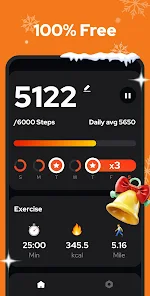
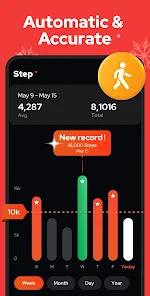
Using the app is very simple. After you install it, you just open the app and it starts counting your steps automatically using your phone's sensors. I keep it running in the background, and it doesn't seem to drain my battery too much. A simple tip from my experience: make sure you carry your phone with you, in your pocket or hand, for it to count accurately. If you leave it on a desk, it obviously won't track your steps. The main screen shows a clear number for your daily steps, and you can set a daily goal. I set mine to 10,000 steps, and it gives a little celebration when I hit it, which is a nice motivator. You can also view your history in a simple calendar or chart to see your progress over weeks or months. It's a no-fuss way to stay aware of your activity.
Compared to other similar apps like Google Fit or Samsung Health, Step Counter - Pedometer is much more basic and focused. Those other apps try to do everything—heart rate, sleep, nutrition—which can feel overwhelming. I chose this app because I just wanted a simple, dedicated step counter without a complicated interface. It does one job and does it well. It's lighter on phone storage and easier to understand at a glance. For someone who isn't a hardcore fitness enthusiast but just wants to be reminded to walk more, this app from Hitchhike Tech is a perfect, straightforward choice. It gets the job done without any unnecessary bells and whistles.
features
- 📱 Automatic step tracking using your phone's built-in sensor. It runs in the background after you install it, so you don't need to start it manually every day.
- 📱 Simple goal setting and celebration alerts. You can set a daily target, and the app notifies you when you reach it, which feels more rewarding than more complex fitness platforms.
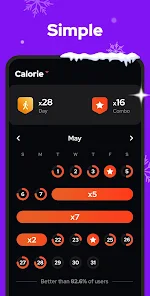
- 📱 Clean history view with charts and a calendar. It lets you easily track your progress over time without any confusing menus, unlike some apps that bury this data.
- 📱 Low battery usage compared to full suite health apps. Because it focuses only on steps, it doesn't constantly sync other data, making it efficient for all day use.
pros
- ✅ Extremely simple and fast interface. It's much easier to check your steps here than in busier apps like Google Fit.
- ✅ No account or login required. You can download and start using it immediately, which is great for privacy and convenience.
- ✅ Reliable basic step counting. It provides consistent data that matches my expectation from daily movement.
- ✅ Lightweight app size. The download and install are quick, and it doesn't take up much space on your phone.
cons
- ⚠️ Contains banner advertisements. The free version shows ads, which can be removed via a purchase.
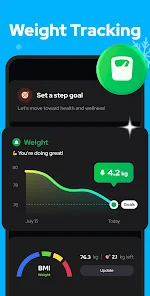
- ⚠️ Lacks advanced features like GPS route mapping or integration with other health services, which some competitors offer.













































