
Screenshots
Related Apps
![]()
Broken Screen Prank
![]()
Fingerprint Scanner App
![]()
Firefox Fast & Private Browser
![]()
Allergy Plus by Pollen.com
![]()
Find My Phone By Clap, Whistle
![]()
Planner 5D: Home Design, Decor
![]()
Ghost Detector Real Life Radar
![]()
Pride Quiz LGBTIQ+
![]()
Galaxy Starry Keyboard Backgro
![]()
Instagram
![]()
Fun Fact- My Personal Fact
![]()
Audible: Audio Entertainment
![]()
Photo Frames
![]()
Photo Collage Maker & Editor
![]()
Japan Timetable & Route Search















About this app
 NameSkin Editor 3D for Minecraft
 CategoryProductivity
 PriceFree
 Safety100% Safe
 DeveloperRemoro Studios
 LabelTools
editor reviews
Skin Editor 3D for Minecraft is a creative design app designed to help you make and customize your own Minecraft character skins. It's a must-have tool for any Minecraft player who wants to stand out with a unique look. The app launched a while back and you can find it on both Google Play and the App Store. It's been downloaded millions of times, which shows how popular it is with the community. The best part? You can download and install it for free. You don't even need to register an account to start creating, which makes jumping in super easy. While the core app is free, there are some in-app purchases available if you want extra features or content packs. You might also see some ads, but they're usually not too intrusive and don't get in the way of your designing.
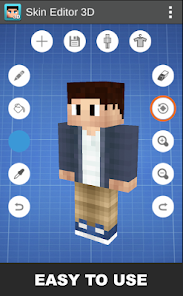
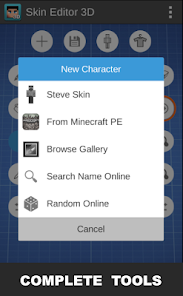
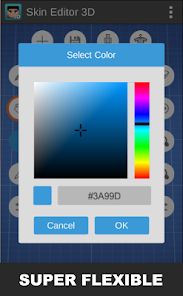
Using Skin Editor 3D is really straightforward. You start by either choosing a blank template or loading an existing skin you want to edit. The 3D view is the coolest part—you can spin your character model around with your finger to see your design from every angle, just like in the real game. This makes painting details way easier than on flat, 2D editors. A simple tip from a regular user: use the layer tool. It lets you draw on different parts like the front, back, or arms separately without messing up other areas. The color picker and brush tools are simple, and you can zoom in for pixel-perfect details. When you're done, you can save your creation directly to your device and then easily import it into your Minecraft game. It feels like having a professional skin workshop right in your pocket.
Compared to other skin apps on Google Play, this one really wins because of its true 3D editing. A lot of other apps just show you a flat grid, which can be confusing when you're trying to visualize how your skin will wrap around the Minecraft model. With Skin Editor 3D, what you see is what you get. It just feels more intuitive and fun. While some apps might have more advanced drawing tools, this app keeps things simple and focused on the Minecraft experience. For me, that's why I chose it over others; it gets me from idea to in-game skin faster, and the process is actually enjoyable, not frustrating.
features
- 🎨 True 3D Modeling: You can rotate and view your Minecraft character in full 3D while you paint, making it incredibly easy to place designs correctly on the arms, legs, and face.
- 🎨 Simple Layer System: The app uses a straightforward layer-based editing system (front, back, right arm, etc.) that mimics how Minecraft skins are built, which is much clearer than complex layer menus in some professional editors.
- 🎨 Direct Game Integration: It offers one-click export options to save your skin directly to the correct Minecraft folder or share it, which is smoother than the multi-step process in many similar apps.
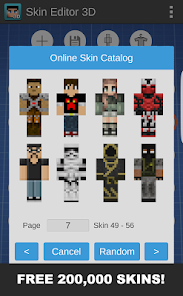
- 🎨 Extensive Template Library: Comes with a huge collection of pre-made skins and templates to remix, giving you a better starting point than apps with smaller, basic libraries.
pros
- ✨ The live 3D preview is a game-changer. Unlike other editors that only show a 2D grid, you instantly see how your design works on a 3D model, preventing mistakes.
- ✨ The user interface is very clean and game-like. It's less cluttered than advanced apps like SkinSeed, making it perfect for beginners and casual creators.
- ✨ It's incredibly fast to go from opening the app to having a new skin in your game. The workflow is more optimized for Minecraft players than generic pixel art apps.
cons
- ⚠️ The free version has ads and locks some advanced brushes/colors behind purchases, whereas some competitors offer more tools for free upfront.
- ⚠️ The drawing tools, while good, aren't as powerful as in dedicated pixel art apps, which might limit very detailed artists.














































