

PhotoLayers-Superimpose,Eraser
Video Players & EditorsLatest APK
DownloadScreenshots
Related Apps
![]()
Broken Screen Prank
![]()
Fingerprint Scanner App
![]()
Firefox Fast & Private Browser
![]()
Allergy Plus by Pollen.com
![]()
Find My Phone By Clap, Whistle
![]()
Planner 5D: Home Design, Decor
![]()
Ghost Detector Real Life Radar
![]()
Pride Quiz LGBTIQ+
![]()
Galaxy Starry Keyboard Backgro
![]()
Instagram
![]()
Fun Fact- My Personal Fact
![]()
Audible: Audio Entertainment
![]()
Photo Frames
![]()
Photo Collage Maker & Editor
![]()
Japan Timetable & Route Search















About this app
 NamePhotoLayers-Superimpose,Eraser
 CategoryVideo Players & Editors
 PriceFree
 Safety100% Safe
 DeveloperhandyCloset Inc.
 LabelPhotography
editor reviews
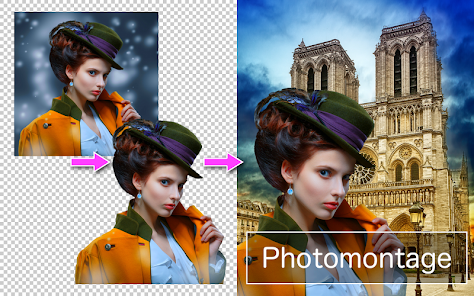
PhotoLayers - Superimpose, Eraser is a photo editing app designed to help you blend, cut out, and combine images in creative ways. I use it mostly for making fun collages, removing backgrounds from pictures, and creating double exposure effects. The app launched a while back and you can easily download it from both Google Play and the App Store. It has millions of installs, which shows how popular it is. The best part is that the core app is free to download and install. You don't need to register or create an account to start using it, which I really appreciate for quick edits. There are some in-app purchases if you want extra features or to remove ads, but the free version is quite powerful on its own. You will see some ads, but they are not too intrusive during normal use.
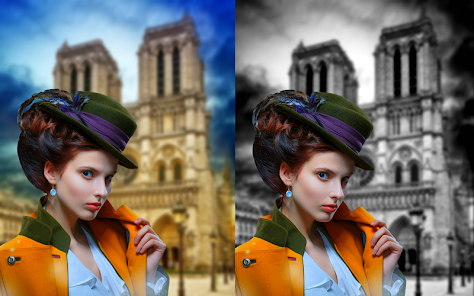
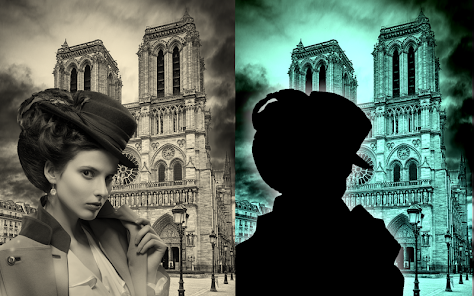
Using PhotoLayers is pretty straightforward. After you install the app, you open it and choose your base photo. Then, you add another image on top as a layer. The magic happens with the eraser and blending tools. I use my finger to erase parts of the top layer to reveal the image underneath, which is perfect for making it look like someone is in a new place. A simple tip from a regular user: use the zoom function for detailed erasing around edges, like hair. It makes the cut-out look much cleaner. Another tip is to play with the opacity sliders to blend layers smoothly for that artistic double exposure look. You can also save your projects as PSD files, which is great if you want to edit more on a computer later.
Compared to other similar apps, I keep coming back to PhotoLayers. There are many photo editing apps on Google Play, but this one feels more dedicated to layering. Some apps are more about filters or basic adjustments. PhotoLayers really focuses on the cut-and-combine part, which is what I need most. Other apps might do it, but they can be clunky or require a subscription right away. With PhotoLayers, the free tools are robust enough for most of my projects. It feels like a specialized tool rather than a jack-of-all-trades, and for quick, creative photo mashups, it's my go-to choice after trying several others in the genre.
features
- 🖼️ The core layering and eraser function is fantastic. You can precisely cut out objects from photos and superimpose them onto new backgrounds. Compared to a popular app like Adobe Photoshop Mix, PhotoLayers feels more intuitive for quick, on-the-phone edits without a steep learning curve.
- 🔄 It supports PSD file saving, which is a standout feature not always found in mobile apps. This means you can start a project on your phone and finish it on desktop Photoshop, offering more flexibility than many similar apps that lock you into their mobile ecosystem.
- 🎚️ The blending controls for opacity, brightness, and saturation per layer are very effective. While apps like Superimpose X also offer blending, PhotoLayers presents these tools in a simpler, more accessible interface that's easier to understand for casual users.
- ✂️ The selection tools, like the magic wand for automatic background removal, work surprisingly well for a mobile app. It's not perfect, but it gives you a great starting point, which is often faster than manual tools in other basic photo editor apps.
pros
- ✅ The precision eraser tool with adjustable brush size and hardness is excellent for detailed work, better than the basic cut-out tools in many free collage apps.
- ✅ The non-destructive editing (you can re-edit layers later) is a pro feature rarely found in free mobile apps, giving it an edge over simpler competitors.
- ✅ The app is very stable and handles multiple high-resolution layers smoothly, which isn't always the case with similar free apps that can crash.
cons
- ⚠️ The user interface looks a bit dated compared to newer, sleeker photo apps, which can make it less appealing at first glance.
- ⚠️ Some advanced features are locked behind in-app purchases, whereas a few competing apps offer a wider set of free blending modes.













































