
Screenshots
Related Apps
![]()
Broken Screen Prank
![]()
Fingerprint Scanner App
![]()
Firefox Fast & Private Browser
![]()
Allergy Plus by Pollen.com
![]()
Find My Phone By Clap, Whistle
![]()
Planner 5D: Home Design, Decor
![]()
Ghost Detector Real Life Radar
![]()
Pride Quiz LGBTIQ+
![]()
Galaxy Starry Keyboard Backgro
![]()
Instagram
![]()
Fun Fact- My Personal Fact
![]()
Audible: Audio Entertainment
![]()
Photo Frames
![]()
Photo Collage Maker & Editor
![]()
Japan Timetable & Route Search















About this app
 NameNeon LED Keyboard: RGB & Emoji
 CategoryProductivity
 PriceFree
 Safety100% Safe
 DeveloperAZ Mobile Software
 LabelPersonalization
editor reviews
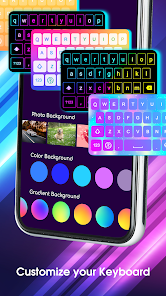
Neon LED Keyboard: RGB & Emoji is a keyboard customization app designed to help you personalize your typing experience with colorful themes and fun emojis. I downloaded this app from Google Play a few months ago when I got tired of my phone's plain default keyboard. It's a free app that's been around for a while, available on both Google Play and the App Store. On Google Play, it has over 10 million installs, which made me feel confident about trying it. You can install it for free without any upfront cost, and you don't even need to register an account to start using it, which is great for privacy. I was pleasantly surprised that the core keyboard functions work without annoying ads constantly popping up. There are in-app purchases if you want to unlock all the premium neon themes or remove a small banner ad, but the free version is quite generous.
Using the app is straightforward. After you download and install it, you just enable it in your phone's settings under 'Language & Input'. It takes a minute to set up, but the app guides you through it. A simple tip from a regular user: make sure to grant the necessary permissions for the keyboard to work properly. Once it's active, you can switch between different neon LED themes directly from the keyboard's toolbar. I use it mainly for messaging friends; the glowing key effects and smooth animations make typing feel more fun. Another handy tip is to explore the emoji panel – it has a good variety, and some are animated, which adds a playful touch to chats. The app runs smoothly in the background, and I haven't noticed any lag while typing, which is crucial for a keyboard app.
Compared to other popular keyboard apps like Gboard or SwiftKey, I chose Neon LED Keyboard for its specific focus on visual flair. While Gboard is excellent for predictions and Google integration, and SwiftKey is great for learning your typing style, this app from AZ Mobile Software is all about making your keyboard look cool. It doesn't try to be the smartest keyboard; it just wants to be the most stylish one on your screen. For someone like me who enjoys customizing their phone's look, this app hits the spot. It's simpler and more focused on aesthetics than the feature-packed giants, which I actually prefer because it's less cluttered. In my daily use, it provides a reliable and visually engaging typing experience without unnecessary complexity.
features
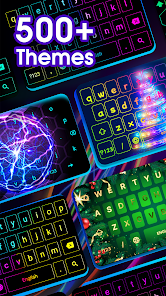
- 🎨 Vast collection of glowing neon and RGB themes that you can apply instantly, making your keyboard stand out compared to more minimalist designs like Gboard's.
- 😍 Integrated emoji and sticker panel with a solid selection, including some animated options, which is fun for casual chats and adds personality.
- ⚙️ Straightforward customization settings for adjusting key sounds, vibration, and layout size, offering decent personalization right after install.
- 🔧 Reliable performance as a daily driver; it doesn't lag during fast typing, which is a key advantage over some other heavily themed keyboard apps that can be slow.
pros
- ✨ The visual effects are truly vibrant and unique, offering a level of customization for keyboard appearance that standard apps like SwiftKey don't focus on.
- 🚀 It's very lightweight and quick to install and set up from Google Play, with no mandatory login, making it more accessible than some competitors.
- 💡 The free version is quite usable with a good number of themes, which is better than many similar apps that lock most looks behind a paywall immediately.
cons
- 🤔 The auto-correction and word prediction aren't as smart or adaptive as top-tier keyboards like Gboard, which can slow down typing accuracy.
- 📢 The free version includes a small banner ad, and accessing the very best themes requires a purchase, which is a minor drawback for a free app.













































