

Lensa: photo editor & AI art
Video Players & EditorsLatest APK
DownloadScreenshots
Related Apps
![]()
Broken Screen Prank
![]()
Fingerprint Scanner App
![]()
Firefox Fast & Private Browser
![]()
Allergy Plus by Pollen.com
![]()
Find My Phone By Clap, Whistle
![]()
Planner 5D: Home Design, Decor
![]()
Ghost Detector Real Life Radar
![]()
Pride Quiz LGBTIQ+
![]()
Galaxy Starry Keyboard Backgro
![]()
Instagram
![]()
Fun Fact- My Personal Fact
![]()
Audible: Audio Entertainment
![]()
Photo Frames
![]()
Photo Collage Maker & Editor
![]()
Japan Timetable & Route Search















About this app
 NameLensa: photo editor & AI art
 CategoryVideo Players & Editors
 PriceFree
 Safety100% Safe
 DeveloperPrisma Labs, Inc.
 LabelPhotography
editor reviews
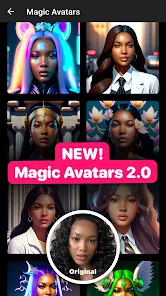
Lensa is a photo editing and AI art app that makes enhancing your pictures and creating digital artwork simple and fast. I've been using Lensa for over a year now, and it's become my go-to tool for everything from quick selfie touch-ups to making those wild, imaginative AI avatars. The app launched a while back, but it really blew up in late 2022 when its 'magic avatars' feature went viral. You can download Lensa on both Google Play and the App Store; it's super easy to install. It has millions of downloads, which isn't surprising given how popular it got. The app itself is free to download and use for basic filters and tools, but to unlock the really cool AI features, you need a subscription. You don't have to register an account to start playing with the basic edits, which I like for privacy. However, to save your creations or use the cloud features, you'll need to sign up. There are in-app purchases for the premium subscription, and yes, you will see ads in the free version, but they're not too intrusive.
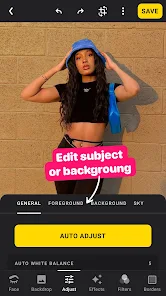
Using Lensa is pretty straightforward. For regular photo editing, you just pick a picture from your gallery, and then you have all the standard sliders for things like brightness, contrast, and saturation. It's very intuitive. Where it gets fun is with the AI tools. To create the magic avatars, you upload 10-20 selfies, pay for the pack (it's part of the subscription), and the AI generates dozens of artistic versions of you in different styles—like fantasy, anime, or pop art. A real user tip: make sure your source photos are clear, well-lit, and show different angles for the best results. I also use it to remove backgrounds from pictures instantly, which is a huge time-saver. Another tip is to experiment with the 'AI Styles' for regular photos; it can turn a simple snapshot into a painting with one tap.
Compared to other apps like FaceApp or Remini, Lensa feels more focused on creative transformation than just face tuning or restoration. FaceApp is great for realistic edits like aging or smiling, and Remini is unbeatable for sharpening old blurry photos. But Lensa is the one I choose when I want to create something completely new and artistic from my images. It's less about perfecting a reality and more about exploring a fantasy. The AI avatars are a unique party trick you won't find in most other editors. The interface is also cleaner and more modern than some older apps. For someone who enjoys playing with their digital identity and art, Lensa is more fun and inspiring.
features
- ✨ The core magic is in its AI avatar generator. You feed it selfies, and it returns dozens of stunning, stylized portraits in various artistic themes. It's way more specialized and creative than the general filters in apps like VSCO.
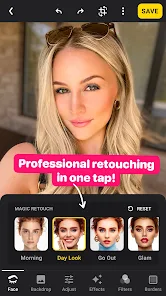
- ✨ It offers powerful one-touch photo enhancement tools, like background removal and skin retouching, that work in seconds. Compared to more complex editors like Adobe Lightroom, Lensa gets professional-looking results with zero effort.
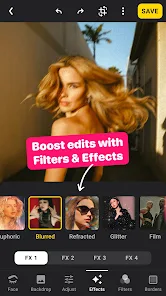
- ✨ The app includes a vast library of artistic filters and effects that can apply complex digital art styles to any photo. While Instagram has filters, Lensa's are more advanced and tailored for creating standalone artwork.
- ✨ Its user interface is incredibly clean and simple, making advanced editing accessible. Unlike some pro apps, you don't need a tutorial to start creating impressive edits immediately after install.
pros
- 👍 The AI avatar feature is truly unique and produces wildly creative, high-quality results that are a step above gimmicky face-swap apps.
- 👍 The speed of tools like background removal is unmatched for a mobile app; it's faster and often more accurate than doing it manually in other editors.
- 👍 The app is beautifully designed and a joy to use. The workflow feels smoother than on many other photo apps available on Google Play.
cons
- ⚠️ The subscription model for key AI features is expensive compared to one-time purchases offered by some similar apps.
- ⚠️ It requires a strong internet connection for AI processing, unlike some offline-capable editors, which can be limiting.















































