
Screenshots
Related Apps
![]()
Broken Screen Prank
![]()
Fingerprint Scanner App
![]()
Firefox Fast & Private Browser
![]()
Allergy Plus by Pollen.com
![]()
Find My Phone By Clap, Whistle
![]()
Planner 5D: Home Design, Decor
![]()
Ghost Detector Real Life Radar
![]()
Pride Quiz LGBTIQ+
![]()
Galaxy Starry Keyboard Backgro
![]()
Instagram
![]()
Fun Fact- My Personal Fact
![]()
Audible: Audio Entertainment
![]()
Photo Frames
![]()
Photo Collage Maker & Editor
![]()
Japan Timetable & Route Search















About this app
 NameMicrosoft Outlook
 CategoryProductivity
 PriceFree
 Safety100% Safe
 DeveloperMicrosoft Corporation
 LabelProductivity
editor reviews
Microsoft Outlook is a productivity app designed to help you manage your email, calendar, and contacts all in one place. I've been using it for years to keep my work and personal life organized. The app launched a long time ago, but the mobile version really took off as smartphones became essential. You can download it for free on both Google Play and the App Store. On Google Play alone, it has over a billion installs, which shows how popular it is. It's free to download and install, and you don't necessarily need to register for a new account if you already have a Microsoft, work, or school email. The app itself doesn't have disruptive ads, and while the core features are free, there are optional in-app purchases for more cloud storage through Microsoft 365 subscriptions. It's my go-to app for staying on top of everything.
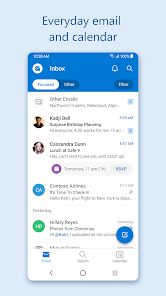
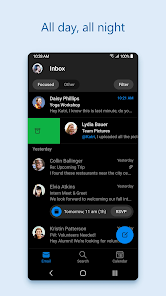
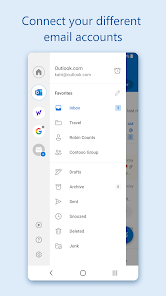
Using Microsoft Outlook is pretty straightforward. After you download and install the app, you add your email accounts—it works with Outlook.com, Gmail, Yahoo, iCloud, and even work accounts. I have both my personal Gmail and my work email in there, so I don't have to switch between apps. The main screen shows your inbox, but the real magic is the focused inbox that separates important emails from the rest. I also live by the calendar feature; it pulls events from my emails and lets me schedule meetings right from the app. A simple tip from a longtime user: use the swipe gestures to quickly archive or schedule emails for later. It saves me so much time. For files, you can easily attach documents from OneDrive or your phone.
Compared to other email apps like Gmail or Apple Mail, I keep choosing Microsoft Outlook. The Gmail app is great for just Gmail, but Outlook handles multiple account types more seamlessly. Apple Mail is simple but feels a bit basic. Outlook strikes a better balance for me because it combines email, calendar, and contacts so well. The "Focused Inbox" does a much better job at filtering noise than the default tabs in Gmail. Also, the integration with other Microsoft apps like Teams and OneDrive is a huge plus for work. It just feels more powerful and organized for managing a busy digital life, which is why it's stayed on my home screen.
features
- 📧 Unified inbox for all your email accounts (Outlook, Gmail, Yahoo, etc.) in one clean view, unlike some apps that feel separate per account.
- 📅 Integrated calendar that automatically adds events from emails and makes scheduling meetings simple, a step ahead of basic mail-only apps.
- 📎 Easy file access and sharing with direct links to OneDrive and other cloud storage, streamlining attachments compared to manual file browsing.
- ✨ "Focused Inbox" that intelligently separates important messages from newsletters and promotions, offering smarter filtering than standard inbox tabs.
pros
- ✅ Excellent organization with the combined mail, calendar, and contact manager, more cohesive than using separate single-purpose apps.
- ✅ Strong security and enterprise features for work accounts, often more robust than consumer-focused apps like Gmail.
- ✅ Reliable push notifications and sync across devices, ensuring you never miss an important email or meeting alert.
cons
- ⚠️ Can feel a bit heavy or complex for users who just want a super simple, fast email-only experience.
- ⚠️ Some advanced features are tied to a Microsoft 365 subscription, whereas apps like Gmail offer more premium features for free.















































