

Screenshots





Related Apps
![]()
Broken Screen Prank
![]()
Fingerprint Scanner App
![]()
Firefox Fast & Private Browser
![]()
Allergy Plus by Pollen.com
![]()
Find My Phone By Clap, Whistle
![]()
Planner 5D: Home Design, Decor
![]()
Ghost Detector Real Life Radar
![]()
Pride Quiz LGBTIQ+
![]()
Galaxy Starry Keyboard Backgro
![]()
Instagram
![]()
Fun Fact- My Personal Fact
![]()
Audible: Audio Entertainment
![]()
Photo Frames
![]()
Photo Collage Maker & Editor
![]()
Japan Timetable & Route Search













About this app
 NameGenie: AI Photo Video Editor
 CategoryGenerative AI
 PriceFree
 Safety100% Safe
 DeveloperAIGX-Studio
 LabelPhotography
editor reviews
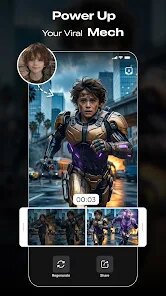
Genie: AI Photo Video Editor is a creative multimedia app in the photo and video editing category that focuses on quick and smart editing using artificial intelligence. I downloaded it from Google Play a few months ago, and it has become one of my go-to apps for touching up pictures and making short clips. The app is free to install, and you don't need to register to start using the basic tools, which is a big plus for me. It has over 10 million installs on Google Play, and it also works on the App Store. There are some in-app purchases if you want the premium features, and you do see a few ads, but they are not too annoying. Overall, it is a handy tool for anyone who wants to edit photos and videos without spending a lot of time learning complex software.
Using Genie: AI Photo Video Editor is pretty straightforward. You just open the app, pick a photo or video from your gallery, and then choose from a bunch of AI-powered tools. For example, you can remove the background with one tap, change the sky in a landscape photo, or turn a regular video into a cartoon-style clip. One tip I can share is to use the "enhance" feature on photos that look a bit dull or dark. It brightens up the colors and sharpens the image in just a few seconds. For videos, the motion tracking tool is really cool you can add text or stickers that follow a moving object. I like to use the app for making quick edits for social media posts because it saves me from opening a full desktop editor.
I have tried a few other photo editing apps like Snapseed and CapCut, but Genie stands out because of how easy it is to use AI tools. Snapseed is great for manual adjustments, but it does not have as many one-click AI features. CapCut is good for video editing on the go, but it can be a bit cluttered with options. Genie feels more balanced for both photos and videos, and the AI background remover works better than most apps I have tried. I chose this app over others because it does not require a steep learning curve. You can get professional-looking results without spending hours watching tutorials. It is not perfect, but for daily casual edits, it is hard to beat. I would recommend it to anyone looking for a simple yet powerful editing app.
features
- 🛠 Background removal: You can instantly remove or replace the background in any photo. It works well with people, pets, and even objects. Just tap and the AI does the hard work.
- 🛠 Sky replacement: This is a fun feature where you can change the sky in your landscape photos. There are many options like sunset, stormy, or starry sky. The app blends it naturally.
- 🛠 AI video effects: You can apply cartoon filters, glitch effects, or slow motion to videos. It processes videos quickly without much lag. My phone is mid-range and it works fine.
- 🛠 Text and sticker tools: Adding text is easy with many fonts and colors. You can also add animated stickers that follow objects in videos. It makes clips more lively.
pros
- 👍 Simple and fast: The app is easy to navigate. Even first-time users can edit right away. No need to watch guides.
- 👍 Great AI results: The background removal and sky change are very accurate. Much better than similar apps like PhotoRoom.
- 👍 All-in-one: You can edit both photos and videos in one place. Picsart needs separate tools for videos.
cons
- 👎 Ads can be frequent: Free users see ads often. During editing, an ad may pop up.
- 👎 Limited advanced controls: If you want fine adjustments like curves, this app does not have them. Snapseed offers more manual controls.














































