

iCut: Video Editor & Maker
Video Players & EditorsLatest APK
DownloadScreenshots





Related Apps
![]()
Broken Screen Prank
![]()
Fingerprint Scanner App
![]()
Firefox Fast & Private Browser
![]()
Allergy Plus by Pollen.com
![]()
Find My Phone By Clap, Whistle
![]()
Planner 5D: Home Design, Decor
![]()
Ghost Detector Real Life Radar
![]()
Pride Quiz LGBTIQ+
![]()
Galaxy Starry Keyboard Backgro
![]()
Instagram
![]()
Fun Fact- My Personal Fact
![]()
Audible: Audio Entertainment
![]()
Photo Frames
![]()
Photo Collage Maker & Editor
![]()
Japan Timetable & Route Search















About this app
 NameiCut: Video Editor & Maker
 CategoryVideo Players & Editors
 PriceFree
 Safety100% Safe
 DeveloperiCut -Video Editor & Video Maker App
 LabelVideo Players & Editors
editor reviews
iCut: Video Editor & Maker is a video editing app designed to help you create and edit videos quickly on your phone. I found this app on Google Play a few months ago and decided to download it because I wanted to make short clips for social media. The app is available on both Google Play and the App Store, and it has over 10 million installs. It is free to download, but you do need to register with an account to use some of the features. There are also in app purchases for extra effects and templates, and there are ads that pop up sometimes, but they are not too annoying.
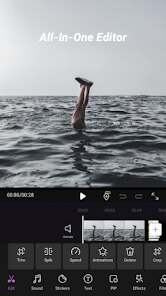
Using the app is pretty simple. When you open it, you can start a new project by picking a video from your gallery. The timeline at the bottom lets you cut and trim clips easily. I usually add music from the app's library or my own files. A tip I found useful is to use the speed control to make parts of the video faster or slower. You can also add text and stickers, which is fun for making intros. The export button is right there, so you can save your video in high quality without much hassle.
Compared to other video editing apps like InShot or CapCut, I think iCut is more straightforward. CapCut has a lot of advanced features that can be confusing, while iCut focuses on the basics. I chose iCut because it loads faster on my older phone and the interface is less cluttered. InShot is also good, but I find iCut's layout more user-friendly for quick edits. It is not perfect, but for simple video making, it works well for me.
features
- 🎥 Main editing tools: iCut lets you cut, trim, and merge video clips with ease. You can adjust the speed of your video, which is great for creating slow motion or fast forward effects. The timeline is simple to use, so you can drag and drop clips without any trouble.
- 🎵 Music and sound: You can add background music from the app's library or your own songs. The app also has sound effects that you can layer over your video. Compared to CapCut, iCut's music library is smaller, but it has enough options for basic projects.
- 🖼️ Text and stickers: Adding text is easy with various fonts and colors. Stickers are available to make your videos more fun. InShot has more sticker options, but iCut's selection is still decent for casual use.
pros
- 👍 User-friendly interface: The app is easy to navigate, even for beginners. CapCut can be overwhelming with too many options, but iCut keeps things simple.
- 👍 Fast export: Videos export quickly without lag. InShot sometimes takes longer, especially with high resolution files.
- 👍 Good for short videos: It is perfect for making short clips for TikTok or Instagram. The app focuses on speed and simplicity.
cons
- 👎 Ads can be distracting: There are too many ads compared to similar apps like CapCut. It interrupts the editing flow sometimes.
- 👎 Limited effects: The app lacks advanced filters and transitions. InShot has more variety in this area.














































