
Screenshots
Related Apps
![]()
Pocket FM: Audio Series
![]()
FalFal: Astrology, Tarot, Love
![]()
Google Drive
![]()
Yuka - Food & cosmetic scan
![]()
GroupMe
![]()
AgeCam: Face Age Changer App
![]()
Air Horn Prank (Loud Joke)
![]()
Palm Secret - Aging&Cartoon
![]()
YouTube
![]()
Anime Girl Wallpapers
![]()
Doodle Art: Magic Drawing App
![]()
Moises: The Musician's AI App
![]()
Zodiac Palm Reader: MagicWay
![]()
DeepSeek - AI Assistant
![]()
Volume Control Sound Launcher















About this app
 NameMoblo - 3D furniture modeling
 CategoryArt & Design
 PriceFree
 Safety100% Safe
 DeveloperMYTIforge
 LabelArt & Design
editor reviews
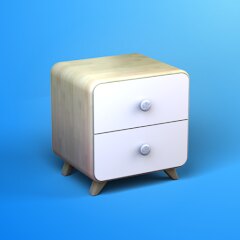
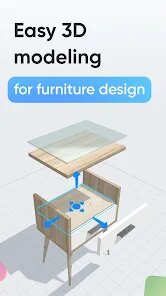
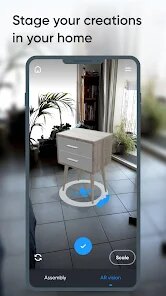
Moblo is a 3D furniture modeling app designed to help you plan and visualize furniture arrangements in your home. It's a tool I use when I'm thinking about redecorating a room or buying a new piece. The app launched a few years ago and you can find it on both Google Play and the App Store. It has over a million downloads on Google Play, which shows a lot of people are using it. The best part is that the app is completely free to download and install. You don't need to register an account to start using it, which is great for quick projects. I just downloaded it and was able to jump right in. There are no annoying ads popping up all the time, and while there are some in-app purchases for extra furniture models or advanced features, the free version has plenty to get you started. It's a very no-pressure way to try out interior design.
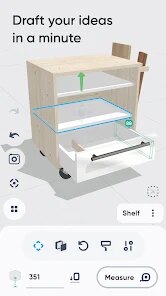
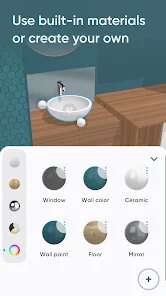
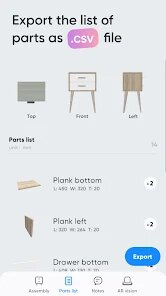
Using Moblo is pretty straightforward. After you install the app, you start by choosing a room shape or even roughly drawing your own room's dimensions. Then, you browse their library of 3D furniture models—things like sofas, tables, beds, and shelves. You drag and drop them into your virtual room. You can rotate items, change their colors or materials, and move them around to see what fits. A simple tip from a regular user: start with the big pieces first, like the bed or the sofa, and then add the smaller items around them. It's also helpful to use the app's built-in measurement tools to make sure a real piece would actually fit in your space. I often use it just to play with different layouts before I commit to moving heavy furniture in real life. It saves a lot of time and backache.
Compared to other home design apps I've tried, like Planner 5D, I keep coming back to Moblo for a few reasons. Planner 5D can feel a bit more professional and complex, which is sometimes more than I need. Moblo feels more focused on the simple joy of arranging furniture. It's less about architectural details and more about the stuff you put inside a room. The 3D models in Moblo are clear and look good, and the controls are intuitive. For a casual user who just wants to see if a new coffee table will work in the living room, Moblo gets the job done quickly without a steep learning curve. It's my go-to app for quick visualization because it's simple, fast, and doesn't overwhelm me with options I'll never use.
features
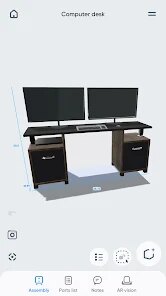
- 🛋️ The core function is a massive library of 3D furniture models you can drag and drop into a room layout. Compared to IKEA Place, which focuses on their own products, Moblo offers a wider variety of generic brands and styles for broader planning.
- 📐 It includes simple room creation and measurement tools. Unlike more complex apps like Home Design 3D, Moblo's tools are basic but perfect for quick space planning without needing to learn advanced floor plan software.
- 🎨 You can customize items by changing colors and materials on the fly. This stands out because some apps lock materials behind paywalls, but Moblo offers a decent range for free, letting you experiment with different looks easily.
- 👁️ The 3D walkthrough feature lets you 'step into' your designed room. This immersive view is what makes it better than simple 2D planners, giving a real sense of space and proportion before you buy anything.
pros
- ✅ The app is incredibly user-friendly and quick to learn. Compared to more professional tools, Moblo's simplicity for basic furniture arranging is its biggest strength for casual users.
- ✅ The 3D visualization quality is very good for a free app. The models are detailed enough to get a realistic feel, which is better than many other free alternatives that use crude graphics.
- ✅ It works offline after the initial download. This is a huge plus over web-based planners, allowing me to sketch ideas anywhere without needing an internet connection.
cons
- ⚠️ The furniture library, while good, could use more modern and niche items. Apps like Houzz have a much larger and more stylish catalog to choose from.
- ⚠️ The room editing tools are somewhat basic. If you need precise architectural adjustments, you'd have to use a more advanced app.













































