
Adobe Photoshop Mix - Cut-out,
Video Players & EditorsLatest APK
DownloadScreenshots
Related Apps
![]()
Broken Screen Prank
![]()
Fingerprint Scanner App
![]()
Firefox Fast & Private Browser
![]()
Allergy Plus by Pollen.com
![]()
Find My Phone By Clap, Whistle
![]()
Planner 5D: Home Design, Decor
![]()
Ghost Detector Real Life Radar
![]()
Pride Quiz LGBTIQ+
![]()
Galaxy Starry Keyboard Backgro
![]()
Instagram
![]()
Fun Fact- My Personal Fact
![]()
Audible: Audio Entertainment
![]()
Photo Frames
![]()
Photo Collage Maker & Editor
![]()
Japan Timetable & Route Search















About this app
 NameAdobe Photoshop Mix - Cut-out,
 CategoryVideo Players & Editors
 PriceFree
 Safety100% Safe
 DeveloperAdobe
 LabelPhotography
editor reviews
Adobe Photoshop Mix is a photo editing app designed to help you cut out and combine parts of images right on your phone. It's like having a basic, mobile-friendly version of the famous Photoshop software in your pocket. The app launched several years ago as part of Adobe's mobile creative suite and is available for free on both Google Play and the App Store. It has been downloaded millions of times, making it a popular choice for quick edits. You can download and install it at no cost, and you don't necessarily need to register to start using it, though signing in with an Adobe ID unlocks some extra features. The app itself is free, but it does include in-app purchases for additional premium tools and content. You might also encounter some ads or prompts to try other Adobe services, but they generally aren't too intrusive for the core cutting and blending functions.
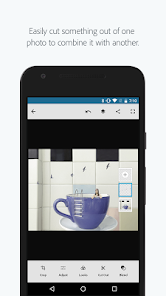
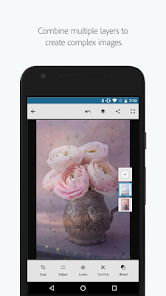
Using Adobe Photoshop Mix is pretty straightforward. After you install it from Google Play, you open the app and choose a photo from your gallery. The main tool you'll use is the 'Cut Out' feature. You simply draw a line around the object or person you want to isolate—like cutting a person out of a background. The app's automatic edge detection helps, but for best results, I zoom in and use the precise brush for tricky areas like hair. Once your cut-out is ready, you can place it onto a new background image. The 'Mix' part comes in with layers; you can add multiple cut-outs, adjust their size, and blend them together. A simple tip from a regular user: always use a high-resolution original photo. The cleaner the starting image, the better the cut-out will look. Also, play with the feathering slider to soften the edges of your selection, making the composite look more natural and less like a obvious copy-paste job.
Compared to other similar photo editing apps, Photoshop Mix has a specific focus. There are tons of free editor apps on Google Play, but many are packed with filters and effects without powerful cut-out tools. An app like PicsArt is more for general editing and social media fun, while Mix is specialized for compositing. I choose Mix over others because it feels more precise and professional for this one task. It doesn't try to do everything; it does cutting and blending very well. The interface is cleaner than some cluttered alternatives, and since it's from Adobe, it works smoothly with other apps like Lightroom. For someone who just wants to remove a background or create a simple collage without a desktop computer, this app is a reliable download.
features
- ✂️ The core 'Cut Out' tool is fantastic for isolating subjects. It offers both automatic and manual brushes, giving you control that simpler apps lack. Compared to a basic background eraser app, Mix provides layer support, letting you build complex composites easily.
- 🔄 Seamless integration with Adobe Creative Cloud and Lightroom is a huge plus. You can open photos directly from your Cloud library, edit, and save back. Other standalone mobile editors usually don't offer this connected ecosystem, making file management harder.
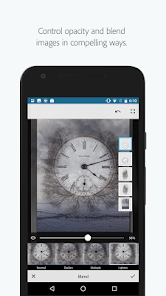
- 🎨 Advanced blending options like color adjustment and filter layers go beyond simple pasting. You can match colors between your cut-out and the new background, something many free collage apps on Google Play don't handle well.
- 📱 The interface is intuitive for a powerful tool. It guides you through the process of cutting, adding backgrounds, and arranging layers. It's less overwhelming than the full Photoshop app but more capable than a basic install-and-go photo editor.
pros
- ✅ The precision cutting tools, especially for refining edges, are superior to many free alternatives. It handles complex details like hair better than most apps you can just download and use immediately.
- ✅ Working with layers on a mobile device is implemented smoothly. This core Photoshop feature sets it apart from apps that only allow single-image edits, offering much more creative freedom.
- ✅ The app's performance is generally reliable. It processes cuts and applies changes quickly, without the lag found in some similar free editing apps on Google Play.
cons
- ⚠️ Some of the best features, like certain premium cut-out brushes or access to high-quality stock images for backgrounds, are locked behind in-app purchases. A totally free similar app might offer fewer tools but no paywalls.
- ⚠️ The automatic selection can sometimes be inaccurate, requiring more manual cleanup than advertised. Other dedicated 'background remover' apps might provide a faster, one-tap result for simpler images.














































