

Screenshots
Related Apps
![]()
Pocket FM: Audio Series
![]()
FalFal: Astrology, Tarot, Love
![]()
Google Drive
![]()
Yuka - Food & cosmetic scan
![]()
GroupMe
![]()
AgeCam: Face Age Changer App
![]()
Air Horn Prank (Loud Joke)
![]()
Palm Secret - Aging&Cartoon
![]()
YouTube
![]()
Anime Girl Wallpapers
![]()
Doodle Art: Magic Drawing App
![]()
Moises: The Musician's AI App
![]()
Zodiac Palm Reader: MagicWay
![]()
DeepSeek - AI Assistant
![]()
Volume Control Sound Launcher















About this app
 NameYouVersion Bible App + Audio
 CategoryBooks & Reference
 PriceFree
 Safety100% Safe
 DeveloperLife.Church
 LabelBooks & Reference
editor reviews
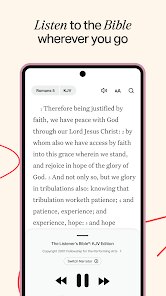
YouVersion Bible App + Audio is a book and reference app made for anyone wanting to read or listen to the Bible on their phone. I first found it years ago when I was looking for a simple way to start reading the Bible daily. It is available for free download on Google Play and the App Store, and it has over 500 million installs worldwide, which really shows how many people trust it. You can use it without signing up, but creating a free account lets you save your reading plans and highlights. The app is completely free to download and use. There are no in app purchases to unlock features. I have not seen any annoying ads either. That is a big deal for me because I hate when apps interrupt my reading. It works on Android and iOS, so no matter what phone you have, you can install it. The audio part is great too. I listen to it while driving or doing chores, and the voices are clear and natural. The app covers many Bible translations like KJV, NIV, and ESV, and even some more modern ones. You can switch between them easily with a single tap. It also has thousands of reading plans on topics like anxiety, faith, or marriage. The plans send daily reminders, which helps me stay consistent. Overall, this app makes reading the Bible feel less like a chore and more like a daily habit I enjoy.
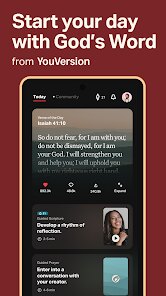
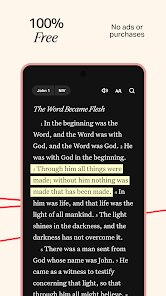
Using this app is pretty straightforward. I open it, pick a translation, and start reading or hit the play button for audio. One tip I have is to use the verse of the day feature. It shows a new verse every morning, and you can tap it to see more context. That is how I started reading whole chapters step by step. The highlight tool is useful too. I color code verses I like. Yellow for hope, blue for wisdom, and pink for verses I want to memorize. The app also lets you share verses on social media with nice background images, which I do sometimes to encourage my friends. I really like the night mode setting. It makes reading in bed easier on my eyes. Another simple tip is to start a reading plan that fits your schedule. Some plans take a full year, but others are just a week long. The app tracks your progress with a streak system, which motivates me to not break my chain of daily reading. The community prayers feature is also nice. You can read prayers other people shared or add your own. It feels personal and supportive, even though I do not know those people.
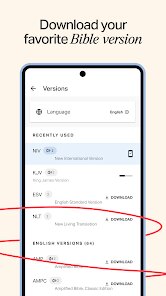
Compared to other Bible apps on Google Play, YouVersion is my top pick. For example, Bible.is also has audio, but its interface feels cluttered and outdated to me. The Olive Tree Bible App is good for deep study, but it costs money for extra commentaries and tools. That is what really sets YouVersion apart. It gives you everything for free. No hidden fees or locked features. Another app I tried was the King James Bible app, but it only has one translation, which is too limited for me. With YouVersion, I can jump from the NIV to the Message translation depending on my mood. The audio quality is also better than most other free Bible apps I tested. Some apps have robotic voices, but YouVersion uses real narrators. The social features like verse sharing and community prayers also make it feel more alive. I never feel alone when using it. The app updates regularly too. They add new plans, languages, and features often. I think that is why it remains the most popular Bible app on both Google Play and the App Store. It is simple, reliable, and genuinely helpful for anyone wanting to read the Bible.
features
- 📖 Read and compare multiple Bible translations side by side. I can open the NIV and the Message version at the same time, which helps me understand hard passages. Other apps like the KJV Bible app only offer one translation. That is a big limitation for me.
- 🎧 Listen to high-quality audio Bibles free. The narrators sound professional and calm. I use this feature during my commute. Apps like Bible.is have audio too, but their player is less user friendly and often stops or lags.
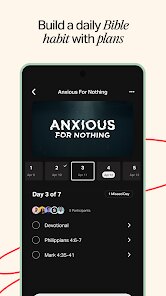
- 📅 Follow daily reading plans with reminders. I love the wide variety of plans on topics like stress, parenting, or biblical history. The Olive Tree Bible App has plans too, but most require a purchase. YouVersion gives them all away for free.
- 💬 Share verses with custom backgrounds and community prayers. I can post a verse on Instagram in seconds. No other Bible app makes sharing this easy or visually appealing. The community feel is a nice bonus.
pros
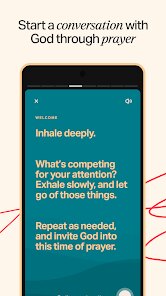
- 🙏 The community prayer feature is something special. You can read and post prayers anonymously. Competing apps do not offer this social support layer, which makes the experience feel less isolated.
- 🔔 Daily verse notifications are gentle but effective. They remind me without being pushy. Other Bible apps like the Blue Letter Bible have no such reminder system, so I often forgot to open them.
- 🎨 The interface is clean and modern. Night mode makes reading at night comfortable. The layout is much less cluttered than Bible.is, which has too many buttons and menus.
cons
- 🔄 Syncing between devices could be faster. Sometimes my highlights and bookmarks take a few minutes to appear on my tablet after I add them on my phone. Apps like Olive Tree sync instantly.
- 🔍 The search function is not always accurate. When I look for a specific phrase, the results can be messy. The KJV Bible app has a more precise search tool.














































