
Screenshots

Related Apps
![]()
Pocket FM: Audio Series
![]()
FalFal: Astrology, Tarot, Love
![]()
Google Drive
![]()
Yuka - Food & cosmetic scan
![]()
GroupMe
![]()
AgeCam: Face Age Changer App
![]()
Air Horn Prank (Loud Joke)
![]()
Palm Secret - Aging&Cartoon
![]()
YouTube
![]()
Anime Girl Wallpapers
![]()
Doodle Art: Magic Drawing App
![]()
Moises: The Musician's AI App
![]()
Zodiac Palm Reader: MagicWay
![]()
DeepSeek - AI Assistant
![]()
Volume Control Sound Launcher















About this app
 NameAmazon Prime Video
 CategoryEntertainment
 PriceFree
 Safety100% Safe
 DeveloperAmazon Mobile LLC
 LabelEntertainment
editor reviews
Amazon Prime Video is a streaming app designed to help you watch movies, TV shows, and original content. It's basically your ticket to a huge library of entertainment, from the latest blockbusters to classic series. The service launched as part of Amazon Prime back in 2006, but the mobile app really took off as smartphones became popular. You can download the Amazon Prime Video app for free from both Google Play and the Apple App Store. It has been installed hundreds of millions of times on Google Play alone, showing how popular it is. While the app itself is free to download and install, you need an Amazon Prime membership to watch most of the content. Setting up is easy; you just log in with your Amazon account. There are no annoying ads during the shows and movies if you're a Prime member, which is a huge plus. However, they do offer extra movies and shows for rent or purchase, which are in-app purchases, and some content might have ads unless you pay to skip them.
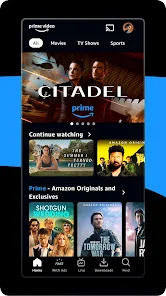
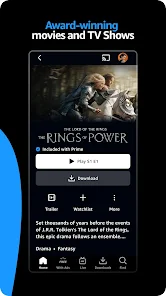
Using the app is pretty straightforward. After you install it from Google Play or the App Store and log in, you're greeted with a clean home screen full of recommendations. I usually browse by genre or search for something specific. A great user tip is to download shows and movies when you're on Wi-Fi to watch later offline, like on a plane or during a commute—it saves a ton of mobile data. The playback controls are simple, and you can easily adjust video quality based on your connection. For families, setting up separate profiles is a lifesaver so everyone gets their own recommendations and watchlist. It feels like having a personalized TV in your pocket.
Compared to other streaming apps like Netflix or Hulu, I often choose Amazon Prime Video for a few reasons. First, if you're already an Amazon Prime member for the shipping benefits, the video service feels like a fantastic free bonus, making the overall value hard to beat. While Netflix has a slightly more polished interface and stronger original series buzz, Prime Video's library includes a lot of popular older movies and TV shows that aren't on other platforms. It also has unique features like X-Ray, which lets you see actor info and trivia while you watch, which is cool for movie buffs. For the price and the extra perks you get with Prime, it's my go-to app for casual watching and finding hidden gem movies.
features
- 🎬 Huge Included Library: With a Prime membership, you get instant access to thousands of movies and TV shows at no extra cost, unlike some apps where everything is a la carte.
- 🎬 Offline Downloads: You can download most titles directly to your device for offline viewing, a feature that rivals like Netflix also have, but Prime Video's integration is very seamless.
- 🎬 X-Ray Feature: This standout feature lets you identify actors and get trivia in real-time, something most other streaming apps, including Disney+, don't offer.
- 🎬 Live TV & Rentals: Beyond the included library, it doubles as a storefront to rent new releases or add premium channels, giving it more breadth than a single-focus app like HBO Max.
pros
- 👍 Value Bundle: The biggest pro is its value as part of Amazon Prime, offering shipping, music, and video in one subscription, which apps like Netflix or Apple TV+ can't match.
- 👍 Content Diversity: It has a wide mix of genres, including robust classic film and international selections, often more varied than Hulu's more TV-focused catalog.
- 👍 User Profiles: Supports multiple profiles for personalized experiences, a standard but essential feature it shares with top competitors.
cons
- 👎 Interface Clunkiness: The app's menu and search can feel less intuitive and more cluttered compared to the sleek, simple design of Netflix.
- 👎 Inconsistent Audio/Subtitle Options: Sometimes finding or enabling subtitles or alternate audio tracks is more cumbersome than on Disney+.












































