
Screenshots
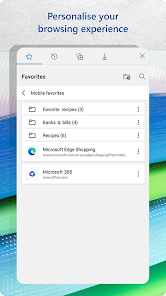
Related Apps
![]()
Broken Screen Prank
![]()
Fingerprint Scanner App
![]()
Firefox Fast & Private Browser
![]()
Allergy Plus by Pollen.com
![]()
Find My Phone By Clap, Whistle
![]()
Planner 5D: Home Design, Decor
![]()
Ghost Detector Real Life Radar
![]()
Pride Quiz LGBTIQ+
![]()
Galaxy Starry Keyboard Backgro
![]()
Instagram
![]()
Fun Fact- My Personal Fact
![]()
Audible: Audio Entertainment
![]()
Photo Frames
![]()
Photo Collage Maker & Editor
![]()
Japan Timetable & Route Search















About this app
 NameMicrosoft Edge: Browse with AI
 CategorySocial
 PriceFree
 Safety100% Safe
 DeveloperMicrosoft Corporation
 LabelCommunication
editor reviews
Microsoft Edge is a web browser app designed to help you browse the internet faster and smarter. It's a free app you can download from Google Play or the App Store, and it's been around since 2015 when Microsoft launched it to replace the old Internet Explorer. It's super popular, with billions of installs on Android alone. You don't need to register to use it, which is great for just jumping in. The core app is completely free to download and install, and you can use it without paying anything. It does have some optional in-app purchases, like extra storage for OneDrive, and you might see some ads, but they're usually not too intrusive. I use it as my main browser on my phone because it syncs perfectly with my laptop.
Using Microsoft Edge is pretty straightforward. I just open the app and type what I'm looking for into the search bar. One of my favorite tips is using the Collections feature. If I'm planning a trip or researching for a project, I can just click the plus icon and save all my open tabs into a neat collection. It keeps everything organized so I don't lose track. The built-in AI helper, Copilot, is a game-changer. When I'm reading a long article, I can ask it to summarize the key points for me, which saves so much time. Another simple tip is to use the vertical tabs on the desktop version; it makes managing lots of open websites way easier, though on mobile, the tab view is clean and easy to swipe through. I also have it set to block trackers by default, which makes browsing feel a bit safer and faster.
Compared to other browsers like Chrome or Samsung Internet, I keep coming back to Edge for a few personal reasons. The biggest one is how well it works with my Windows computer. All my passwords, bookmarks, and open tabs just appear on my phone without me doing anything. It feels like one seamless experience. While Chrome is super common, I find Edge to be lighter on my phone's battery sometimes, especially with its sleeping tabs feature. Safari is great on Apple devices, but I use both Android and Windows, so Edge bridges that gap perfectly for me. It just fits into my digital life more smoothly than other options, making the switch from my laptop to my phone feel effortless.
features
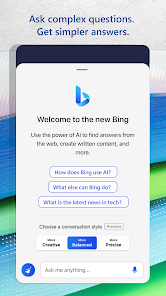
- 🧠 Built-in AI (Copilot): This is Edge's standout feature. You can get summaries of articles, draft emails, or even generate ideas without leaving the browser. It's like having a smart assistant right in your search bar, which Chrome doesn't offer natively.
- 📚 Collections for Organization: Unlike simply bookmarking, Collections lets you group tabs, notes, and images into projects. It's more visual and practical for research than Firefox's bookmark folders or Chrome's tab groups.
- 🛡️ Strong Privacy Controls: Edge has robust built-in tracking prevention (Balanced, Strict, or Basic modes). Compared to Chrome, it gives you more straightforward control over trackers from the get-go, similar to Brave but without focusing on crypto.
- ⚡ Performance & Efficiency: Features like Sleeping Tabs and Startup Boost make it feel fast and light on resources. Compared to other browsers, it manages memory better on my device, leading to smoother multitasking.
pros
- ✅ Seamless Cross-Device Sync: The sync with Windows PCs is flawless. My history, tabs, and passwords are always there. It works better for Windows users than Chrome's sync across different platforms.
- ✅ Integrated AI Tools: Having Copilot for free summaries and queries is a massive time-saver. Other browsers require extensions or separate apps for similar AI functions.
- ✅ Reading & PDF Features: The Immersive Reader is excellent for clutter-free reading, and the PDF editor is surprisingly capable. Safari has good reader mode, but Edge's PDF tools are more advanced.
cons
- ⚠️ Can Feel Bloated: With all the AI and sidebar features, it can feel a bit heavy compared to minimalist browsers like Firefox Focus or Samsung Internet.
- ⚠️ Extension Library: While growing, its mobile extension library is still not as vast as Chrome's, limiting some customization options.












































