

Screenshots
Related Apps
![]()
Broken Screen Prank
![]()
Fingerprint Scanner App
![]()
Firefox Fast & Private Browser
![]()
Allergy Plus by Pollen.com
![]()
Find My Phone By Clap, Whistle
![]()
Planner 5D: Home Design, Decor
![]()
Ghost Detector Real Life Radar
![]()
Pride Quiz LGBTIQ+
![]()
Galaxy Starry Keyboard Backgro
![]()
Instagram
![]()
Fun Fact- My Personal Fact
![]()
Audible: Audio Entertainment
![]()
Photo Frames
![]()
Photo Collage Maker & Editor
![]()
Japan Timetable & Route Search















About this app
 NamePawAI: AI Cartoon Pet Filter
 CategoryGenerative AI
 PriceFree
 Safety100% Safe
 DeveloperNow Tech
 LabelEntertainment
editor reviews
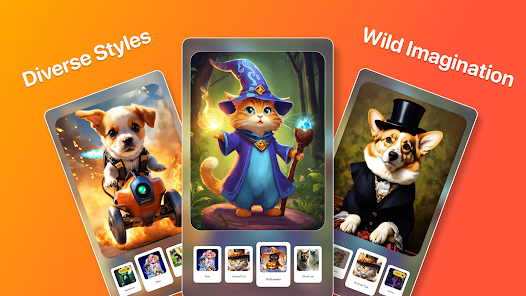
PawAI: AI Cartoon Pet Filter is a photo editing app designed to help you turn pictures of your pets into adorable cartoon characters. I downloaded it from Google Play after seeing a friend's hilarious cartoon dog on social media. The app launched a few months ago and is available on both Google Play and the App Store. It has over 500,000 installs, which shows a lot of people are trying it out. The best part is that the core download and install are completely free. You don't even need to register an account to start using it, which I really appreciate for quick edits. However, to unlock all the advanced cartoon styles and remove watermarks, there are in-app purchases. You'll also see some banner ads in the free version, but they aren't too intrusive.
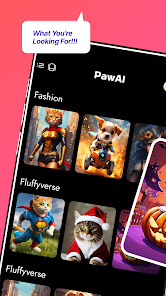
Using PawAI is super straightforward, which is why I keep it on my phone. You just open the app, tap to select a photo from your gallery or take a new one. The AI processes it in seconds. My tip is to use a clear, well-lit photo of your pet looking at the camera for the best cartoon results. You can then choose from different art styles, like a classic Disney look or a more anime-inspired vibe. After you pick a style, you can add funny stickers, text bubbles, or cute frames before saving or sharing your creation directly to Instagram or WhatsApp. I use it mostly to make fun birthday posts for my friends' pets.
Compared to other similar pet photo apps like 'Pet Cartoon Maker', I find myself choosing PawAI more often. The main reason is the quality of the AI filter; it just seems to capture my dog's grumpy expression better and turns it into a cartoon that actually looks like him. Other apps sometimes make the face look generic. Also, PawAI's interface feels less cluttered. While 'Pet Cartoon Maker' might have more filter options, many are locked behind a paywall immediately. With PawAI, I felt I could get a genuinely good, shareable cartoon with the free styles before deciding if I wanted to pay for more. For quick, cute results, it's become my go-to app.
features
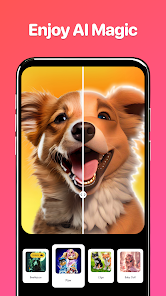
- 🎨 Instant AI Cartoon Conversion: The core function is turning any pet photo into a cartoon in seconds. Unlike some editors that just apply a simple filter, PawAI's AI seems to redraw the features, making it look like a custom illustration.
- 📸 Multiple Art Style Choices: After the AI conversion, you can apply different cartoon styles. This is a step above basic apps that give you one look. You can make your cat look like a comic book hero or a soft watercolor painting.
- ✏️ Simple Decoration Tools: It includes stickers, text, and frames specifically themed for pets (like bones, fish, and "Good Boy" badges). Compared to a general editor like Canva, these are perfectly tailored and quick to use for pet pics.
- 🔄 One-Tap Sharing: The app is built for social media. Once your cartoon pet is ready, sharing buttons for all major platforms are right there. It's more streamlined for this purpose than saving and then opening another app to post.
pros
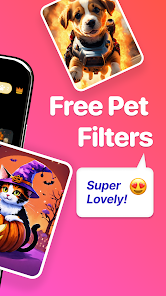
- 👍 Free to Try: You can download, install, and create a basic cartoon without paying, which is great for testing. Some competitors require payment just to remove a huge watermark.
- 👍 Fast and Accurate AI: The cartoon results are consistently good and fast. Compared to other AI pet apps, it better preserves the unique markings and personality of your animal.
- 👍 User-Friendly Design: The whole process is intuitive. From a user's view, it's less confusing than professional editors and more focused than apps cluttered with unrelated features.
cons
- 👎 Limited Free Styles: The free version has only a few cartoon styles. Similar apps sometimes offer a wider rotating selection of free filters to keep things fresh.
- 👎 Ads in Free Version: While not overwhelming, the banner ads can be a slight annoyance. Some competing apps offer a one-time purchase to remove ads permanently, which PawAI currently doesn't.
















































