

Screenshots
Related Apps
![]()
Pocket FM: Audio Series
![]()
FalFal: Astrology, Tarot, Love
![]()
Google Drive
![]()
Yuka - Food & cosmetic scan
![]()
GroupMe
![]()
AgeCam: Face Age Changer App
![]()
Air Horn Prank (Loud Joke)
![]()
Palm Secret - Aging&Cartoon
![]()
YouTube
![]()
Anime Girl Wallpapers
![]()
Doodle Art: Magic Drawing App
![]()
Moises: The Musician's AI App
![]()
Zodiac Palm Reader: MagicWay
![]()
DeepSeek - AI Assistant
![]()
Volume Control Sound Launcher















About this app
 NameAccupedo Pedometer
 CategoryHealth & Fitness
 PriceFree
 Safety100% Safe
 DeveloperCorusen LLC
 LabelHealth & Fitness
editor reviews
Accupedo Pedometer is a fitness app designed to help you track your daily steps and activity. I've been using it for a few months now to keep an eye on my movement throughout the day. It's a straightforward pedometer app that launched several years ago and is available on both Google Play and the App Store. On Google Play, it has over 10 million downloads, which shows a lot of people trust it. The app is free to download and install, which is great for anyone wanting to start tracking steps without an upfront cost. You don't need to register or create an account to start using the basic features, making the setup super quick. However, there are in-app purchases if you want to unlock more advanced features, and you will see some ads in the free version. For a basic step counter, though, the free version covers the essentials.
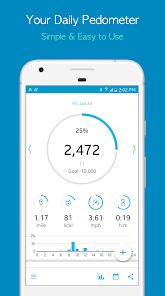
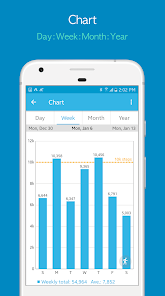
Using Accupedo is very simple. After you download and install the app, it runs in the background. I just carry my phone in my pocket or bag, and it automatically counts my steps. The main screen shows a clear number for my daily steps, and I can easily check my progress. A simple tip from a user: make sure the app has permission to run in the background for accurate counting. I also like to set a daily step goal within the app; it gives me a little notification when I reach it, which is a nice motivator. Sometimes I check the weekly graph to see my activity patterns. It doesn't have complex social features or intense workout plans, which I actually prefer because it keeps things light and focused on just counting steps.
Compared to other step counter apps like Google Fit or Samsung Health, Accupedo is much more basic and dedicated. Those other apps are often part of a larger ecosystem and can feel a bit bloated with features I don't use. I chose Accupedo because it's a simple, no-fuss pedometer. It does one job and does it well without draining my phone's battery too much. For someone who just wants a reliable step count without connecting to other smartwatches or health platforms, this app is a perfect choice. It feels less like a corporate health suite and more like a personal tool, which is why I've stuck with it.
features
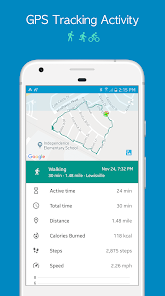
- 📱 Automatic step tracking that runs reliably in the background after you install the app, using your phone's sensor without much setup.
- 📱 Clean and simple interface focused on your daily step count and goal progress, avoiding the clutter of bigger fitness platforms.
- 📱 Provides basic activity history with daily and weekly graphs, letting you see your trends without complex data analysis.
- 📱 Low battery usage compared to some other pedometer apps, making it practical for all-day use after download.
pros
- 👍 Its simplicity is its strength; it's a dedicated pedometer app that doesn't try to be a full health dashboard, unlike Google Fit.
- 👍 The instant, at-a-glance step count on the widget and main screen is faster and clearer than navigating some integrated apps.
- 👍 Very easy to start using right after download with no account needed, lowering the barrier to entry for new users.
cons
- ⚠️ The free version has ads, which can be intrusive compared to completely free alternatives like some basic pedometer apps.
- ⚠️ Lacks integration with other health apps or wearable devices, which might be a downside for users with a broader fitness ecosystem.












































