

Screenshots

Related Apps
![]()
Broken Screen Prank
![]()
Fingerprint Scanner App
![]()
Firefox Fast & Private Browser
![]()
Allergy Plus by Pollen.com
![]()
Find My Phone By Clap, Whistle
![]()
Planner 5D: Home Design, Decor
![]()
Ghost Detector Real Life Radar
![]()
Pride Quiz LGBTIQ+
![]()
Galaxy Starry Keyboard Backgro
![]()
Instagram
![]()
Fun Fact- My Personal Fact
![]()
Audible: Audio Entertainment
![]()
Photo Frames
![]()
Photo Collage Maker & Editor
![]()
Japan Timetable & Route Search















About this app
 NameYahoo Mail – Organized Email
 CategorySocial
 PriceFree
 Safety100% Safe
 DeveloperYahoo
 LabelCommunication
editor reviews
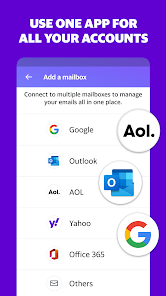
Yahoo Mail is a free email app designed to help you manage your inbox across multiple accounts. I've been using it for years to handle my personal Yahoo address, plus I added my Gmail and Outlook accounts too. It launched way back in 1997 on the web, but the mobile app we all download today is constantly updated. You can get it on Google Play and the Apple App Store, and it has over a billion installs on Google Play alone. It's completely free to download and install. You do need to register for a Yahoo account to use its main features, but you can add other existing email accounts without creating new ones. The app does show ads in the inbox, which is how it stays free, but you can pay for a subscription called Yahoo Mail Pro to remove them and get some extra perks like more storage.
As a daily user, I open the app to quickly scan all my emails in one place. The main screen shows everything, but I love using the swipe gestures. I swipe left to delete and right to archive, which makes cleaning up my inbox super fast. A real user tip: don't forget to set up notifications for only your important senders, or you'll get buzzed for every single promotion. I also use the search function all the time; it's powerful and finds old emails much better than some other apps I've tried. For attachments, I just tap the paperclip icon to view or download files directly to my phone. It feels very straightforward for checking mail on the go.
Compared to other options like the default Gmail app or Outlook, I keep coming back to Yahoo Mail for a few personal reasons. Gmail is great, but I find Yahoo's interface a bit cleaner and less cluttered for my eyes. Outlook is fantastic for work email, but for my mix of personal accounts, Yahoo Mail just feels simpler. The app doesn't try to overcomplicate things. It lets me read, reply, and organize without too many extra steps. When I recommend an email app to friends who just want something reliable and easy, I usually point them to download Yahoo Mail from Google Play first.
features
- 📧 Unified Inbox: View all emails from Yahoo, Gmail, Outlook, and more in a single, scrollable list. This is a huge time-saver compared to jumping between different apps.
- 📧 Powerful Search & Organization: Find any email instantly with robust search filters. Features like customizable folders and one-tap swipe gestures (archive/delete) make inbox management faster than many competitors.
- 📧 Integrated Attachments & Tools: Open and manage attachments seamlessly. It includes a built-in document signer and photo preview, which some other basic email apps lack.
- 📧 Customizable Notifications: Set alerts only for important senders or keywords. This level of control helps reduce distraction compared to the all-or-nothing approach in some similar apps.
pros
- 👍 Clean, User-Friendly Interface: The layout is intuitive and less busy than Gmail's, making it easier to focus on your emails.
- 👍 Excellent Cross-Account Management: Handling multiple email addresses feels more integrated and smoother here than in many other free email apps.
- 👍 Reliable Push Notifications: It delivers alerts promptly and consistently, which isn't always the case with every email client on the market.
cons
- 👎 Persistent Ads: The free version displays ads in the inbox, which can feel intrusive compared to ad-free experiences from some competitors.
- 👎 Occasional Slowness: The app can sometimes feel slower to load or sync than lighter alternatives like Apple Mail or Spark.
















































