

Screenshots
Related Apps
![]()
Pocket FM: Audio Series
![]()
FalFal: Astrology, Tarot, Love
![]()
Google Drive
![]()
Yuka - Food & cosmetic scan
![]()
GroupMe
![]()
AgeCam: Face Age Changer App
![]()
Air Horn Prank (Loud Joke)
![]()
Palm Secret - Aging&Cartoon
![]()
YouTube
![]()
Anime Girl Wallpapers
![]()
Doodle Art: Magic Drawing App
![]()
Moises: The Musician's AI App
![]()
Zodiac Palm Reader: MagicWay
![]()
DeepSeek - AI Assistant
![]()
Volume Control Sound Launcher












About this app
 NamePiano: Learn & Play Piano
 CategoryEducation
 PriceFree
 Safety100% Safe
 DeveloperEnable Startup
 LabelMusic & Audio
editor reviews
Piano: Learn & Play Piano is a music education app designed to help you learn piano from scratch. I've been using it for a few months now to finally tackle an instrument I've always wanted to play. The app launched a while back and you can download it on both Google Play and the App Store. It has millions of installs, which gave me some confidence before I hit the download button. It's completely free to install, which is a huge plus for someone just wanting to try things out. You don't need to register an account to start playing, which I really appreciate for privacy and simplicity. There are some in-app purchases if you want to unlock more advanced lessons or songs, and you'll see a few ads here and there, but they're not too intrusive.
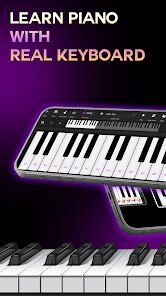
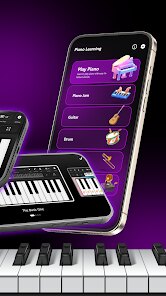
Using the app is super straightforward. After you install it, you open it up and it immediately shows you a virtual keyboard. You can start tapping keys right away. The main way I use it is through the song lessons. It has a big library of popular songs, from classics to modern pop. The app lights up the keys you need to press in time with the music, almost like a game. My simple tip is to start with the very easy songs, even if they seem childish. It builds your finger coordination and confidence. I also use the daily practice feature, which gives you short exercises. Another tip is to use headphones; it makes the sound from the virtual piano much clearer and helps you focus.
Compared to other learn piano apps I've tried, like Simply Piano, this one feels less restrictive. Simply Piano is also great, but it often pushes its subscription model harder. With Piano: Learn & Play Piano, I felt I could do more for free before deciding if I wanted to spend money. The song selection here also seemed more varied to me. I chose this app because the interface was simpler and less cluttered. It didn't overwhelm me with theory right away; it just let me play. For a casual learner like me who just wants to have fun and learn some tunes, this app on Google Play was the perfect free download to get started without any pressure.
features
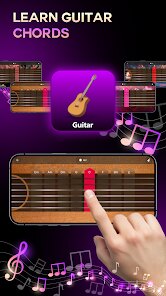
- 🎹 Huge Song Library: The app comes packed with hundreds of songs across many genres. Unlike some apps that lock popular songs behind a paywall, this one offers a solid collection for free, letting you practice real music you enjoy right after install.
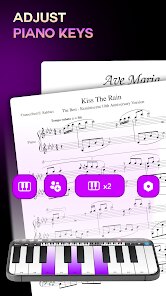
- 🎹 Interactive Key Highlighting: The core learning tool lights up the keys in falling notes, similar to rhythm games. This visual guide is much clearer and more responsive than the static sheet music or slow demonstrations in some other beginner apps.
- 🎹 Instant Play, No Setup: You can literally download the app and be playing a tune within a minute. There's no lengthy sign-up or complex setup. This immediate gratification is a big win over apps that require account creation before you even see a keyboard.
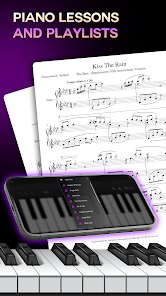
- 🎹 Structured & Free Lessons: It offers step-by-step lessons for absolute beginners, teaching notes, chords, and hand positioning. While apps like Yousician are more comprehensive, this app provides a genuinely useful free curriculum that gets you playing quickly.
pros
- 🎵 Excellent for Complete Beginners: The app is incredibly welcoming. It breaks down songs into tiny, manageable sections and slows down the tempo, which is more patient and beginner-friendly than some rival apps that assume a bit of prior knowledge.
- 🎵 Fun and Game-Like Approach: The learning process feels like a game, which keeps motivation high. This engaging style is a standout compared to more traditional and dry tutorial apps available on Google Play.
- 🎵 Works on Any Device: Since it's just a virtual keyboard, you can practice anywhere without a real piano. This flexibility and portability surpass apps that require you to connect a MIDI keyboard or have specific hardware.
cons
- 🔉 Sound Quality Can Be Basic: The piano sound from the virtual keys isn't as rich or realistic as the audio in premium apps or those that connect to a real digital piano. It's functional but not immersive.
- 🔉 Limited Feedback on Technique: The app tracks if you hit the right note at the right time, but it can't correct your hand posture or finger technique like some advanced, subscription-based competitors can.













































